I am asking, on behalf of all interested parties, for everyone’s assistance.
If you:
- Have a QNAP NAS
- Are using QTS or QuTS Hero
- Have an Nvidia card installed
- Using PMS 1.23.0.4482 (which contains QuTS package additions)
AND
- The card does not transcode.
Please provide the following information so it may be forwarded to QNAP.
- NAS Model
- Nvidia Card model
- QuTS / QTS version (specify whether QuTS or QTS)
- Version of NVIDIA_GPU_DRV
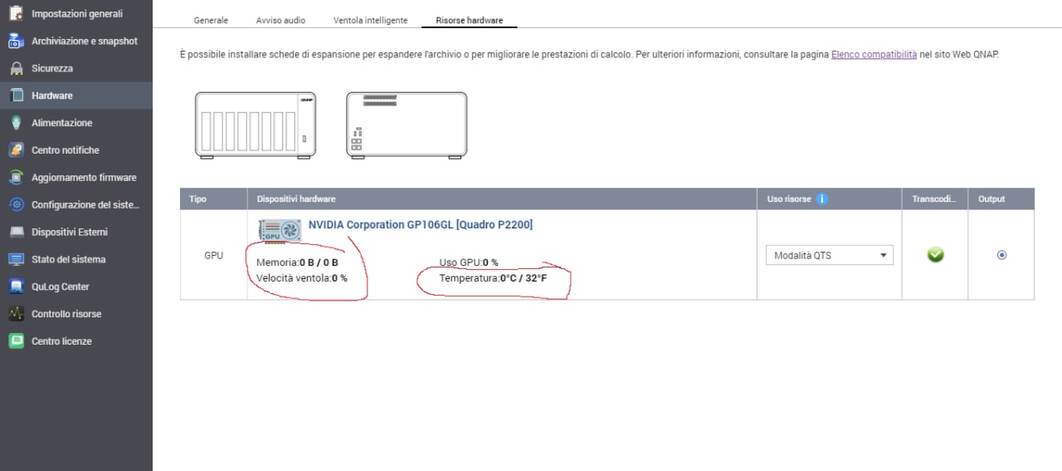
- What you see in the Control Panel.
- QNAP Support ticket number(s) (this provides more details for QNAP)
I will collect this up and forward today so please be prompt.
1 Like
1 - TS-473
2 - Quadro P400
3 - QTS 4.5.3
4 - NvKernalDriver 4.5.3.1652 & NVIDIA GPU Driver 5.0.2
5 - Q-202105-20668
1 - TS-873
2 - Quadro P2200
3 - QTS 4.5.3
4 - NvKernalDriver 4.5.3.1652 e driver GPU NVIDIA 5.0.2
5 - Q-202104-18536
I forgot to request:
Screenshot of what QTS shows you.
Should look like:
1 - TS-873
2 - Quadro P2000
3 - QTS 4.5.3.1652
4 - NvKernalDriver 4.5.3.1652 and driver GPU NVIDIA 5.0.2
5 - Haven’t opened any thicket with qnap
May I add I was loosing my mind around this issue. I hope it will be fixed soon 
Thanks
I did get a follow up response off QNAP saying that they knew the issue and will be resolved in the next QTs patch.
So fingers crossed
2 Likes
well,
they liquidated me saying that the pictures are not compatible …
qnap losers!
But from the answer they gave you I am slightly more hopeful.
@ilboss
Elaborate please ?
“Picture not compatible” ? WTH does that mean ?
Dunno, this is all I got, but it sounds like they’re doing something for it:
Thanks. I can do that in the meantime.
I assume a fix will be forthcoming in the future?
All the best
Mike
QNAP Technical Support has updated the support ticket Q-202105-20668. To check this ticket, go to QNAP Customer Portal . A preview of the updated ticket is shown below:@@@
Hi Michael,
Yes please check the notes for the next incremental update of 4.5.3
So I’m taking that as a ChuckPA effort and enough of us mentioning it to them has prompted them to at least look into it
I’m sorry folks,
I will not let this thread go off topic. I have removed the off-topic posts.
Please stay on QNAP topic.
@ppecet
Thank you for reporting.
QNAP is aware of the reporting problem.
I have confirmed the GT 1050 works.
If your GT 1050Ti does not, I will need the DEBUG log files which capture the failure.
I suspect it’s another QNAP - Driver bug
@ChuckPa
DEBUG log files was send to Qnap support.
This’s 100% of nvdrivers 5.0.2 bug…
Thx for reply
@ppecet
QNAP Support has confirmed this with you?
Is it the device driver or the kernel driver module ?
@ChuckPa
No. Just before upgrading nvdrivers to 5.0.2 (ie on nvdrivers 4.0.2) on the new nvkernel 4.5.3.1652 and system version 4.5.3.1652 everything worked. It is a pity that I did not download the previous version of nvdrivers (4.0.2) because they are now unavailable for download.
I have good news for you then. I searched a little bit and was able to find the 4.0.2 driver on qnap servers here is the link: https://download.qnap.com/QPKG/driver/NVIDIA_GPU_DRV_4.0.2_x86_64.zip
I can confirm that by installing this driver I was able to use hardware transcoding 
Thanks a lot I can now play with my plex once again
Edit: link
1 Like
@guidePantin

Thank you for Link. However, I am unable to install (via update) this version on my Qnap. I will still try to uninstall and install these drivers.
OK…
https://download.qnap.com/QPKG/driver/NVIDIA_GPU_DRV_4.0.2_x86_64.zip
I download and I will test!!! 
@ppecet I uninstalled previous drivers first, manually installed (though app center) new one. Reboot nas and it worked
@broncogr thanks, I edited my post
1 Like