HI,
ok will try this evening to remove it. But If I read it correctly it will only delete the wrong one.
The right one will stay in the App center.
Did you already have a look into the log files. Can you see anything why 1.20.1 is not working?
I did have opportunity to read through the logs.
- PMS.log – crashes as it starts up while attempting to upload the previous crash report
- PMS.1.log – is commanded to stop before coming ready.
- PMS.2.log – is also commanded to stop before coming ready
- PMS.3.log – appears to have crashed while initializing the media monitoring (Notify)
- PMS.4.log – shows normal playback activity and normal commanded shutdown.
- PMS.5.log – shows normal playback activity (that which preceeds the ‘.4’ log
HM. So whats the error then? I only manually installed the PMS 1.20.1 over the 1.16.6 and restart the QNAP. After reboot PMS is not running. What can I do to make this running?
would you open the ssh to the NAS and do the following?
cd /share/CA*/.qpkg/Plex*
./plex.sh stop
./plex.sh start
Please let me know that that reports

unfortunately PMS 1.20.1 is not starting.
Here is again the logsLogs.zip (3.6 MB)
Just how big is that database (how much media/items are indexed) ?
Sep 11, 2020 21:32:36.103 [0x7fcef69ae740] DEBUG - Vacuuming database.
Sep 11, 2020 21:33:03.543 [0x7fcef69ae740] INFO - SQLITE3:(nil), 17, statement aborts at 57: [select * from metadata_items limit 1] database schema has changed
Sep 11, 2020 21:33:03.549 [0x7fcef69ae740] DEBUG - Completed forward migration 20200114193300.
Sep 11, 2020 21:33:03.549 [0x7fcef69ae740] DEBUG - Running forward migration 20200124193500.
Sep 11, 2020 21:33:03.549 [0x7fcef69ae740] DEBUG - Captured session 0.
Sep 11, 2020 21:33:03.549 [0x7fcef69ae740] DEBUG - Captured session 1.
Sep 11, 2020 21:33:03.670 [0x7fcef69ae740] DEBUG - Analyzing database.
Sep 11, 2020 21:33:04.084 [0x7fcef69ae740] DEBUG - Vacuuming database.
Sep 11, 2020 21:33:29.140 [0x7fceeca3c700] DEBUG - BPQ: [Starting] -> [Processing]
The above tells me there were so many changes made in the upgrade that it reached the fragmentation threshold and forced it. It had to do it several times.
Also suggest the following:
- Upgrade to latest version again
- Shut down PMS in the AppCenter, and then restore the newest backup you have:
Ref: https://support.plex.tv/articles/202485658-restore-a-database-backed-up-via-scheduled-tasks/ - Verify your Network Settings on your QNAP, since I see
bond0interface, and not anethinterface, which suggest that you have two interfaces bound to the same IP address, so do you have a switch in front of it supporting LACP? - Restart QNAP, and wait at least 5 min.
I zip it, it is about 23GB.
OK, now its getting serious. Even the 1.16.6 is not working anymore.
I get this error message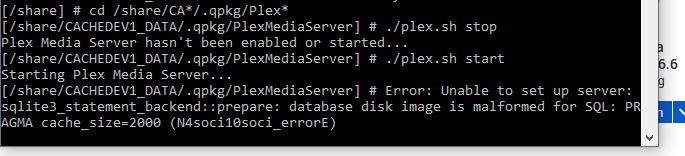
Please follow my suggestions!
You for one have a broken database!
I did, with no success
I uninstalled now Plex 1.16.6, restart NAS and installed Plex 1.20.1. At least it did start up. Now I amtrying to restore all data from the PlexMediaServer directory and I hope not to scan again everything on my HDD. That will be a nightmare!
@dane22
yes, I have 2 LAN connections of my NAS bound to 1 connected to a managed switch. This cannot really be the problem, since this is running since several years.
All of it, including the restore of a database?
Nope, but could be an additional problem, if not configured correctly on the switch
I am unzipping right now since already 6 hours the PlexMediaServer directory. The QNAP doesnt seem very quick with internal zippin or better unzipping. But it seems that all files coming back. Will see if it runs afterwards. After all data are being back on the right directory I will also do again the database restore of the latest version and then run Plex.
I hope this will do. Otherwise I have to do the whole database again with scanning. I hope not.
But at least the 1.20.1 version came up when I started PMS blank.
Huh, I pointed you towards a directory containing backups of your database, that are not zipped
So finally I got all my PlexMediaServer Folder back with everything inside.
I restart PMS 1.20.1 and surprise, it is not working. Not starting up.
@dane22
I did follow everything in the link below. I deleted the database. Renamed an older version of 2 days ago. I set permissions of the renamed files to 777, I deleted the -shm and -wal files.
I waited about 20 minutes, trying to access. Not working.
There must be something in my Plex Media Server Folder which Plex doesnt like anymore.
So it seems, I have to scan all my media again. 
Or do you have any other suggestions, tips??
Maybe we can try by teamviewer and you can see by yourself.
Same asking @ChuckPa.
Maybe you can fix it easily?
That’s not an option for me 
But a fresh set of logs now would be nice, and in a zip
I will provide. Just moved all data to another folder. uninstalled PLex and installed it again. Now I am restarting the NAS as after installing dirextly the PMS did not come up.
Will see if it runs after a restart. Then I will stop it running, move all files back, and start again. I think it will not come up. After that I will provide the logs.
A pitty for me. As it seems then, to go from the very beginning and scanning 5 days of data. If that will be enough. 
