Hello! I’m new to using Plex as a DVR but I’m trying it and mostly like it so far. But I’m definitely encountering quirks. Hopefully you can help me with one…
My wife and I watch Jeopardy, so told Plex to record all new episodes on ABC. But when I go to the schedule it doesn’t show most of the upcoming episodes will be recorded. The next one it says it’ll record is on the 28th, but there’s an episode tomorrow that the guide says is a new episode. If I select that episode, the only recording option it shows me is the series recording that’s already set up. I don’t have the option to record or any his dad. Why isn’t this working?
did you try switching the parameter from all new to just all? I would try that and report back…
Ok I’ve done that, but I’m not optimistic, and here’s why (I’ll see if I can explain this).
So under my initial parameters of new episodes only, it wasn’t getting every show even though they were labeled as NEW in the guide. There appear to be the regular 7:30pm shows and also 2am airings of a previous season that aren’t marked as new. If I went and looked at upcoming airings of the show (all of them, not just the DVR schedule), I would see both the 7:30 and 2 shows, but none of them were from this week, and it only showed about 4 episodes total, despite there being a new Jeopardy every night, of course.
What makes it even more frustrating is the way that Plex shows episodes of a show you’ve set up to record. In the guide, there is absolutely no difference in display of an episode that will and will not be recorded. Is this normal? If I set a show to only record new episodes, then go into the guide and look at a repeat episode, it’ll look exactly like a new episode looks, with some sort of indicator like “recording scheduled.” This is extremely confusing and not at all helpful because it isn’t accurate. Plus, in the case of my Jeopardy example, Plex is not planning on recording tonight’s episode of the show, according to the DVR schedule (which I believe because it didn’t record yesterday), but when I select the episode by navigating straight to it in the guide, it shows “recording scheduled” and I have no option to record it manually because it just takes me to the show’s recording setup.
So far, I’m a little concerned about Plex as a cord cutting option. I really want it to work but I have a number of reservations, especially coming in as a Tivo user for two decades. But I’m willing to work out the problems, if possible. Thanks for your help.
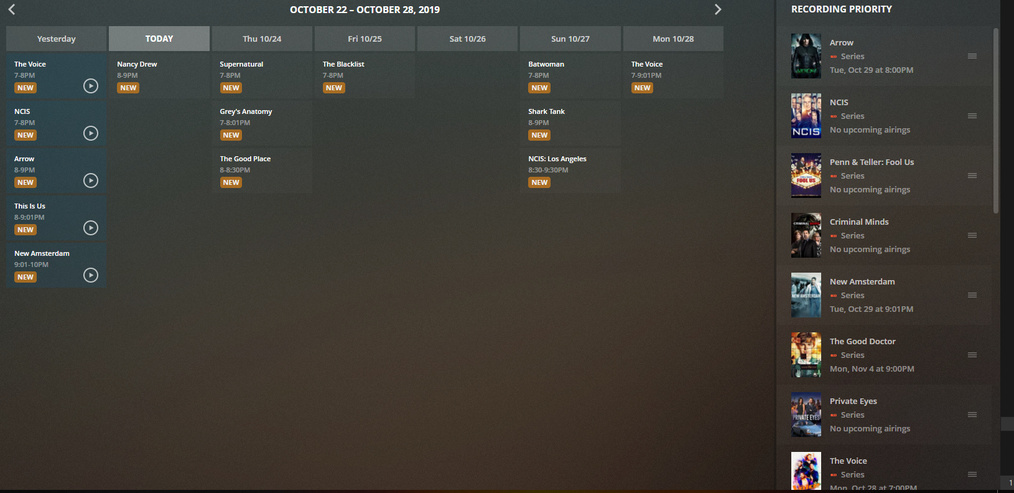
I understand, I just don’t use the DVR feature as much to be honest… I have a handful of shows that I record, and they all seem to work… This is what my current record schedule looks like:
I just added jeopardy as a show, I set to new airings only, and set it to only the ones on NBC, and here’s what I got:
Yeah, the way you’ve set it up and the results you’re seeing make total sense. But on mine, it’s simply not working. I’ve tried deleting the recording schedule several times and setting it back up in numerous ways, but every time it works out the way I described. There’s a new episode of Jeopardy every weekday from today until the end of the guide data, but for some reason it’s impossible to get my recording schedule to see more than the episodes airing this coming Monday and Tuesday. That’s all it’s planning to see. The guide - as far as I know - sees those two episodes the same way it sees all the other episodes, but those are the only two it plans on recording and I have no way to change it. Even if I tell it to record every single episode on any channel at any time, it still doesn’t see them all. It only sees two more episodes at 2am on a couple nights even though it appears there’s one at 2am every weeknight.
This jives with the fact that when I search for “Jeopardy” and select the show, the only episodes it shows upcoming are those ones that show up on the dvr schedule. Even if I click on the show from one of the episodes it’s not seeing, that episode doesn’t show in the list of upcoming episodes, which drives me a little crazy, TBH, and is clearly a bug somewhere.
The DVR feature is pretty much the only reason I’m considering a Plex Pass.
That sounds to me like there’s an issue with the EPG for your area… have you tried finding an EPG provider and loading the XML manually to see if that works better? There’s some where it’s only $20/year… If that works, you can report the EPG error and hopefully it will get fixed…
I suppose it could be an EPG problem. But I’m puzzled why Plex knows that it’s that show, and knows that it’s new, but doesn’t include it in the list of episodes. Seems like it could be a fault on both parties…
And while $20/year isn’t too bad, it still adds to the total that I’m trying to avoid paying my provider. It’s interesting how often the answer to problems with cord cutting are adding a few payments here and there until you wind up paying the same amount you would have to an ISP for a TV package where you’d get more content in a more convenient package. I’m trying here but getting a little discouraged.
Yeah, I can definitely understand that… I’m certainly not suggesting you pay $20 in perpetuity, if you can find a free EPG for your area that’s out there simply as a test, then I’d do that… if not, then $20 is a good secondary option for testing… in an idyllic world, this would give you your EPG for a year while Plex gets its guide/guide provider corrected from your reporting…
Good point. Ok, I’ll try that out when I have some time. Thanks for helping me with this I appreciate it. I’m generally pretty excited to use this stuff, and I definitely like the commercial skip feature so far (though I think it usually cuts off AND starts back up again a tad too early).
I look forward to bumming around the forums here and learning more about what Plex can do.
Thanks again!