Thank you for the feedback and confirming the regression in 1.14.1
first time i got 2 recordings at same time completed successfully, on latest plex version.
i stopped the library scans (“automatically” and “periodically”).
not that i know what i am doing, but i did an export of logs and found that the recordings last failed at same time as library activity…so thought i would stop that activity in settings, and set 2 recordings for the same period (last night), and for the first time i have success completions for BOTH.
maybe try this and see if that is the issue with everyone else?
2 Likes
Now Im getting the “Unable to tune your channel (no parts)” error on 1.13.9.5456 which I know is a fixed issue in 1.14 but that has worse issues of failed recordings in imho. So basically I have the option to have random channel loss and require a reboot or not be able to record more than one thing at a time. I hope an update comes out soon to fix the 1.14 issues.
That worked Yes I cant believe it! Thanks so much I decided to give it one last ditch effort and try it before waiting for a fix from plex and it recorded two test shows correctly with both showing up in the tuner interface on 1.14.1.5488.
1 Like
The above actually worked to help set 2 recordings, how ever still can not record 4 from my quad tuner 
i think actually any background task is interrupting the recordings…so even “fanart” fetches too.
now it is getting silly.
Recordings are still failing at around 50% of the time. I have 2 HDHomerun tuners, the Quattro and the Extend. Each have their own antenna.
There are no other programs accessing the tuners other than PLEX.
I just recorded several shows. the first block were fine and the last two ended a few minutes before the shows end time. Both saying “Recording failed. Please check your tuner or antenna.”
I am using Windows 10, Version 1.14.1.5488. My two HDHomeruns were exclusive with PLEX
Plex Media Server Logs_2019-01-07_10-59-34.zip (3.4 MB)
Thank you
Hi
The problem is being looked into by the development team
Are you saying library scanning activity affects the number of tuners being used ?
Could you put this url in a browser and get me the response you get back
http://192.168.1.207/discover.json
could you get me a screenshot of what Plex Web shows for the DVR/Tuners - want to see if it shows 2 tuners
json file info:
{“FriendlyName”:“HDHomeRun CONNECT Duo”,“ModelNumber”:“HDHR5-2US”,“FirmwareName”:“hdhomerun5_atsc”,“FirmwareVersion”:“20180817”,“DeviceID”:“1066E0FC”,“DeviceAuth”:“K7cVdSpm1l3PG/ARYy+KF5by”,“TunerCount”:2,“BaseURL”:“http://192.168.1.207:80”,“LineupURL”:“http://192.168.1.207:80/lineup.json”}
Screenshot:
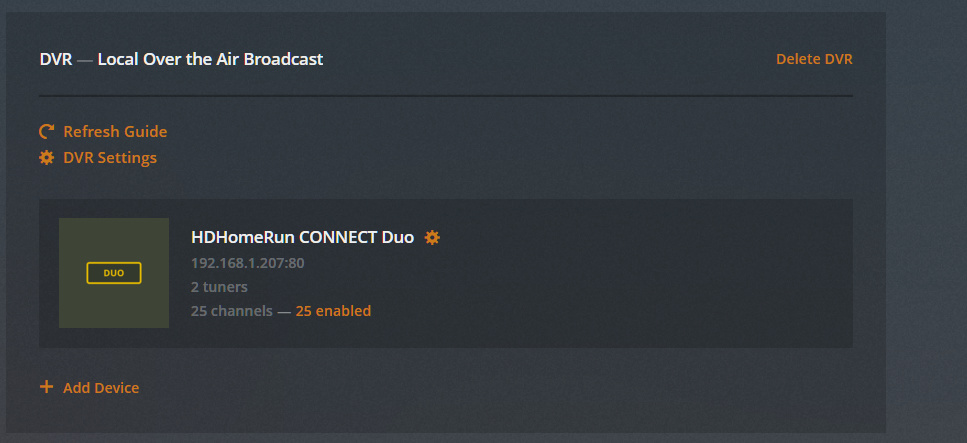
And yes it seems from what @d23wilson said and from my own testing having things scanning even just turned on, not even actively scanning affects the ability to use both tuners. It seems to work perfectly fine when all scanning is disabled.
Thanks for the logs
The logs show the following detected tuners
TBS 6284 DVBT/T2/C Tuner A
TBS 6284 DVBT/T2/C Tuner B
TBS 6284 DVBT/T2/C Tuner C
TBS 6284 DVBT/T2/C Tuner D
Looking at the 5th January attempts to tune channels. There was only one successful tune - for channel 73 at 04:41:58
There were repeated attempts to tune channel 76 with no success and one attempt for channel 74 also failed
For both channels the failure when tuning the transpoder was No video PID found - could the channels be radio channels? For some reason no video stream was detected.
Assuming the issue is still there, would like to capture the two channels streams using curl.exe. This would be running curl.exe in a command line window and capturing the stream if each channel through Plex Media Server and into a .ts file (one for each capture)
Make sure it is done whilst Plex Media Server is running and no recordings or live tv sessions in progress
Download curl binary for windows from curl - Download
Unzip / Install
Start a command line window session
use cd to switch to the curl directory holding the curl.exe binary
Then run these commands
First capture from channel 76
curl http://127.0.0.1:32600/devices/dvb%23bda%230%23%40device%3apnp%3a%5c%5c%3f%5cpci%23ven_1131%26dev_7160%26subsys_00016284%26rev_02%234%2628cddf4%260%2600a8%23%7b71985f48-1ca1-11d3-9cc8-00c04f7971e0%7d%5c%7b3ff44ee5-8547-402a-94f3-d44700020000%7d/media/triplet%3A%2F%2F9018%3A12294%3A14440?param=%3C%3Fxml%20version%3D%221%2E0%22%20encoding%3D%22UTF-8%22%3F%3E%0A%3Ctunedata%3E%3Ctt%3E4%3C%2Ftt%3E%3Cdq%3E0%3C%2Fdq%3E%3Cdr%2F%3E%3Cfr%3E641833%3C%2Ffr%3E%3Cmd%3E0%3C%2Fmd%3E%3Csr%3E0%3C%2Fsr%3E%3Cpl%3E0%3C%2Fpl%3E%3Clf%3E8%3C%2Flf%3E%3Cl1%3E0%3C%2Fl1%3E%3Cl2%3E0%3C%2Fl2%3E%3Cls%3E0%3C%2Fls%3E%3Cpp%3E0%3C%2Fpp%3E%3Chz%3E0%3C%2Fhz%3E%3Cin%3E0%3C%2Fin%3E%3Cfc%3E0%3C%2Ffc%3E%3Ct%3E12294%3C%2Ft%3E%3Cn%3E9018%3C%2Fn%3E%3Cs%3E14440%3C%2Fs%3E%3Cen%3E0%3C%2Fen%3E%3C%2Ftunedata%3E%0A > capture76.ts
This would start displaying some time info. After 1 minute break in on it with control and c
Then execute the command for the capture from channel 74
curl http://127.0.0.1:32600/devices/dvb%23bda%230%23%40device%3apnp%3a%5c%5c%3f%5cpci%23ven_1131%26dev_7160%26subsys_00016284%26rev_02%234%2628cddf4%260%2600a8%23%7b71985f48-1ca1-11d3-9cc8-00c04f7971e0%7d%5c%7b3ff44ee5-8547-402a-94f3-d44700020001%7d/media/triplet%3A%2F%2F9018%3A24640%3A27136?param=%3C%3Fxml%20version%3D%221%2E0%22%20encoding%3D%22UTF-8%22%3F%3E%0A%3Ctunedata%3E%3Ctt%3E4%3C%2Ftt%3E%3Cdq%3E0%3C%2Fdq%3E%3Cdr%2F%3E%3Cfr%3E617833%3C%2Ffr%3E%3Cmd%3E0%3C%2Fmd%3E%3Csr%3E0%3C%2Fsr%3E%3Cpl%3E0%3C%2Fpl%3E%3Clf%3E8%3C%2Flf%3E%3Cl1%3E0%3C%2Fl1%3E%3Cl2%3E0%3C%2Fl2%3E%3Cls%3E0%3C%2Fls%3E%3Cpp%3E0%3C%2Fpp%3E%3Chz%3E0%3C%2Fhz%3E%3Cin%3E0%3C%2Fin%3E%3Cfc%3E0%3C%2Ffc%3E%3Ct%3E24640%3C%2Ft%3E%3Cn%3E9018%3C%2Fn%3E%3Cs%3E27136%3C%2Fs%3E%3Cen%3E0%3C%2Fen%3E%3C%2Ftunedata%3E%0A > capture74.ts
Control and C after 1 minute
Zip the two .ts files, upload to dropbox or similar service and share the links to the files
Thanks
I changed to beta Version 1.15.0.550 and I am still getting failures. See attached logs for DVR of "Happy Together "
Plex Media (3.2 MB)
Previous post:
Thank you
Thanks for the response i have sort of done what you asked as i noticed that channel 74 was a jewellery making channel so decided to disable the channel completely from with in plex. so only did channel 76 below is the zip for it which contains two ts files an a couple of pics as when i started the 1st curl i noticed that the guide was updating, the 2nd is with the server doing nothing which the pics included will show also.
I am able to record two programs at once now with the server not updating the library’s at all except for the recordings but when trying to record with all four tuners it fails on two of them though. have included most recent logs too just in case ya need or want to view.
If you need anything else let me know and thanks for the help so far…
Dropbox - Chl 76.zip - Simplify your life
Plex Media (4.4 MB)
So I went to enable commercial removal in the DVR settings today and if that’s enabled that also seems to cause issues recording two shows at once.
Woop. Woop. 4 recordings all at once I took the advice from ya’ll here, all library’s are updated manually except for the library’s that I have set for the recorded programs/films. as they update them selves once recording has finished.
I also disabled all removal of adverts/commercials.
The only downfall with this i will have to edit all recorded things to remove adverts manually…
And before any one says anything they are all random things recording lol

will edit this once all have completed… just in case they fail towards the end…
Did you capture any logs?
hey bud i just tried recording two programs at once one with adverts removed from dvr settings and the other just enable one has failed… will uploads logs for you as it has come up please check tuner or antenna..
Plex Media (5.5 MB)
i must admit did start it a bit late but told it it could do a partial record..

Here’s where it gets a bit puzzling, a new program started recording, so maybe it is the Use DRV settings in the remove commercial settings that throw it off??
deffo gonna have to do some more tests now… 


Plex Media Server Logs_2019-01-09_02-12-18.zip (5.2 MB)
Shock horror Kitchen nightmares starts recording after The Big Bang Theory finished…
so it is now recording kitchen nightmares and Benefits.
I hope all this info helps…
I’ll pull logs later tonight I just had another failed recording tonight. This time I was watching something previously recorded so it seems if I do anything as the recording is starting it fails. I could resume watching the item in my library without interruption during recording after starting the recording again.
