I manage my Plex Media server’s content (Ubuntu, headless), which I put there, using a browser from a workstation. I’m somewhat fearful of the options to
Refresh Metadata
or Upgrade Libraries
because I go to the trouble of perfecting mistakes in individual summaries (and other fields) brought in during scanning and I don’t want these wiped out in favor of what’s out there in general database land.
I wondered if clicking the padlock when editing will for sure protect me against such mischief?
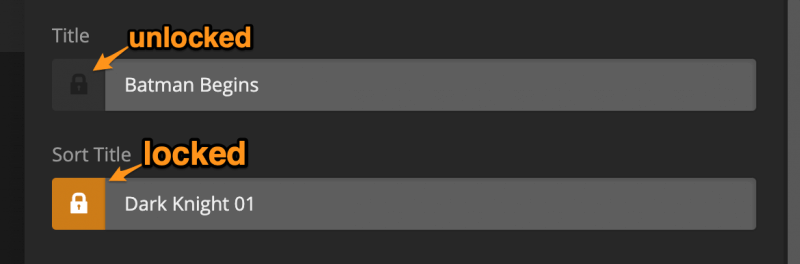
If you’ve made an edit to a field, it is automatically locked. A locked field will not be altered when an item is refreshed. To lock or unlock a field:
Edit the field and it will lock automatically
Click the lock icon to either lock or unlock the field
A field is locked when the lock icon is colored orange
As not all the data we use in our new system is exactly what the old agent would use, you may notice some changes to existing metadata when upgrading. Metadata fields you have locked will not be changed, however. If you are just creating a new library you don’t need to worry about this.
Locked fields will have the padlock icon colored orange.