I’ve come up with a workaround, only slightly less elegant than my original idea. If I use a webm container for the audio files, Plex is tricked into thinking they are videos, and so I can keep them in a video library and run the agent. Presumably I could also use an mkv or mp4 container, but I haven’t tested them.
Dont think its a bug ive probably done something wrong. I have created two plex libraries both as movies and tv shows to see the difference. Movies seem to get all the meta data correct for the episodes so i think thats fine. But the series library shows two series inside the youtube channel folder. inside that it shows folders for Series and Season 1 and there are only a few episodes spread between those folders. I have 30 eps inside the channel folder though.
Each video is similar to this:
YouTube\Life of Boris [UCS5tt2z_DFvG7-39J3aE-bQ]\20181218 - Harder than real life - Cooking Simulator (1920x1080) [7IoveKFIWy8].mkv

I only have that one channel. I have set the youtube directory as the directory for the library so why is it putting the episodes into Specials and Season 1 and also only showing 3 episodes

I cant post logs as none show up in /Plex Media Server/Logs/PMS Plugin Logs/ after refreshing metadata
I have a lot of videos that I have gotten from YouTube, ripped from music video DVD’s etc.
Is there a renamer that can scan files like FileBot for example and look up videos to ADD the ID to the file name in this way so this agent will work?
I have been collecting videos for years. There is no way I could go back and manually name all my files.
Thanks!
@ NO_obz eps not showing up are the SCANNER responsability… According to the readme requirements are:
- Please use the Absolute Series Scanner to scan your media and leave the YouTube id in the series/movie title
- leave the YouTube video ID on every file
- Playlist (preffered) id OR Channel id on series foldername (as Search() need to assign an id to the series)
Which scanner do you use for the series library?
Need help.
Plex is not showing Channels (as shows) and Playlists (as episodes). Here is how I’ve structured the directory for YouTube videos:
Media > Channel Name [Channel ID] > Playlist Name [Playlist ID] > Video Name [Video ID]
Here is a screenshot:

It is strange because Plex is showing 1 playlist for each channel. Here are screenshots from my Plex interface:
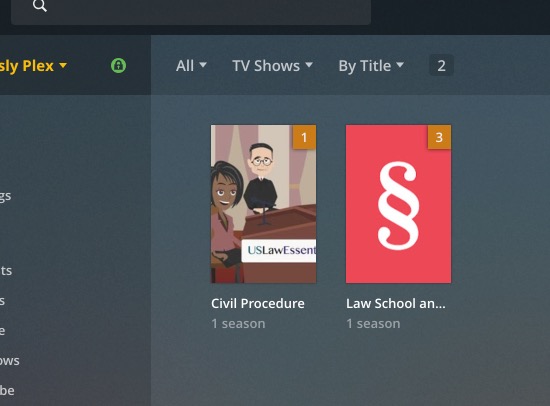
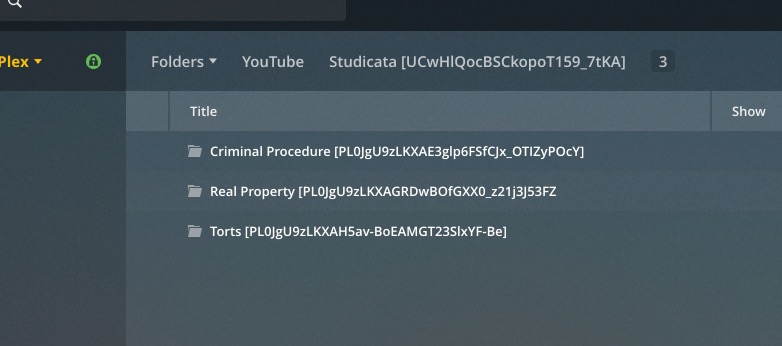
Here is a screenshot of my Library settings:

Hi! This plugin seems perfect for what I need only I have one issue.
Is there a way to reverse a playlist when it’s added as a series? This creator for example puts their latest episode as number 1 in the playlist and goes back in time (https://www.youtube.com/playlist?list=PLOHbM4GGWADc5bZgvbivvttAuWGow6h05).
I had YouTube-DL download the playlist in reverse using the “–playlist-reverse” option and added the reversed playlist index to the filename but that doesn’t seem to make a difference.
I seem to be having the same problem as @SweetK and @kwebber321 my directory structure is
YT/Uploader [uploader_id]/Playlist [playlist_id]/[playlist_index] [title] [id]
but it identifies the playlist as the channel

=============================================================================================================================================================
Library: 'no valid X-Plex-Token.id', root: '/YouTube/Kids Educational', path: 'Kurzgesagt – In a Nutshell [UCsXVk37bltHxD1rDPwtNM8Q]/Science and other stuff explained [PLFs4vir_WsTyXrrpFstD64Qj95vpy-yo1]', files: '2', dirs: '0'
Manual scan start: 2019-09-28 10:16:52,866541
=============================================================================================================================================================
Forced ID (series folder) - source: "youtube", id: "PLFs4vir_WsTyXrrpFstD64Qj95vpy-yo1"
-------------------------------------------------------------------------------------------------------------------------------------------------------------
exception: list index out of range
[ 0] https://www.googleapis.com/youtube/v3/playlistItems?part=snippet&maxResults=50&playlistId=PLFs4vir_WsTyXrrpFstD64Qj95vpy-yo1&key=AIzaSyC2q8yjciNdlYRNdvwbb7NEcDxBkv1Cass
---- count: 21
[Da-2h2B4faU] rank:   3 in file: S01E3 - String Theory Explained – What is The True Nature of Reality [Da-2h2B4faU].mp4
"Science and other stuff explained [PLFs4vir_WsTyXrrpFstD64Qj95vpy-yo1]" s01e003                         "YouTube" "String Theory Explained – What is The True Nature of Reality?" "S01E3 - String Theory Explained – What is The True Nature of Reality [Da-2h2B4faU].mp4"
[-O5kNPlUV7w] rank:   2 in file: S01E2 - Why Beautiful Things Make us Happy – Beauty Explained [-O5kNPlUV7w].mp4
"Science and other stuff explained [PLFs4vir_WsTyXrrpFstD64Qj95vpy-yo1]" s01e002                         "YouTube" "Why Beautiful Things Make us Happy – Beauty Explained" "S01E2- Why Beautiful Things Make us Happy – Beauty Explained [-O5kNPlUV7w].mp4"
[return]
=============================================================================================================================================================
Library: 'no valid X-Plex-Token.id', root: '/YouTube/Kids Educational', path: 'Kurzgesagt – In a Nutshell [UCsXVk37bltHxD1rDPwtNM8Q]/Our Best Stuff [PLFs4vir_WsTzcfD7ZE8uO3yX-GCKUk9xZ]', files: '3', dirs: '0'
Manual scan start: 2019-09-28 10:16:53,086599
=============================================================================================================================================================
Forced ID (series folder) - source: "youtube", id: "PLFs4vir_WsTzcfD7ZE8uO3yX-GCKUk9xZ"
-------------------------------------------------------------------------------------------------------------------------------------------------------------
exception: list index out of range
[ 0] https://www.googleapis.com/youtube/v3/playlistItems?part=snippet&maxResults=50&playlistId=PLFs4vir_WsTzcfD7ZE8uO3yX-GCKUk9xZ&key=AIzaSyC2q8yjciNdlYRNdvwbb7NEcDxBkv1Cass
---- count: 13
[UjtOGPJ0URM] rank:   1 in file: S01E1 - Why Alien Life Would be our Doom - The Great Filter [UjtOGPJ0URM].mp4
"Our Best Stuff [PLFs4vir_WsTzcfD7ZE8uO3yX-GCKUk9xZ]" s01e001                         "YouTube" "Why Alien Life Would be our Doom - The Great Filter" "S01E1 - Why Alien Life Would be our Doom - The Great Filter [UjtOGPJ0URM].mp4"
[9P6rdqiybaw] rank:   3 in file: S01E3 - Wormholes Explained – Breaking Spacetime [9P6rdqiybaw].mp4
"Our Best Stuff [PLFs4vir_WsTzcfD7ZE8uO3yX-GCKUk9xZ]" s01e003                         "YouTube" "Wormholes Explained – Breaking Spacetime" "S01E3 - Wormholes Explained – Breaking Spacetime [9P6rdqiybaw].mp4"
[MBRqu0YOH14] rank:   2 in file: S01E2 - Optimistic Nihilism [MBRqu0YOH14].mp4
"Our Best Stuff [PLFs4vir_WsTzcfD7ZE8uO3yX-GCKUk9xZ]" s01e002                         "YouTube" "Optimistic Nihilism" "S01E2 - Optimistic Nihilism [MBRqu0YOH14].mp4"
[return]
Regardless thank you SO MUCH for the time and effort that you have put in maintaining these. I will defintely be buying you a beer.
{
 "error": {
  "errors": [
   {
    "domain": "usageLimits",
    "reason": "dailyLimitExceeded",
    "message": "Daily Limit Exceeded. The quota will be reset at midnight Pacific Time (PT). You may monitor your quota usage and adjust limits in the API Console: https://console.developers.google.com/apis/api/youtube.googleapis.com/quotas?project=621317441038",
    "extendedHelp": "https://console.developers.google.com/apis/api/youtube.googleapis.com/quotas?project=621317441038"
   }
  ],
  "code": 403,
  "message": "Daily Limit Exceeded. The quota will be reset at midnight Pacific Time (PT). You may monitor your quota usage and adjust limits in the API Console: https://console.developers.google.com/apis/api/youtube.googleapis.com/quotas?project=621317441038"
 }
}
Please use your own API key and put it in agent settings and try again


One more Issue:
- Video skips 1-2 seconds around every minute
- happens only when playing downloaded YT-Videos via Plex
- no problems playing the Video directly with VLC
Does anybody have similar problems?
@ckarrie Plex issue, not agent. depends on which format, resolution, transcoding,
Pretty sure i instructed to use my scanner in the agent readme…
Thanks @ZeroQI <3
There are a bunch of people having this or a similar issue. A common thread for me, now that I just saw your post, is the skips are almost exclusively or far more common with downloaded youtube videos playing in the web player.
Thanks for your infos. Then this might be a Plex or Youtube-DL iussue.
I’ve hit the “Daily Limit Exceeded” error and I’m not sure how to generate my own API key to fix this? Any help would be greatly appreciated.
Unfortunately, the api key i created gets hits with too many user requests (However i don’t have that problem for donation, my thanks to lad1337 and Aaron who donated and no didn’t forgot to name anybody) so you need to generate your own api key for youtube:


Your sorting is neat yet unsupported for now.
The series seasons and episode assignment are decided by the scanner, so wrong thread…
Try the below naming convention
Series [UC…]
- Season 01 - Title [PL…]
- Season 02 - Title [PL…]
You could have grouped the playlist/series in collections as well…
I have the exact same issue.
Also, see this: Absolute Series Scanner (for anime mainly)
The steps to properly reproduce this are to put a few episodes into a series folder without playlist subfolder, because again: a lot of uploaders in the real world don’t bother with putting all or even any videos in a playlist… It seems to trigger this better by using an older upload? E.g. you have 3 vids from 2019 and 3 from 2018, if I add a video from the beginning of 2018 it’ll cause this to happen sooner? Maybe it’s coincidence though, I haven’t tested a lot of channels and vids, because why add a lot only to be forced to do the Plex dance and lose all your play counts anyways?
I’m using latest Absolute Series Scanner, latest Youtube Agent. I suppose it’s a Scanner issue, because episode assignment is done by the scanner. But if you say post it in the Agent thread I’ll merrily do it, in the end the same guy sees the request anyways…
Logs:
Youtube Agent didn’t create one after refreshing metadata or after adding an episode…
I’ve been using a TV Show library for my YouTube content, and while it took some deliberation I’ve gotten everything almost perfect. IDs are being read and Metadata matches perfectly, sorting order for my library shows the proper air dates for each video, etc.
My issue is the actual episode numbers are all 501+ regardless of having been downloaded in a Playlist or not. My setup is a YouTube folder with folders of channels inside it, rather than folders for playlists. (Funhaus has a lot of one-off episodes that I love but aren’t part of a series, and I only download specific ones.)
What I’m trying to do is have each channel as a show organized by air date, but the episode numbering makes it so the videos in each channel play in seemingly random order.
I’ve got the latest scanner and agent, and everything else is working perfectly. Is there anything I’m missing to make this happen? Or is this not a valid feature?
