So:
\youtube
\channel + id
\playlist + id
\video + id
Is this correct?
Do all videos need to be in a playlist, or could I recognize them standalone, as their own show?
Do all playlists need to be in a channel, or could I make a playlist into a show?
If I made a playlist of random videos that I found funny, and placed them in a folder \youtube\funny, is there a way I could make them appear nicely with this agent?
Video Id in each file should allow fallback or episode metadata.
Playlist id allow to have series information and use the scanner to have the ordering right
You can give playlist URL to youtube-dl and that is it, files will be tagged property.
i do not use scripting with youtubedl, just paste the playlist ling on it and files are nammed properly. I rename the folder manualyl. That’s a question for youtubedl support, am sorry but cannot help further there
Thanks. I eventually figured it out! I ended up making this command:
youtube-dl -v --dateafter 20081004 --download-archive /volume1/Youtube/.Downloaded -i -o “/volume1/Youtube/%(uploader)s [%(channel_id)s]/%(playlist_index)s - %(title)s [%(id)s].%(ext)s” -f bestvideo+bestaudio -ci --batch-file=/volume1/Youtube/Channels_to_DL.txt
Which gives me files in this format:
Youtube\Errant Signal [UCm4JnxTxtvItQecKUc4zRhQ]\001 - Thanksgiving Leftovers - Battlefield V [Qgdr8xdqGDE]
Where Errant Signal is the name of the channel, and then the video title.
I’m using this script to download both channels and playlists, they all end up in the format above.
I’m running into some issues however:
Many videos share the same thumbnails. It seems the agent gets confused and either doesn’t generate the correct ones, or it’s just showing the wrong ones. For example in a folder with 400 videos, I’ll often see the same 5 thumbnails repeated.
Many videos seem to get the wrong meta data. For example:
The file:
Noah Caldwell-Gervais [UC5CYeHPLer3lbEhgonvbbAA]/07 - Scars & Stories [Planescape - Torment vs. Torment - Tides of Numenera] [-_rHuBwaFdw].webm
Will be represented as:
“A Thorough Look at Neverwinter Nights”, which is the metadata for another video on his channel.
Any idea how I can avoid those issues?
By the way, your work has really transformed how I consume Youtube videos. Really good work! I’d say about 90% of what it scanned has worked great. It’s so much better than just adding videos in Plex.
video id correct and match code format…
You are also using my scanner, right?
I need the agent logs to know if thumbnail generated from video or downloaded.
Ok so I’m running into an issue, the scanner (Absolute Series Scanner) seems to only recognize files if they are in 1 folder down, if I do the UC or PL in the root folder, then put the videos inside, all is good. But if I do as recommended and do UC\PL\Videos it doesn’t find any of the videos.
I updated my Absolute Series Scanner and Youtube Agent and now the videos were detected properly. The thumbnails are still wrong though, for example: https://imgur.com/a/SC11TsM
Edit: I’ve just noticed the correct thumbnail is downloaded. If I click Edit and go to Poster, the correct poster is there, but it’s the second poster. The default poster is something else. Any idea how to fix this?
Still playing with this nice addition, but I’m getting odd and unexpected results.
So I tried the youtube2 mode, for seasons by year. But it seems to randomly apply the videos to the wrong year. Videos posted in 2014, will show up in Season 2018, so this doesn’t make sense to me.
Also it seems to make the most recent video Episode 1, I’m not sure what happens if a new video is added, do all the videos get shift down? So Episode 1 because Episode 2?
Your agent and scanner is exactly what i’ve been looking for to get my downloaded youtube videos into plex neatly.
My “Channels” library works fine, with all of a youtubers videos directly within their folder, this shows in plex with Channel Name as Series name & the seasons split into years.
My “Playlists” library doesn’t seem to work. I’d ideally like the Channel Name, then playlist then videos, i’ve read that the Channel Name is the collection, playlist is series & then a single season with all episodes inside. Unfortunately none of my “Series” have the “Collection” tag filled in.
Example of my files:
└───SoundmanCA [UC_ojrdK0jMGKFduQuDcyanw]
    ├───Amplified Season 1 [PLB1063EAB37E62353]
    │       Amplified - Air Bagged Dodge Ram iPad install. Custom Box JL Audio system EP 9 - [tDQD8kyTMv4].mkv
    │
    ├───Amplified Season 2 [PL8C789F10C2CCD4CE]
    │       Amplified - 22, 'Season 2 Premiere' @SoundManCA - [zs6h3K9wzjs].mkv
    │
    └───Amplified Season 3 [PL4AAD4FE51CB83C5F]
            Accent Lighting installed in a Honda fit, Hertz Audio HE4 Ford Ranger, Amplified 72 - [Ag6EFWerBPc].mkv
Should this be filling out the collection field or is my format incorrect?
The below makes me believe that it should be?
“/Channel [UCxxxxxxxxx]/Playlist [PLxxxxxxx]/video [xxxxxxx].ext should create Playlist as Series and Channel as Collection”
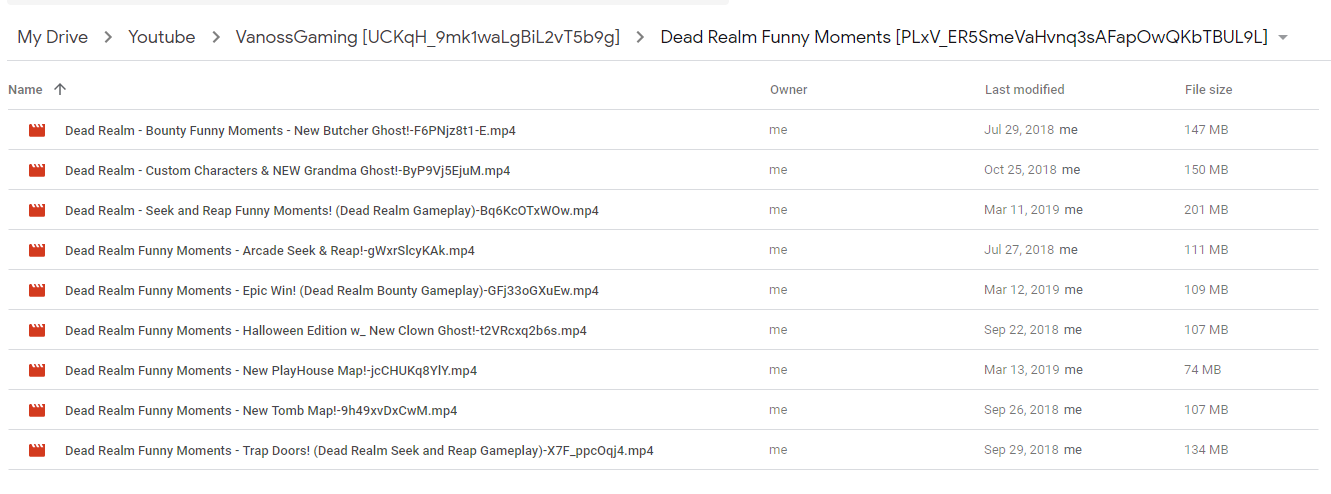
The issue im having is plex recognizes the files but the problem is it names the channel after the name of the playlist. So i have this on my google drive,
VanossGaming [UCKqH_9mk1waLgBiL2vT5b9g]
Dead Realm Funny Moments [PLxV_ER5SmeVaHvnq3sAFapOwQKbTBUL9L]
Dead Realm - Bounty Funny Moments - New Butcher Ghost!-F6PNjz8t1-E
But plex just shows
Dead Realm Funny Moments [PLxV_ER5SmeVaHvnq3sAFapOwQKbTBUL9L]
Dead Realm - Bounty Funny Moments - New Butcher Ghost!-F6PNjz8t1-E
Hi, I have a question about the folder structure. The Youtubers I download from are a bit behind on putting their videos in actual playlists, so the videos don’t have a playlist ID. Can I put them in a folder with a custom name or even just a season number and the scanner will still parse them right? So:
Show [UCxxx]/Custom Name/Video [ID]
ETA (7 Apr): I think I’ll just test this in practice and see how it goes. But is there any way for the scanner to change the “originally available” date in the Plex metadata to the date that matches the video publish date?
I just found this awesome scanner and agent. But I’ve got a couple questions that I have been running into
I have a lot of archived youtube videos that don’t exist anymore, so there is no way to actually redownload and grab the ids. They are just in a folder structure like “…Youtuber\Playlist\01 - file.ext”
They are all nicely sorted with numbers at the front to make it look like the release order.
Is there any way to use this scraper or have it in the same library with all my other youtube files but still make it look nice? I’m baffled that Plex has completely ignored something that so many people want, and a quick option to allow us to use a simple way of archiving our own collections
@vertigo235 It should makes newest video the last so ep numbers don’t change at every new file. No logs… @Miguel1993 Yes that’s how it is meant to work. No logs @kwebber321 “exception: list index out of range” hummm bug here maybe the underscore in playlist? Files added in Plex so can be ignored for now… Did you set your library settings to show collections and hide items in collection?
Fantastic work! I’m glad to have found this project.
I’d like to adapt the agent to work with Plex audio (‘Music’) libraries. I reckon that not too much would need to be changed besides the video title being assigned to ‘album’ and the channel name to ‘artist.’ I was wondering if @ZeroQI or anybody else involved in development might give me some pointers.