Server Version#:1.32.6.7557
Player Version#:4.1080?
<If providing server logs please do NOT turn on verbose logging, only debug logging should be enabled>
Most of the Files from my nas are being grouped together in the wrong series
I thought i had had a problem like this, and after mega search I seem to have lost the how to fix it paperwork.
I hope that someone can point in the right direction.
And Yes I think I have the files properly formatted and properly set according to the how to guides, I have two hd’s that are setup like so HD/tv shows/#, a,b,c.etc/series name/season##/series name.s01.e01.avi. Both of the hard drives are set up the same half the alphabet on one the rest on the other.
as an example one of my tv series has 422 files in 20 seasons (it only ran for 3 years).
Thank you in advance for any help
What folder(s) are you adding to Plex? You’ll have to add the individual letters, since for each folder you add to Plex, Plex expects that it will contain individual show folders (see the first “Tip!” in the naming guidelines). If you only add “HD/tv shows”, Plex will think that everything in “a”, “b”, “c”, etc. is a single show.
hd is labeled media10 then the next folder is tv2 then it is tvshows, then alphabet sorting the tv show into them, each letter is a separate folder, the next breaks down into series names, then breaks down to seasons then breaks down into series name.s01.e01.avi etc., I also have provided season 00 for any extra stuff that is included
I’m asking what folders you have added in Plex itself: https://i.imgur.com/nbZdRyg.png
You’ll need to individually add /media10/tv2/tvshows/a, /media10/tv2/tvshows/b, etc., not just /media10/tv2/tvshows.
yep I had done that already and still hasn’t fixed anything.
Sometimes, when a library isn’t built correctly (structure),
the best recourse is to delete that library section and recreate it fresh.
It’s harder to undo / fix bad matches than create new proper ones.
I was starting fresh after the server was giving me grief and I re started it. After I got the server to recognize me I started with the furthest in from the tree, ie two hd’s that are setup like so HD/tv shows/ for both drives, I also loaded HD/tv shows/# in to the library
. Still wonder what step I should take next to correct the files that have the wrong tv shows in them. or do I have start over again and add 1 folder at a time, down to the individual tv shows and then work back up the tree till I get all of them installed
First and foremost — Organize the files in a way which makes sense to you.
Also – keep it simple (less maintenance headaches).
Until this is done, I doubt you’ll have much success getting what you want.
Have a clear clean plan then implement it
I store the series in one of these 4 top level directories:
- ‘tv’ for popular / current tv series
- ‘tv2’ for less common and classic tv series
- ‘tv3’ for cartoons
- ‘tv4’ for cooking programs
This makes maintenance easier for me.
My “Television” library section, which includes popular / current and classic tv series looks like this:

/vol is the main storage area on the NAS.
/vol/media is where I put all my media files.
/vol/media/tv is, obviously. popular/curent tv shows
etc
To show you what ‘tv3’ and ‘tv4’ look like.
[chuck@lizum media.2004]$ ls tv3
Animaniacs/                         Looney Tunes/                   The Jetsons/       Wile E. Coyote Road Runner (1949-2010)/
Futurama/                           Looney Tunes (1929)/            The Pink Panther/
Johnny Sokko and His Flying Robot/  Star Trek The Animated Series/  Tom and Jerry/
Jonny Quest/                        The Flintstones/                Wacky Races/
[chuck@lizum media.2005]$ ls tv4
Celebrity MasterChef/                     Hell's Kitchen (US)/                     MasterChef (US)/
Chef's Table/                             Kitchen Nightmares (US)/                 Next Level Chef/
Dinner Impossible/                        MasterChef/                              Restaurant Impossible/
Gordon Ramsay's 24 Hours to Hell & Back/  MasterChef Australia/                    Top Chef/
Gordon Ramsay - Uncharted/                MasterChef - The Professionals/          Top Chef - Last Chance Kitchen/
Hell's Kitchen (AU)/                      MasterChef The Professionals Australia/  Tournament of Champions/
[chuck@lizum media.2006]$
The result is a nice clean ‘Television - Cooking’ library section.
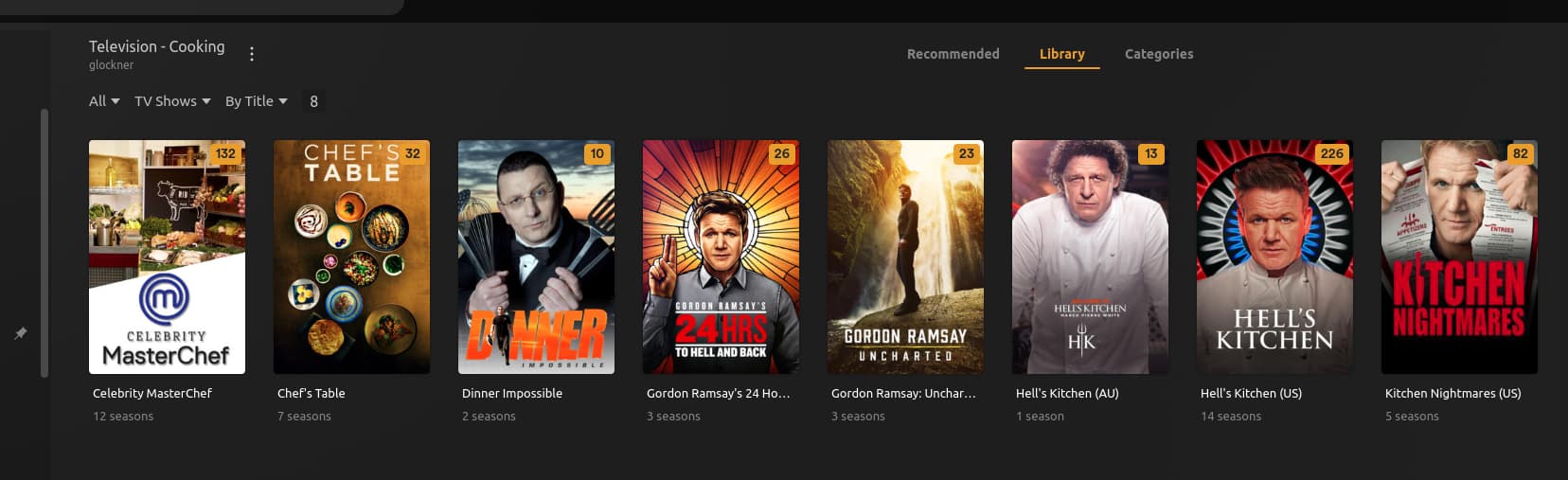

(I very much believe in not overthinking / trying to force Plex. Structure the files and it will do what you want)
Does this help ?
I thought I had it arranged correctly but I am wondering did I try to load it to fast or to much at one time or didn’t clear the cache or memory before reloading the files
Show me what you have ?
If your names are correctly formatted – There is no such thing as “too fast”
Bad naming is a common mistake for those first starting out.
The stucture Plex expects:
/top/level/folderename/
    Series/
      Season 01/
        Series - S01E01 -  Optional First Episode Title.ext
If you use a renaming tool, you’ll get perfect naming every time (plex never misses)
Here’s an example of what I have: Hell’s Kitchen (US)
[chuck@lizum tv4.2010]$ ls Hell\'s\ Kitchen\ \(US\)/
Season 09/  Season 11/  Season 13/  Season 15/  Season 17/  Season 19/  Season 21/
Season 10/  Season 12/  Season 14/  Season 16/  Season 18/  Season 20/  Season 22/
[chuck@lizum tv4.2011]$ ls Hell\'s\ Kitchen\ \(US\)/Season\ 21/
Hell's Kitchen (US) - S21E01 - Let the Battle Begin.mkv
Hell's Kitchen (US) - S21E02 - Just Wingin' It.mkv
Hell's Kitchen (US) - S21E03 - Clawing Your Way to the Top.mkv
Hell's Kitchen (US) - S21E04 - Slipping Down to Hell.mkv
Hell's Kitchen (US) - S21E05 - Breakfast 911.mkv
Hell's Kitchen (US) - S21E06 - Til Chef Do Us Part.mkv
Hell's Kitchen (US) - S21E07 - Wok This Way.mkv
Hell's Kitchen (US) - S21E08 - Game On!.mkv
Hell's Kitchen (US) - S21E09 - Putting the Carne in Carnival.mkv
Hell's Kitchen (US) - S21E10 - Everyone's Taco'ing About It.mkv
Hell's Kitchen (US) - S21E11 - 21st Annual Blind Taste Test.mkv
Hell's Kitchen (US) - S21E12 - What in Hell's Kitchen.mkv
Hell's Kitchen (US) - S21E13 - The Fab Five Take Flight.mkv
Hell's Kitchen (US) - S21E14 - Lights, Camera, Sabotage!.mkv
Hell's Kitchen (US) - S21E15 - A Finale for the Ages (1).mkv
Hell's Kitchen (US) - S21E16 - A Finale for the Ages (2).mkv
[chuck@lizum tv4.2012]$
This is Plex-perfect naming.
It matches incredibly fast and is 100% accurate

FWIW:
While I have multiple drives in my NAS, I let DSM make it one big “Volume” (logical disk)
I don’t care where DSM puts the file as long as the stucture is retained (which it will)
I don’t known how to show you what I have but I can show you what is written
Syno2019/media18/tvshows/#/ 2 Broke Girls/Season 01/2.broke.girls.s01e01.hdtv.avi
and the rest follow this pattern
Thank you.. I see the problem right now.
Your naming is VERY dirty. You use ‘.’ as the delimiter AND a space.
I took this screenshot of filestation on my syno (this is my development machine)

The problem with your naming is simple – You have periods Everywhere.
This is REALLY hard
It should be:
Syno2019/
  media18/
    tvshows/
      #/
        2 Broke Girls/
          Season 01/
            2 broke girls - s01e01 - hdtv.avi
To make this work, you need to tell Plex to use the folder:
Syno2019/media18/tvshows/#
as the top of the library section.
If you don’t, it’s going to put everything in a series named ‘#’ (which doesn’t exist)
Personally, I think separating down that far is too much work.
ESPECIALLY when you have a NAS and a renaming tool.
FileStation will present everything alphabetical for you
Syno2019/
media18/
tvshows/
#/
2 Broke Girls/
Season 01/
2.broke.girls.s01e01.hdtv.avi
Something like this is the way i have set
My screen looks like your synology with the same setup but I think I found the difference you have a line with just seasons in before it drops down to the individual seasons
The other difference here- Look at my naming. I use punctuation VERY sparingly.
PMS is smart. Too much punctuation is going to make it mess up on the name
If you can get the names this type of clean (a renaming tool really helps)
2 broke girls - s01e01 - hdtv.avi
And in 'Series name/Season XX` structure, it’ll work really well
ok I’ll have to try the that program that I saw on here Filebot
suppose to work in synology
Cause I don’t want to retype everything
You can use it on PC or Synology.
I use it on Linux. I suggest PC (so you can verify before renaming)
I prefer seeing it / having control of the names BEFORE they rename.
If you want help with the renaming rules, I’ll help you
Tell me what the mounts (drive mappings) look like on your computer.
I’ll write renaming rules for you which work with what you have
Thank you I have a copy of the naming support article already printed out but I won’t hesitate to ask you for more help if i get stuck
Thank you for time and knowledge that is a great boon to this community
Anytime. That’s why I’m here.
This topic was automatically closed 90 days after the last reply. New replies are no longer allowed.

