I have had a red connection as well since the last update on plex pass. please helpPlex Media Server Logs_2018-11-15_18-00-43.zip (4.2 MB)
Yes i can see the issue that came in with 1.14.0.5465
Nov 15, 2018 17:45:12.662 [7760] WARN - NAT: UPnP, error mapping port 20392, error: Unknown Error, controlURL: http://192.168.1.1:49152/upnp/control/WANIPConn1.
I have given you access to the development build
Yes it did work. I expect a new beta to be released sometime next week with the fix
Yes @lainalex, it worked for me, and has been stable thus far. and I use a SageMCOM and a Nighthawk…and I’m still pumping out remotely I’ve also killed it and reran it for test runs with Wireshark for data for @sa2000 and I’m still good to go. Thanks for the hotfix much appreciated.
Routers affected are those that have not implemented version 2 of the uPnP WAN IP Connection spec released in 2010 http://www.upnp.org/specs/gw/UPnP-gw-WANIPConnection-v2-Service.pdf
Interresting… but my ISP router, despite I have several others devices using UPnP-IGD connected, never worked with Plex… Therefore, I always used the manual port setting… and I still lose the Remote Access…
But it was working fine before… 
Yours is a different issue and i have already said what the issue was Remote access broken, yet again! - #25 by sa2000
It is a different fix which is expected to be released in the next beta together with the uPnP fix
1 Like
Broken over here too, pls fix  Thank You!!!
+1 on this. Just noticed because I share a server with a friend and he told me he lost access a couple of days ago. Must’ve been with the update.
I have a Huawei HG8247Q with UPnP enabled since the beginning.
Let me know if I can help in any way, or let me know if I can’t, which in that case, I will revert back until there’s a fix.
Keep up the great work!
Remote Access drops from time to time here also. Not UPNP issue, as I use a static port. Sometimes it drops several times an hour and sometimes it works for 8-10 hours without any issues… but then fails again. I can “repair” it every time på clicking “try again” next to the static port option in settings. This is very annoying :\ Would like to get access to beta solution if any, thanks. Logs attached
All the best
Plex Media Server Logs_2018-11-18_20-52-28.zip (4.8 MB)
Thanks for the logs. I can see 3 attempts to get remote access going - but there seems to be an issue with getting a connection established with a back end plex.tv server for connectivity testing and as such although connections to the server were successful, there was no event received to indicate that.
There was a bug causing transient lockouts when the server is communicating with the router to get the public IP address and there is a possibility that this was happening - although not concrete evidence
I would like to suggest that we wait for the beta hot fix release for 1.14.0 which I am hoping will come out next week and that will have the fix for the transient lockout (which is known to give rise to server unreachable) as well as the uPnP fix discussed earlier
If problem persists with the hot fix release, please let me have fresh logs
1 Like
Thanks for your fast reply. I will wait for the beta hotfix release then and hope it solves it. Where are these hotfixes announced? So I can have it as soon as it’s out.
It would be the Announcements section
See Plex Media Server - #238 by drzoidberg33
Can I have it, I gave you logs here.
Plex Media Server Logs_2018-11-20_14-23-35.zip (65.9 KB)
I’m using a Netgear R7000 with Firmware DD-WRT v3.0-r37715M kongac (11/14/18)
I tried with and without manually port, also I left port open in my router config to this testing no avail. Usually I don’t have it open. it let upnp take care of it, but both ways fails with this version of plex.
Can I have it, I gave you logs here.
Plex Media Server Logs_2018-11-20_14-23-35.zip (65.9 KB)
I’m using a Netgear R7000 with Firmware DD-WRT v3.0-r37715M kongac (11/14/18)
I tried with and without manually port, also I left port open in my router config to this testing no avail. Usually I don’t have it open. it let upnp take care of it, but both ways fails with this version of plex.
can you tell me what was the port forward that was setup in the router when you tried a manually selected port? What wan port was forwarded to what LAN port and to which IP
The log suggests that perhaps the port forward was not setup or not setup correctly
Nov 20, 2018 14:15:01.429 [99272] DEBUG - Request: [192.168.1.2:23139 (Subnet)] PUT /:/prefs?ManualPortMappingMode=1 (10 live) GZIP Signed-in Token (USER_REMOVED)
Nov 20, 2018 14:15:01.429 [99272] DEBUG - MyPlex: Setting manual port mode to 1.

Nov 20, 2018 14:15:11.452 [95764] DEBUG - EventSource: Got event [data] '<Message address="IP_REMOVED" port="32401" asyncIdentifier="cdca5874-e147-4b44-95cd-a3b238896b6b" connectivity="0" command="notifyConnectivity"/>'

Nov 20, 2018 14:21:59.847 [85996] DEBUG - EventSource: Got event [data] '<Message address="IP_REMOVED" port="32401" asyncIdentifier="0aba9a47-f047-4409-b44e-c501a23c772c" connectivity="0" command="notifyConnectivity"/>'
I run several gaming things too so I do not want it out in the public, thats why username,wan ip and directory name was removed.
The lan has running 32400 by default and the WAN has 32401 when, I have multiple port forwards in my configuration for a dozen other things, I know how to setup port forwards  , when I roll back to the version before this it works right away.
The server is running on 192.168.1.3 mine is .2
it works straightaway because uPnP auto mapping would work whereas because of the bug in 1.14.0.5465 it is not
Nov 20, 2018 14:14:59.039 [97084] WARN - NAT: UPnP, error mapping port 29161, error: Unknown Error, controlURL: http://192.168.1.1:1780/control?WANIPConnection.
But even with this bug, the manual port forward for 32401 WAN to 32400 LAN to 192.168.1.3 should have worked - but the log shows a connectivity test to the wan IP and port 32401 failed to get through to 192.168.1.3
The event got to the server but the field of connectivity="0" indicates it failed to reach your server from the plex.tv backend systems.
I am expecting the beta hot fix to 1.14.0 to be released tomorrow hopefully so that will get it to work with uPnP auto mapping
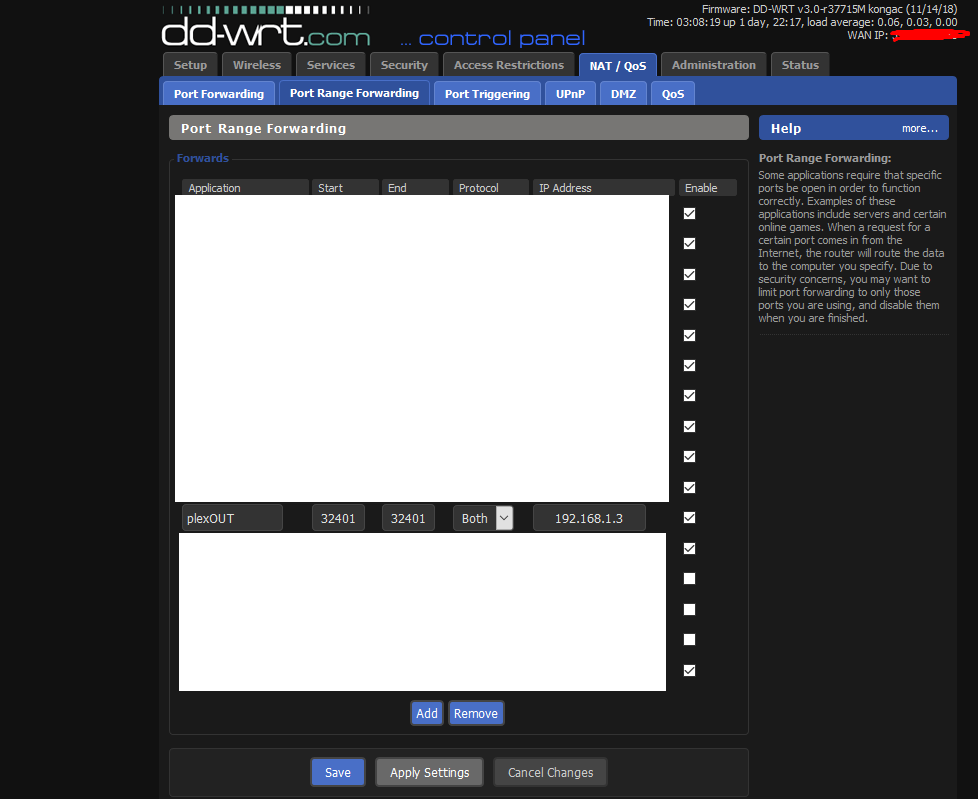
Your port forward appears wrong
It is forwarding 32401:32401 to 32401
Need another field for local / lan port and set it to 32400
