Server Version#: Version 1.31.1.6782
Player Version#: Version 4.102.1
I have 2 x Plex servers on the same subnet (Syno NAS & Mac mini M1) and the Remote Access failed on the Mac a few days ago, whilst the Synology server remained accessible throughout.
The ‘Remote Access’ tab for the Mac server showed the correct internal path [Private 10.0.1.16 : 32400] but trying to reconnect either via UPNP or by manually specifying a port failed to establish a connection.
Running through network logs I could see the Plex Media Server for the Mac was actually trying to connect to the 192.168.1.0 subnet and, as I have no available ACLs for that network, the connections were denied.
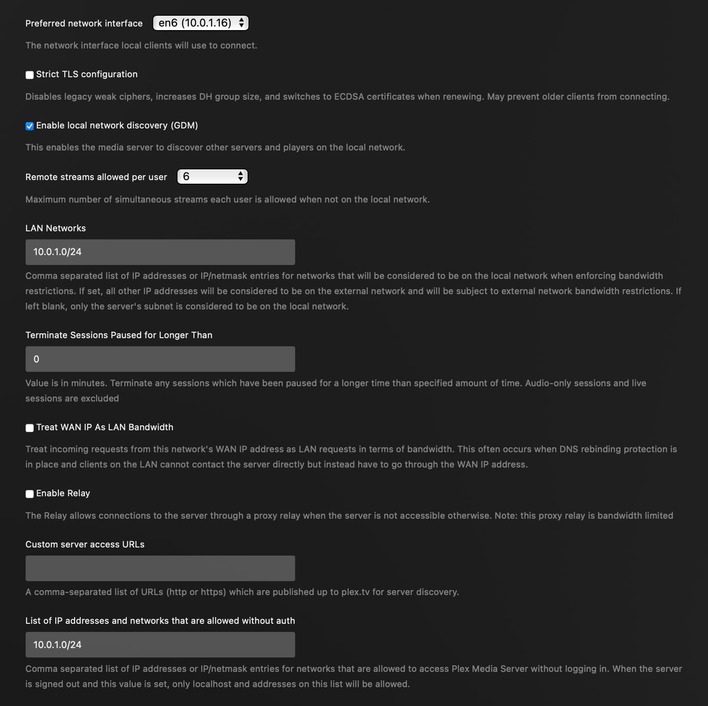
The Mac Plex Server resides on the 10.0.1.0 subnet [10.0.1.16], has the Preferred Network Interface set correctly and has the LAN Networks defined [10.0.1.0/24] but these settings are not being honoured.
Restarting the Mac Plex Server had the benefit of displaying on the ‘Remote Access’ tab that Plex was indeed attempting to connect via the 192.168.1.0 subnet (ie removing the previous false reporting of 10.0.1.16:32400).
The Mac mini itself does have a secondary un-switched direct connection ethernet to my router, which is used for the router’s internal management interface alone - residing on the 192.168.1.0 subnet. This specific subnet has no need to route externally so Plex’s attempt to use this interface will always fail.
Disabling the secondary connection restores normal Plex Remote Access functionality:
This looks like a bug but I am not sure when it appeared.
The desired behaviour is for Plex to respect the LAN subnet defined in the ‘Preferred network interface’ and set in ‘LAN Networks’. Ideally the Plex GUI should display the actual subnet it is trying to use on the ‘Remote Access’ tab too; to ease my head-scratching diagnostics if nothing else.
Regards to all.

Do you have a “Router” (default gateway) assigned to 192.168.1.0 interface in macOS? If so, try removing that. (Assuming that interface doesn’t require Internet access.) That should resolve the issue as it will prevent Plex Media Server from using it to contact its servers for MyPlex purposes.
Note: Preferred Network Interface has nothing to do with remote access. It only tells PMS which interface’s IP address to publish with Plex for use with local clients’ connections.
I do have a gateway assigned to the 192.168.1.0 network, primarily for pfSense updates and package management. Removing it would be inappropriate in this case but not a bad idea though.
macOS (on which the Plex Server sits) is set to prefer the 10.0.1.0 network and establishes its own link on that interface. Likewise with all other apps and services, they associate with the preferred interface and network. Only Plex favours the secondary network.
In this case I’d still recommend removing the default gateway from the 192.168.1.0 interface, but add a specific route (or routes) for it manually so that the rest of your 192.168.1.0 network can be reached. This can be done by using the route comand, something like:
sudo route add -net 192.168.1.0/24 -iface en1 # Substitute the correct interface
This won’t persist reboots, so you’ll need to script it and have it run at startup.
You can see which route will currently be used for any particular destination with something like the following:
route get www.plex.tv
route get www.google.com
Thanks as that pointed my thinking in a different direction. I am wondering if a simple firewall would actually suffice, to avoid the route and script.
Something on the lines of a polite ‘reject’ rule on the management interface/network for an ‘inverse’ of my ‘RFC1918_PrivateNets’ - so that Plex could not reach the WAN via that interface but the local networks would still work and the router itself would have WAN connectivity?
The above presumes that Plex would get the hint and use the desired interface itself. Of course, it does not solve the undesirable behaviour of Plex choosing a client interface that is not set as highest in the Service Order.
Plex itself should not have free rein to pick the interface it wants on a whim and if did so it should have an interface setting that specifically directs it which interface to use. This still feels like a bug:
As it is, all the Plex settings above can become meaningless if Plex silently picks a different interface entirely.