This is what i have as default…with the Protocol drop down TCP or UDP or both…

Local IP address
Protocol: TCP
port start: 32400
port end: 32400
Remote IP: leave it on “all addresses”
“WAN ports” means the “public” side of the router, which should use a different number than 32400. I recommend using some random 5-digit number between 30000 and 50000.
You just need to remember to put the same number in Plex after “Manually specify port”.
we didnt switch the 32400 last time, but i did it this time (to 40000), i shut down the plex server and restarted and came up ok (see pic) ill monitor it and get someone to try it out. If i try it out on my phone will that count? how about my tv in the other room? or do i need someone outside my house to see if its on direct play?
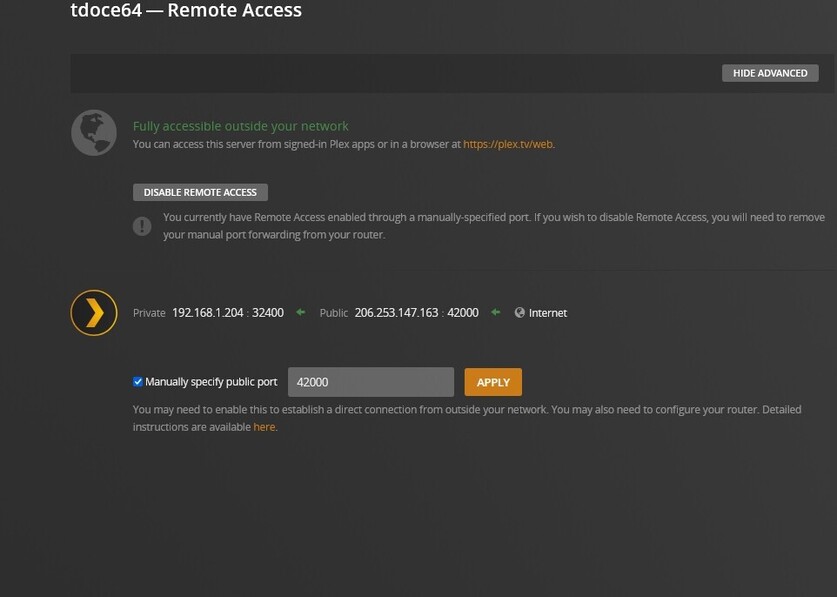
Try canyouseeme.org again and use this external port number.
it couldnt see it
Then your port forwarding may not be working. Or your ISP still hasn’t given you a publicly reachable IP address.
canyouseeme.org only works if you try it from inside the same network where your server is.
what exactly is considered my network? anything in my house running on wifi, is that in or out of my network?
Normally, every device inside your home WiFi should qualify, yes.
(Unless e.g. your phone has decided to use your mobile data plan instead.)
Oh, with the new router, your Windows may have switched back the network connection to “public”. Check that it’s “private” again.
so if they are able to get direct play it essentially doesnt count because they are in my network? as opposed to friends and family who likely will be transcoding? I dread having to deal with my ISP and get a new IP address etc… after all these problems. Should everything in my house always get direct play? I remember when it was listing as transcoding even on my tv in the other room
Let’s deal with the remote access first. Direct play for local devices is a different matter.
how come last time i had it working and i left it on 32400?
With the new router, your Windows may have switched back the network connection to “public”. Check that it’s “private” again.
it was public i just changed it
Then restart Plex server again, please. Then repeat the test with canyouseeme.org
i did, it cant
hold on
my fault i think
i was checking the wrong port, 42000 not 40000. it still cant see me
the last time when i had it up and running it stayed on port 32400 we never changed it
Which port number did you use in the portforwarding menu in the router?
You screenshot above suggests you did put 42000 into the Plex configuration. The two numbers must be the same.
You are free to try 32400. Think of changing it in both the router settings and Plex Server menu.
