Server Version#: 4.63.0
Player Version#: Plex for Samsung TV, all others
Hi - remote access keeps dropping. Here’s a couple of screenshots. What am I doing wrong? Thank you.
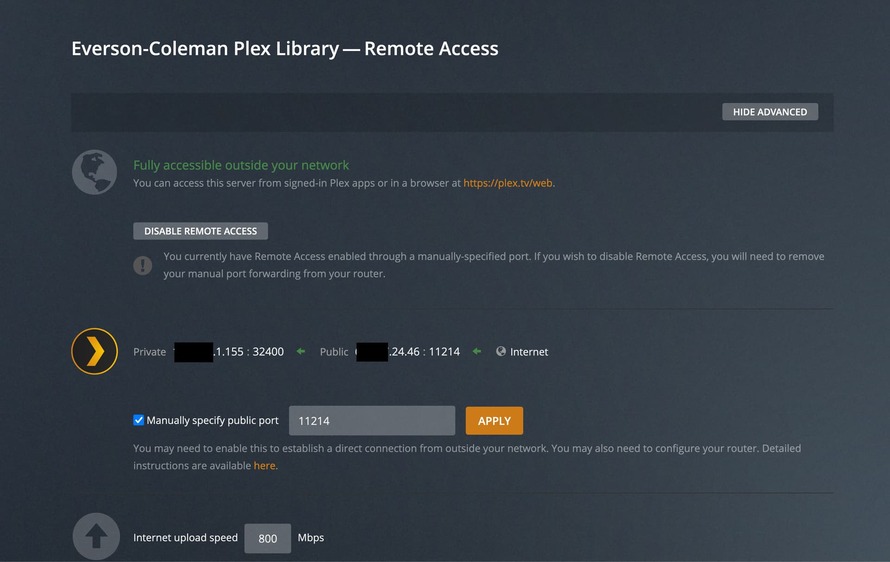
Original = 11214.
Forward to Port = 32400.
The Plex server communicates with clients on TCP/32400, so that is always the internal, or “Forward To,” port number.
You want the router to forward packets from Internet devices using port 11214 to your internal server on port 32400.
Port Forwarding statement in ASUS router:
Plex Remote Access configuration screen:

Connectivity check via canyouseeme.org:

Same thing is happening to me. Nothing has changed on my end, and my server has been working flawlessly for quite some time. Jumped on today and this keeps happening. Hitting “RETRY” will get the remote access to connect temporarily, but as soon as I click to any other section of the Settings, remote access drops. I checked the Plex status page but didn’t see anything showing issues, so I’m very confused.
Edit: Screenshots of configuration and results from canyouseeme dot org are attached. I can also access the service by manually going to the public IP [:] port. However, the remote access functionality is not working.
EDIT 2: This is related to the SSL Cert issue in this thread.
Thank you! So far so good…