Okay so that part is configured correctly then?
Correct
However, do me a favor and switch it from TCP to TCP & UDP
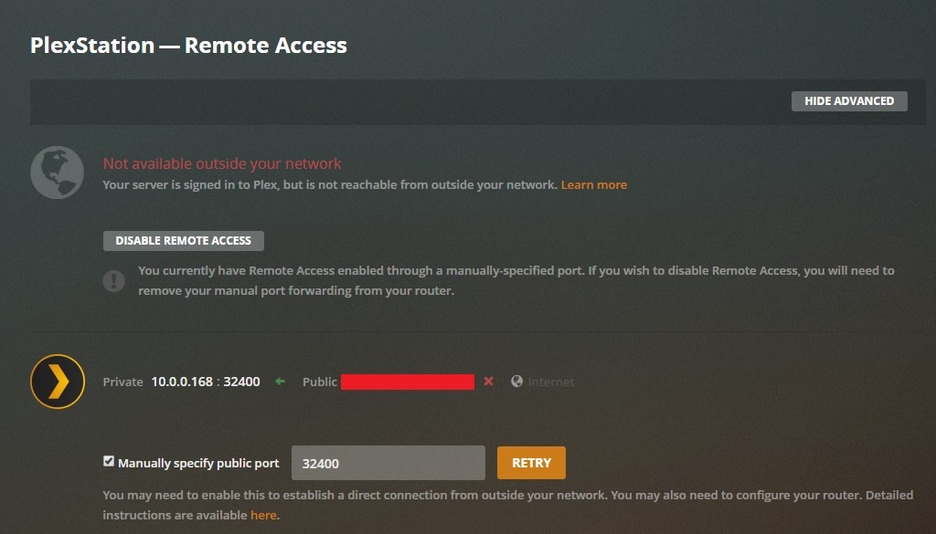
Alright. I did that. Saved it on the xfinity config page. Stopped the plex media server, restarted it. refreshed settings page and it gave me the green light, but turned red after about 10 seconds like it has been doing.
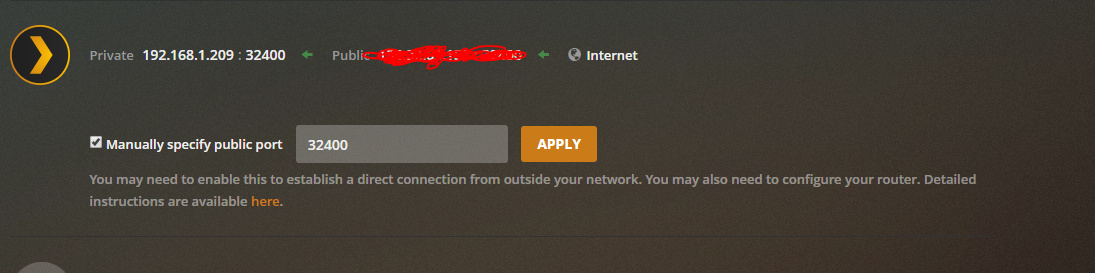
One thing I’ve noticed, even though right now they are both showing 32400, is that if I change the port being used on the Plex remote access page, it only changes it for my private IP address. So if I change it to 5056 to use your previous example, it only changes it there next to the private IP and the public IP still shows 32400. I’m not sure if any of that makes a difference, but it’s just something I’ve noticed.
So the other thing I want you to do is go here https://www.canyouseeme.org/
And type in 32400 in the port box and click go, and tell me what it says…
and what did canyouseeme.org say?
Oh. I’ve never used it. But I’m guessing I’m putting in the 32400 port? If so it says " Success: I can see your service"
awesome, that’s actually GREAT news…
Do you have any other software anti-virus or firewall running on your computer right now?
Just whatever windows has built in.
Hmm… you’re certain? No Norton, Panda, McAfee, AVG, or anything else like that?
No nothing. I stopped using those things before building this PC.
and if you go to Windows Settings>Network and Internet You see something similar to this?

Sorry, I use dark mode on my computer… I hate bright lights, lol
Yes it’s exactly like that, minus the 3.
So, I actually just noticed, Windows 10 Firewall allows you to specify ports in its firewall software… Did you do this for 32400? If so, remove that please…
And then check again on Canyouseeme.org, and then go to plex and click apply on the manually specify port button
Alright, I’ve deleted that entry. When I try to go back to that website though, it says " This site can’t be reached"
that’s odd… But try clicking the apply button on the Remote Access page on your server… does it go green and then go red again? Or?
Yes it goes green for about 5-10 seconds, then right back to red. In my searches, I found another thread with someone having the exact same problem and then the thread was closed and linked to another thread - PMS on Win 10 suddenly losing remote access then continued here Remote Access Drops with Version 1.13.2.5154
I’ve been reading through them but it doesn’t seem like they ended with any sort of actual fix. It’s just an existing problem that hasn’t been resolved since 2018 unless I’m misunderstanding things.
I appreciate all your help and I can try some other things if you have suggestions, but I have to run a quick errand across town so I may be away for a short while.
@ChuckPa maybe you can help here since you’re around. @Corvid has no remote connection, relay only.
Already checked his port fowarding
Already checked windows firewall
Already checked for Double NAT
Already checked Antivirus or other stuff running
Tried Different ports, no success
canyouseeme.org showed service running on 32400
But still no dice
Comcast Modem/Router>Unmanaged Switch>PC on Windows 10 with PMS and a Synology NAS elsewhere on the network.
