Thank You Cloneking!
Your instructions on “How to role back” the plex update (1.14.1 to 1.13.9) resolved my Remote Access issue… Just in time for Thanks Giving
Thank You Cloneking!
Your instructions on “How to role back” the plex update (1.14.1 to 1.13.9) resolved my Remote Access issue… Just in time for Thanks Giving
Thanks cloneking! I was having the same issues, a quick rollback seems to have fixed me up!
Plex Media Server 1.14.0.5468 has just been released as Beta. It has two fixes for bugs that impacted Remote Access
See Release Notice
Anyone running an early beta or a development build with early release of these fixes should now update to the official beta, Thank you for helping confirm the fixes
Appears that you have a Double NAT issue caused by having a CGNAT Public IP address
See section on Detecting Double NAT on this support article which does cover CGNAT
https://support.plex.tv/articles/200931138-troubleshooting-remote-access/
You need to ask your ISP tp provide you with a fixed Public IP address which they would probably charge for. Alternatively switch to one that does not put you behind CGNAT
CGNAT range of IP Addresses is 100.64.0.0 - 100.127.255.255 and your IP is within this range. The IP that plex.tv is different
Nov 19, 2018 09:02:53.210 [3728] DEBUG - PublicAddressManager: Got public IP from http://plex.tv: 104.218.xxx.xxx
Nov 19, 2018 09:02:56.570 [10148] DEBUG - NAT: UPnP, mapped port 18518 to 192.168.1.6:32400.
Nov 19, 2018 09:02:56.679 [3728] DEBUG - NAT: UPnP, public address is 100.73.xxx.xxx
Nov 19, 2018 09:02:56.679 [3728] DEBUG - PublicAddressManager: got WAN IP 100.73.xxx.xxx from router
Nov 19, 2018 09:02:56.679 [3728] WARN - PublicAddressManager: WAN IP on router does not match public IP from plex.tv
Nov 19, 2018 09:02:56.694 [10148] DEBUG - PublicAddressManager: Mapping succeeded for 192.168.1.6:18518.
Nov 19, 2018 09:02:56.741 [3728] DEBUG - MyPlex: Sending Server Info to myPlex (user=xxxxxxxxx, ip=, port=18518)
Nov 19, 2018 09:02:57.398 [3728] DEBUG - MyPlex: Published Mapping State response was 201
Nov 19, 2018 09:02:57.444 [10148] DEBUG - MyPlex: Sending Server Info to myPlex (user=xxxxxxxx, ip=, port=18518)
Nov 19, 2018 09:02:58.069 [10148] DEBUG - MyPlex: Published Mapping State response was 201
Nov 19, 2018 09:02:59.132 [11868] ERROR - MyPlex: mapping failed due to potential double NAT configuration
Nov 19, 2018 09:03:02.413 [8712] DEBUG - EventSource: Got event [data] '<Message address="104.218.xxx.xxx" port="18518" asyncIdentifier="69ca08ab-7d9b-408b-b928-be3f710e1ca3" connectivity="0" command="notifyConnectivity"/>'
Just updated to the latest version of Plex Media Server on my Windows 10 PC and Remote Access is still not available, but I think I can see why from the server logs. My router is 192.168.1.1 and I also have a Philips Hue device on the network which is 192.168.1.2. Plex seems to assign my Public IP address to 192.168.1.2 and when it then tries my router 192.168.1.1, it fails because it thinks my router does not have a Public IP address. Plex should always prioritise the default gateway address (192.168.1.1) with the Public IP address, which would fix this issue.
I have attached server logs.
Nov 22, 2018 08:16:00.162 [7148] DEBUG - HTTP 200 response from GET http://plex.tv/pms/:/ip
Nov 22, 2018 08:16:00.162 [7148] DEBUG - PublicAddressManager: Got public IP from http://plex.tv: xxx.xxx.xxx.xxx
Nov 22, 2018 08:16:02.240 [7148] DEBUG - NAT: UPnP, found device <http://192.168.1.2:80/description.xml> with private address <192.168.1.201>
Nov 22, 2018 08:16:02.240 [7148] DEBUG - NAT: UPnP, not an IGD: <http://192.168.1.2:80/description.xml>.
Nov 22, 2018 08:16:02.256 [7148] DEBUG - NAT: UPnP, found device <http://192.168.1.2:80/description.xml> with private address <192.168.1.201>
Nov 22, 2018 08:16:02.256 [7148] DEBUG - NAT: UPnP, not an IGD: <http://192.168.1.2:80/description.xml>.
Nov 22, 2018 08:16:02.256 [7148] DEBUG - NAT: UPnP, found device <http://192.168.1.2:80/description.xml> with private address <192.168.1.201>
Nov 22, 2018 08:16:02.256 [7148] DEBUG - NAT: UPnP, not an IGD: <http://192.168.1.2:80/description.xml>.
Nov 22, 2018 08:16:02.568 [7148] DEBUG - NAT: UPnP, found device <http://192.168.1.1:5000/Public_UPNP_gatedesc.xml> with private address <192.168.1.201>
Nov 22, 2018 08:16:02.584 [7148] DEBUG - NAT: UPnP, not connected or has no external IP: <http://192.168.1.1:5000/Public_UPNP_gatedesc.xml>(urn:schemas-upnp-org:service:WANIPConnection:1).
Nov 22, 2018 08:16:02.584 [7148] DEBUG - NAT: UPnP, not connected or has no external IP: <http://192.168.1.1:5000/Public_UPNP_gatedesc.xml>(urn:schemas-upnp-org:service:WANPPPConnection:1).
Nov 22, 2018 08:16:02.584 [7148] DEBUG - NAT: UPnP, getPublicIP didn't find usable IGD.
That is not the latest server version according to your logs (Plex Media Server v1.14.0.5465-425e4ac90)
The new version is v1.14.0.5468 and should correct the remote access issues you’re having.
I realised it was not the very latest version, and have updated, still does not work.
Plexserver internal IP 192.168.1.201
Router IP 192.168.1.1
Philips Hue IP 192.168.1.2
I have attached the logs
Plex Media (3.8 MB)
Thanks for logs and screenshots
I can see attempt to get it to work with manual port selection of 32400 as well as uPnP both failing
Nov 22, 2018 09:25:10.533 [1756] DEBUG - EventSource: Got event [data] '<Message address="80.229.xxx.xxx" port="28326" asyncIdentifier="ce4996c3-4a6c-4ee3-a0f6-acfe65078c16" connectivity="0" command="notifyConnectivity"/>'

Nov 22, 2018 09:25:31.375 [5648] DEBUG - MyPlex: Setting manual port mode to 1.
Nov 22, 2018 09:25:43.343 [1756] DEBUG - EventSource: Got event [data] '<Message address="80.229.xxx.xxx" port="32400" asyncIdentifier="7d617d3a-8e70-47b6-9ce1-0dd4d437c7c0" connectivity="0" command="notifyConnectivity"/>'

Nov 22, 2018 09:25:50.968 [3764] DEBUG - MyPlex: Setting manual port mode to 0.
Nov 22, 2018 09:26:09.811 [1756] DEBUG - EventSource: Got event [data] '<Message address="80.229.xxx.xxx" port="28326" asyncIdentifier="28ec4078-97d8-41a8-a7d1-f5cae190ac7c" connectivity="0" command="notifyConnectivity"/>'

Nov 22, 2018 09:26:16.763 [9056] DEBUG - MyPlex: Setting manual port mode to 1.
Nov 22, 2018 09:26:26.982 [1756] DEBUG - EventSource: Got event [data] '<Message address="80.229.xxx.xxx" port="32400" asyncIdentifier="b606e319-e933-4b22-9ed8-f7338d7339a8" connectivity="0" command="notifyConnectivity"/>'
This suggests to me that it probably a firewall / security software issue
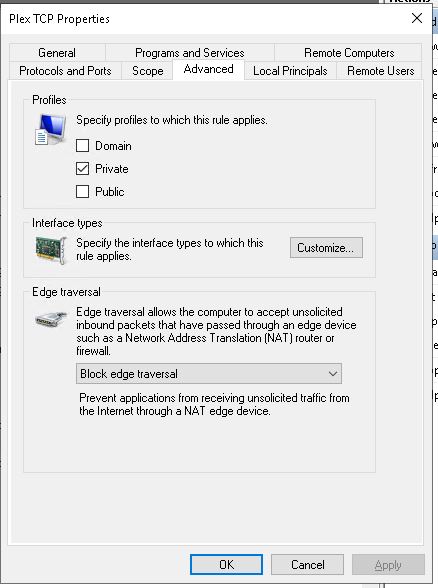
Can you check that your network connections do show in windows as private network and not as Undefined Network or Public Network
Also you can add a firewall port rule like this
Protocol TCP
Rule Type: Inward Connection - Port Rule
Remote Port = any
Local Port = 32400
Remote IP = Any
Programs = All
Action = allow
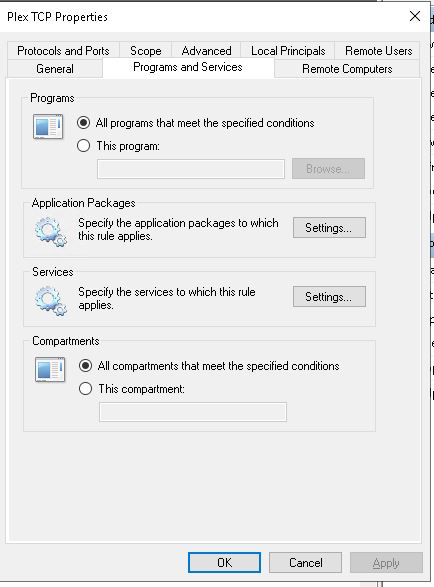
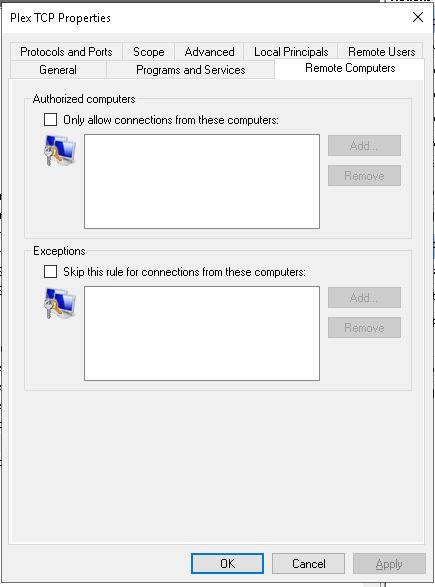
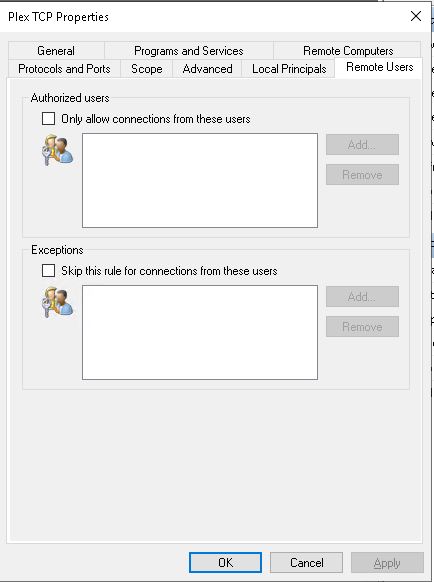
can i see the other tabs for this rule. This is a port rule - so no programs to be specified
There should be a separate set of rules for programs whitelisting each of the Plex exe files for everything
looks good. Could try and reboot and then test out canyouseeme.org to 32400 (assuming you have not flipped back from manually specified port 32400)
Stay with the port forward option -don’t flip flop between the two methods
Try also to reboot router
If problems persists, check router after the restart still has the port forward
check the ip is still the same for the server
and try wireshark when testing with canyouseeme.org to see if the request comes to the server.