I need to see if we have any screenshots in the old 2014 forum threads for this router. I will continue tomorrow. You could browse that thread that i linked and also search the forum for FIOS-G110. The User manual is useless and does not mention source port
I went through the thread you mention and I have it setup according to what you posted here and there. There were no screen shots though.
it is strange that we only have fields for 2 ports - source port and destination port
I would have expected there to be
source port = any
destination port (wan) = 8443
forward to lan port = 32400
too late now for me - 4am
I am going step by step through this thread… seems there is a few more steps under this method that are not mentioned in the manual. Will let you know.
No forward to Lan Port… However I was able to setup this screen… I changed everything back to 32400 for simplicity. I was also able to setup a Port Triggering off the thread. None of it worked, but I don’t know if this is something you might be looking for.
I was able to utilize this screen based off of the thread. Maybe there is something here you are mentioning?
Port Triggering Screen

Well the good news is I have been able to get it to go to green and stay green. I took out the port foward from the advanced section and just did the port forward under the firewall section. I followed the above thread and so far it seems to be working!!!
So far I have been able to play several songs in a row!!!
This is the thread:
Let‘s hope it stays that way.
But I have to say: That is one confusing router menu. And the manual isn‘t much better. If I were you, I‘d consider getting an aftermarket one - in case your ISP lets you.
Sounds good - but we should use Port Forwarding and not Port Triggering
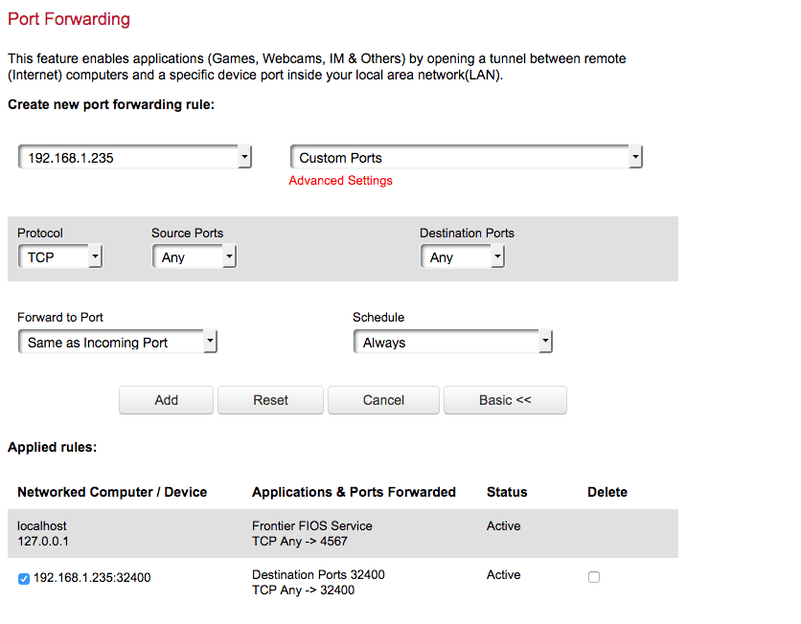
This looks like the perfect screen to use
With Source Ports = Any and then one of these 2 options
Either
Destination Ports = 8443 and Forward to Port = 32400 coupled with Manually Specify Port of 8443
or
Destination Ports = 32400 and Forward to Port = Same as incoming port coupled with Manually Specify Port of 32400
That is the one I used and I am glad to say it is still working as of this post!
You are telling me re: confusing menu. Once I took out the port forward and just did the port forward under the firewall section, it worked! Of course I had to use the screen shot @sa2000 posted above in order to achieve what I wanted. But so far so good! I will keep monitoring for a few days and then report back if there is anything wrong, but for right now! All is working.
Excellent
We are in a better position now than in October 2014 as we do have the screenshot of the router page
If you do lose remote access, open the server remote access settings page, do an F5 button browser refresh and if problem remains, get the logs zip
Thanks
I am happy to report I have been streaming all morning, about four hours worth without a single issue. Fingers crossed and I will report back in a few days or if I run into any issues.
Streaming has been via Cellular on my iOS app via the Plex app.
I want to give a big ole thank you to all of you who helped me with this!!! I was about ready to give up on Plex, but I am once again a happy camper!
Glad it works now!
Go ahead and mark @sa2000’s answer (post 109) as the solution so others can find it.
Done… Again thank you both!!!
