Hi all,
I’m having remote access issues.
I can connect to my server remotely, but only indirectly.
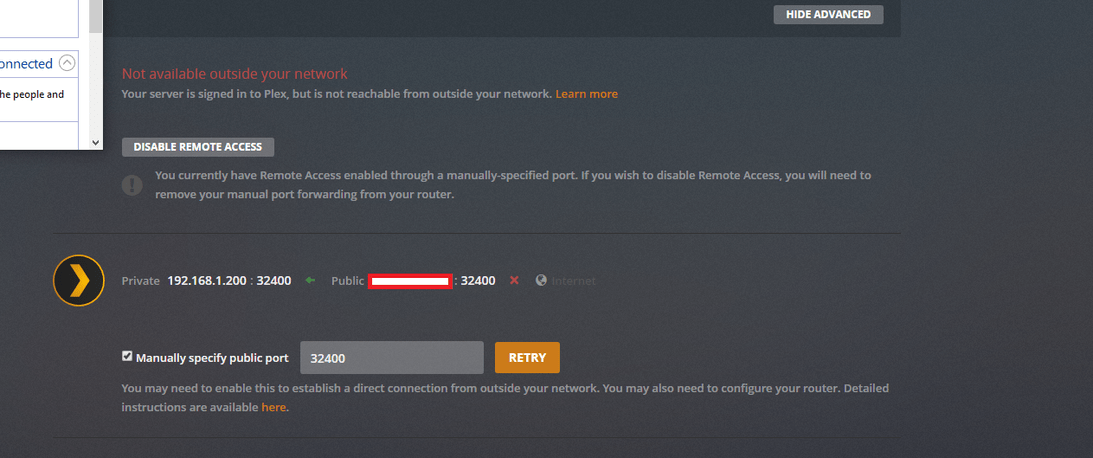
When I first make changes to my remote access settings, it shows “Fully Accessible outside your network”.. After approx 5-10 seconds, this changes to “Not available outside your network”

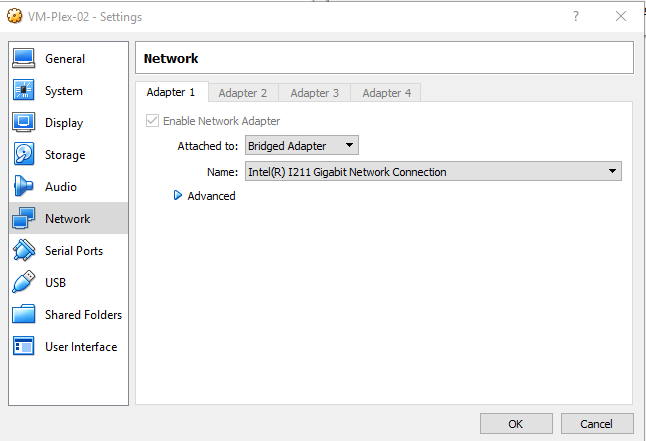
I’m running Plex off VirtualBox 5.2.22, Windows 10 - latest updates installed.
VirtualBox’s Network Adapter is in Bridge mode - so talking directly with my router, has it’s own IP address, etc..
I should note, this setup with VirtualBox used to work for me - so I’m fairly certain it’s not this.
I have 1 router only. I am not double NAT’ed.
I have setup a static IP (192.168.1.200) → I port forwarded manually (after failing with UPNP) PublicIP:32400 to 192.168.1.200:32400.

My router is a Draytek Vigor 2862 and I have other applications on other machines port forwarded perfectly.
I have tried changing my internal IP
I have tried changing my internal port (along with PF)
My network connection is in Private mode on the VM
I have added a filewall rule, and also even temporarily disabled my firewall , but still no success.
The host PC also has firewall temporarily disabled and network set to private.
Server Version#: 1.16.5.1488
Player Version#: Web player v4.2.2
Unfortunately, still no luck. I can’t get it to work.
Anybody have any other ideas? Have I missed anything?
My log file:
PMS-2019-08-24.zip (276.9 KB)
Many thanks for your help
