I have the Plex Server on a laptop mapped to an external HD. I have 2 network options: 1) Cable modem/wireless router (no VPN) and 2) Linsys VPN wireless router. I have attempted connecting the Plex Server wirelessly with both options and remote access still does not work. I have also tried enabling remote access via the Network Control Panel in the laptop’s Windows screens but this doesn’t work either. I have manually configured the port in Plex “Settings” and that also doesn’t work. I have had mixed results with devices connecting via the Plex Server “Relay” option…the best results appear to be via connecting the devices to the cable modem/router (instead of the VPN Router) but I suspect that remote access would provide the best performance of all (if I could actually get it working). I was debating on connecting an Ethernet cable to the laptop and see if that gets me anywhere. Anyone have any ideas?
You best best bet is your laptop with Ethernet into the option 1) Cable Modem/Wireless router as it will most likely not work on VPN at all for remote access.
You should have a spare RJ45 Ethernet port on your WiFi Router to hard wire your Plex PC so no Wifi…
Give your plex a Static IP and get it connected to the internet on non VPN.
You will need to setup port forwarding on your Wireless router to plex on port 32400
Once setup and canyouseeme.org shows success on port 32400 we can check further.
Thanks for the information. Connected the laptop to Option 1) cable modem/router via the Ethernet cable. Set-up port forwarding on the router for port 32400 (beginning and ending). However, canyouseeme.org does NOT show success on port 32400. The Comcast port forwarding web page shows my private IP address NOT my public IP address; however, canyouseeme.org shows my public IP address. Not sure if this is the problem or not but canyouseeme.org does NOT indicate that the port 32400 is open. I spoke to a Comcast support person and their only suggestion was to get a newer modem/router from Comcast so I went ahead and ordered a newer modem/router. Not sure what else I can do at this point except try again when I get the new modem/router. Any other ideas? Thanks again for your assistance.
What is the model of your router?
Can you post shots of the port forwarding?
Yes canyouseeme.org should show “Public” IP and router should show “Private” or internal IP.
I use Xfinity myself so it should work…
Sure. The modem/router model is TEC TC8305C.
Here is a screen shot of the port forwarding (jpg also attached):
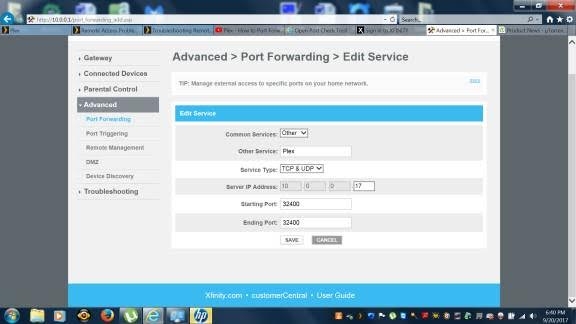
Are you sure 10.0.0.17 is your plex server?
Do you have any firewall on your plex server?
Can you browse at home to http://10.0.0.17:32400 ?
FYI. This problem seems to be resolved now. The Remote Access is working and the canyouseeme.org says that port 32400 was successful. I have no idea what the problem was though. Thanks for your help.
