Server Version#: 1.24.1.4931
Player Version#: latest iOS iPad, iPhone and Windows 10 versions
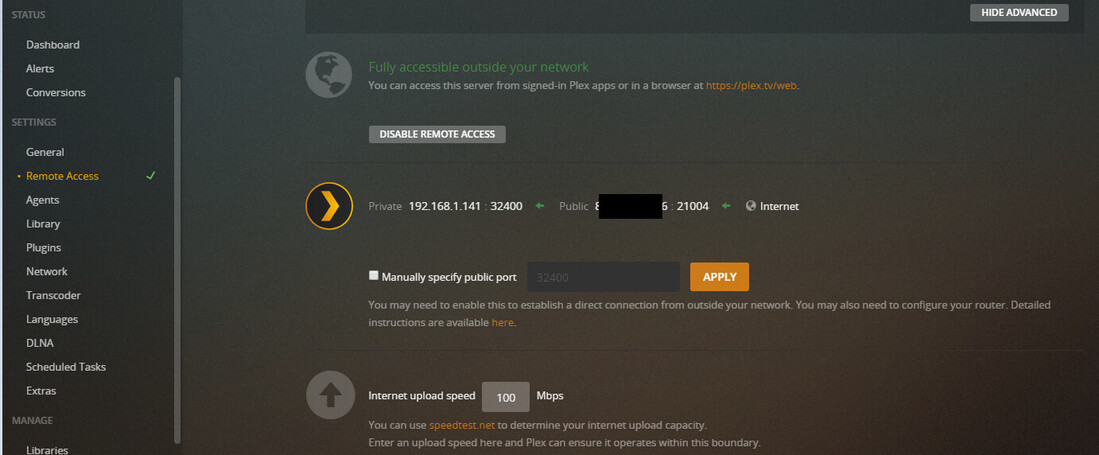
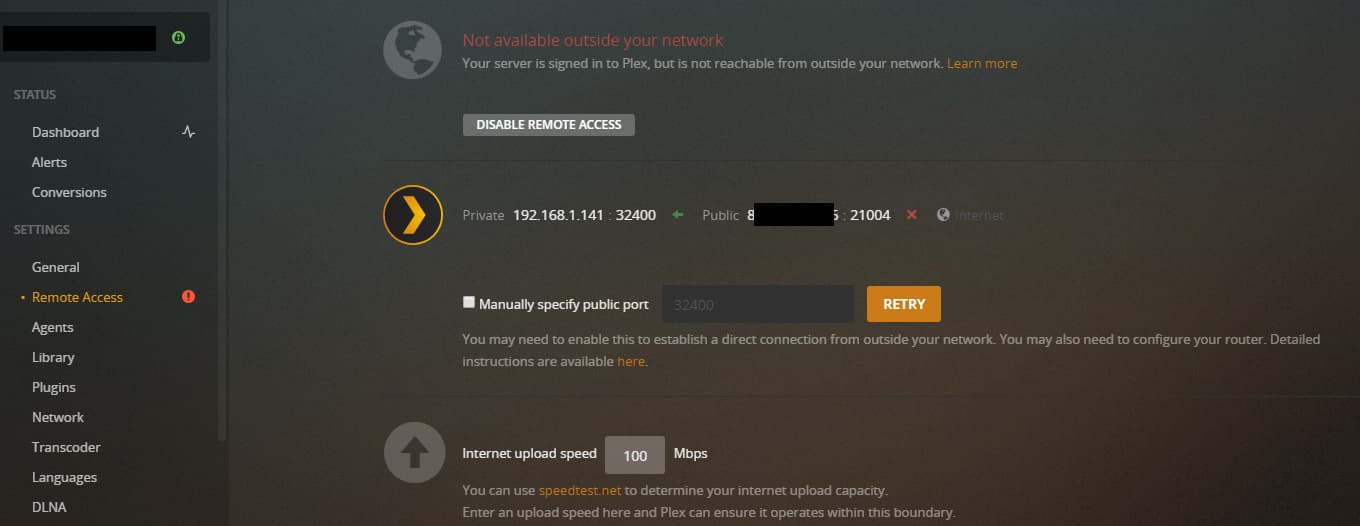
My servers Remote Access status changes every now and then from “Not available outside your network”, to “Fully accessible outside your network” and back again. It can change several times during the day.
Now the case is that even though “Not available outside your network” is displayed, I do indeed have access from outside my network.
I fear there is some setting that is not in its ideal position and I was hoping you could help me fix this so that “Fully accessible outside your network” is always displayed.
I’ve attached two pictures taken about 30 minutes apart.
You may want to check the server dashboard during remote playback to see how the connection is being reported. It should display the remote client’s IP address, along with “Local,” “Remote,” or “Indirect.” You’ll need to click the “Expand Details” button to see this information (it’s in the upper-right of the “Now Playing” section).
If it shows “Remote” it means that remote access is working properly. If it shows “Indirect” it means that the Plex Relay feature is being used, and the stream is being proxied through Plex, Inc.'s servers.
There’s not necessarily anything wrong with an indirect connection, it still provides you with remote access to your server. But it does mean that the connection to your server is not direct and there are bandwidth limitations as a result; Plex limits relayed connection to 1 Mbps (non-Plex Pass) or 2 Mbps (Plex Pass).
The first thing I’d try would be configuring a manual port forward rule in your router. It varies by router, the basics would be:
Router setting              Value
External/public port:       32400 (you can use a different value here, but start with the default)
Internal/private port:      32400
Protocol:                   TCP
Internal/private IP:        192.168.1.141 (the IP address of your server)
External/source IP:         If you have this setting, leave it blank, or set it to none (whatever your router allows).
In Plex Media Server’s remote access settings, enable “Manually specify public port” and set it to 32400 (and click Apply).
Then, check to see if remote access works as expected; that is, does it now show “Remote” on the dashboard during playback? If not, try browsing to canyouseeme.org and test port 32400.
Right now, Plex Media Server is attempting to automatically configure a port forwarding rule on your router using UPnP/NAT-PMP. This can work (and usually does), as long as your router has UPnP enabled.
I’ve now manually configured the router and opened port 32400. Then I went into my NAS Firewall ,where the Plex server is located, and opened the same port. Then checked the canyouseeme.org webpage as suggested. It indicates the port is open.
In the Plex Server - Remote access I set the same and activated manual port, then clicked Apply and/or Retry (it changed name a couple of times).
All streams indicate “Secure” instead of “Indirect”.
In two of three streams (all remote, one via a different Wifi in another city, and the two others via cellular data) I see "Direct Play as the screenshot below shows. I do not see “Remote” anywhere. Maybe I am looking at the wrong place?
Edit - I do see Remote next to the IP address. And when I restarted the iOS app of the one that did not show Direct, it also changed so that all three now play direct.
I think this may relate to the issue I have been experiencing. I have checked the dashboard during playback and I am getting a ‘remote’ message, but relating to an IP address that I do not recognise. It is not the IP address of my NAS or my remote work server, which my NAS is connected to (they share the same IP address). Could a different IP address have been automatically assigned?
what you had going on is my current issue and sometimes my family can get on and sometimes they cant. Very frustrating as u continue to see my remote access go from green to red. anyway you can walk me through this when you have time as i do see sometimes it does say indirect but when i check the dashboard it will say for that user they have not watched anything. Definitely appreciate you offering any assistance
I am not. using an I5 dell desktop computer. Never had issues with this in the past as i am not the most tech savy but my friend referred plex to me and given how easy it was to manage my library i moved forward. as i have been trying to figure this out i attempted to port forward through my nighthawk x8 and after about 8 hrs my whole internet would shut down. just bought a new Nighthawk XA8 (i think-looks like a stealth fighter) and i am afraid to try that again for fear the same thing may happen
so i have several ongoing issues but i feel i have the right equipment
Then I’m not sure I can help you very much as I am not tech savy myself…
What I did was first to go into my routers port forwarding settings and create a new rule to allow TCP on port 32400 to my NAS internal IP (hidden on this screenshot). The internal IP of my NAS was already known (You should learn the IP of the computer hosting the Plex Server. This IP should also be static so that it does not change to something else after for example a router or computer restart)
From there I accessed the Synology NAS Firewall and allowed incoming traffic on the now open port. Since your not hosting on a Synology NAS it makes little sense to describe this process in detail, but this step was essential.
Finally I manually specified the 32400 port in the Remote access of the Plex Media Server.
thanks for your help. the other person just told me i need to create my own thread as i am in the wrong room i will try this and then figure out how to create my own thread. your information that you provided may be a winner as well. please wish me luck as i am having to learn this on the fly


 still unsure why I have playback via my Synology but not my Xbox though.
 i will try this and then figure out how to create my own thread. your information that you provided may be a winner as well. please wish me luck as i am having to learn this on the fly