Remote Access troubleshooting help request

Hi all,

Modest expertise, if any, with these things. Plex Remote Access has worked in the past, but I’ve had to switch routers, and I can’t seem to get it running again.

  • The Plex server is on its own computer, wired to the router, and set with a static IP (192.168.0.133).

Here’s what I’m seeing:

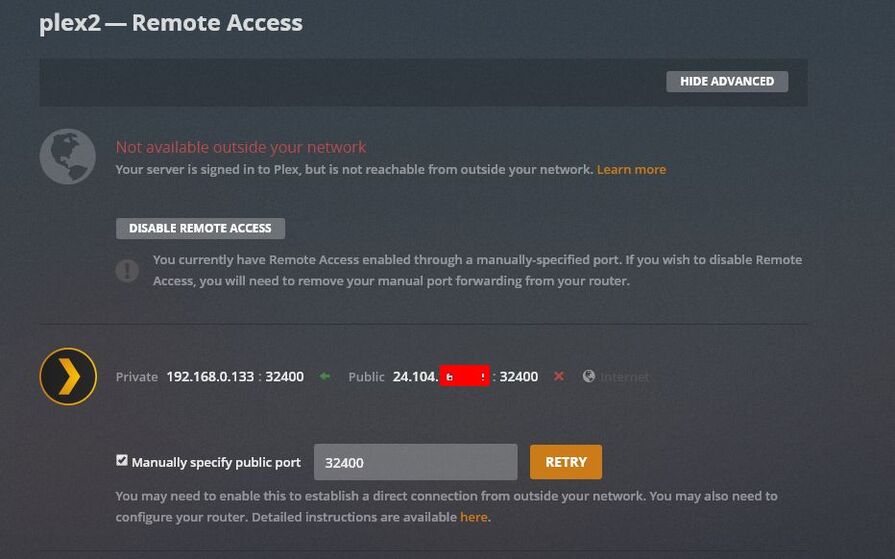
Plex Settings show no remote access, even with a remote port manually enabled (the recommended 32400):

The router has been set up with port forwarding to the IP address of the Plex server:

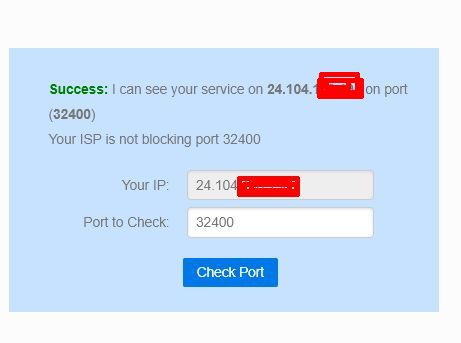
Externally, CanYouSeeMe can find the port okay:

I’m not sure what I haven’t done, or should be doing. Any help appreciated!

If Ubuntu, make certain to allow port 32400/tcp in ufw (or disable ufw). Sometimes it gets turned on by default.

Thanks – I ran sudo ufw status verbose in the Ubuntu command prompt, and have

status:inactive

so it seems to be turned off.

My only other thought is I installed Tautulli by following installation instructions step by step from the Tautulli GitHub site before the new router/IP address. Could it somehow be messing with things?

I don’t use or know Tautulli so can’t advise about any impact it might have.
I can’t see where it would interfere unless it was monopolizing the API

It’s not running at the moment anyway. It’s intended to passively read the Plex database and report statistics (play times, users, etc.).

I understand. It accesses the same port and API that a remote access play request does. This is the confusion.

And there we go – I went into Tautulli, which was still configured to the old IP, manually corrected the IP to the new one so Tautulli is pointing at the right place, and remote access is restored. Thanks for your patience, Chuck.

This topic was automatically closed 90 days after the last reply. New replies are no longer allowed.