Turn on dmz in your router for your Plex Media server computer I am staying connected
Thanks, trying enabling DMZ (whatever that is)
Just wanted to note that I too am experiencing this issue. I’ve had stable port forwarding configuration for years on 32400. But now I cannot keep a stable remote connection. I’ve rebooted all hardware and disabled and reenabled all port forwarding rules. This seems to be a plex service issue or some misconfiguration in the software. Hope you guys issue an update soon that fixes this.
same here, 10 days to the forum to go down and nothing…
Same for me.
Same here. Can see the port active from outside, routing and firewall configured correctly. data is passable in and out of port 32400. restarting things doesn’t help. Internet icon on remote access will not stay connected.
Wanted to update and close out my specific issue from 3 days ago. My port forwarding configuration (which never changed) stopped working consistently - sometimes working sometimes not. I experimented with changing on both my internal router and xFinity xFi router port forwarding but to no avail. Eventually I realized that the xFi router I have had enabled “Advanced Security” and I had all these warnings. All this malicious activity on port 32400 from all the IP’s of people I wanted to be connecting too. This setting ghost turned itself on in the xFinity router 3 days ago. So heads up to anyone with xFinity xFi routers - xFinity apparently thinks its great to just randomly turn on new “cool” features that bork your network - but its for your own protection they tell me.
We have Same problem here. It just came out of nowhere, i.e. we changed nothing, But my friend does have a new style infinity router that he got several months ago. everything (Plex Server) was working just fine for several months since he got the new router, then all of a sudden REMOTE ACCESS will not connect or stay connected. We are using the REMOTE ACCESS auto setting option. We were NOT using the Manual port forwarding option on his server.
What do I need to do or reset in the xFinity router ? Such as Turn Off “Advanced Security” ? or will the router let even us turn the advanced security off? Thanks !
add me to this list as well. my settings have not changed in literally YEARS and suddenly, with this last update ( i want to kick myself for updating too!), i have been unable to maintain connection outside my network.
i’ll tell you the things that DO put it back online, even if only for an hour:
i have a linksys router… this has been my router’s connection settings:
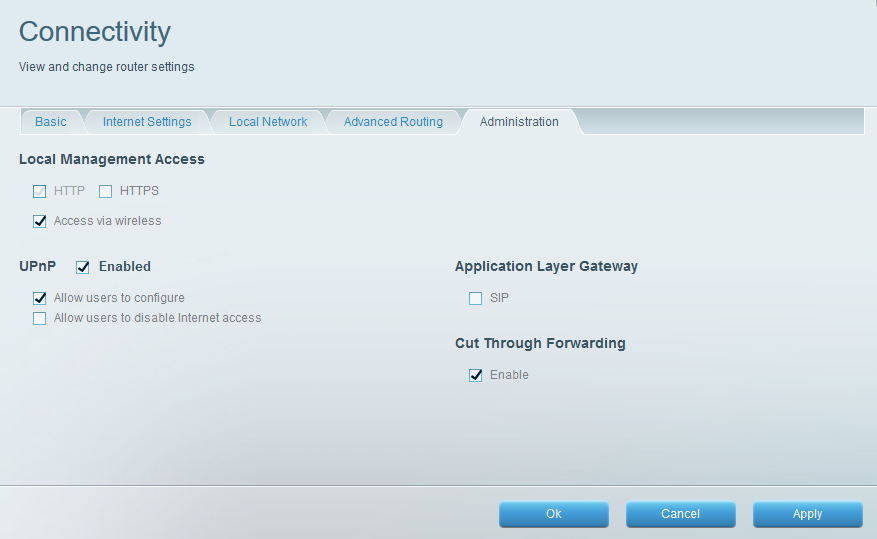
however, if i UNCHECK those three check boxes

hit apply - then RECHECK those check boxes so it, in essence resets… then we’re ok again for a little while… sometimes good for ten minutes, sometimes good for an hour - but without fail - we will still get kicked off and have to reset the connections again in the same manner.
this is NO fun.
i also whole heartedly agree plex needs a roll-back option on their updates.
I have downgraded to 1.16 with time machine… My mac is right now as it was a month ago… and the problems connection continues… Seems to be something outside of our servers and routers…
What I feel most is that no plex member says anything. I’ve been migrating my libraries to emby all day … a hard job … I’m thinking of selling my plexpass at half price …
Ugh… same issue here. Upgraded to a couple of 1.18 versions and remote users are still having issues connecting; myself included to my own server.
So, basically, Plex knows about this but isn’t fixing it? Well that makes me unhappy. The good news is that after finding this thread, I’m not going to spend ANY more time trying to fix it on my own, because it clearly isn’t my fault!
Thanks for all the ideas of what to try. – Pansy
1 Like
This topic was automatically closed after 90 days. New replies are no longer allowed.
