Remote Access works/notworking depending on file

Server Version#: 1.41.2.9200 on Synology DS923+
Player Version# Android 10.24.0.2257
I migrated from my old Synology to a new DS923+. All works fine, even remote access on my android device. I added new files and especially the new files within plex can be played within LAN but not remotely. I double checked access rights and even overrrided them but could not fix this yet.

Any idea?

Thanks and best

Try analyzing the new files again.

Plex normally does that when you first add the files, but sometimes the analysis can become out of date/disconnected, due to server upgrades etc. so they sometimes need to be re-analysed.

Also, go to Plex Settings > Server > Remote Access and make sure you set the Internet upload speed.

If your ISP provides you with E.G. 50 Megabytes per second (MB/s) upload speed, then you need to multiply that by 8 and enter that number. There are 8 bits for every byte.

In this example, that would be 400 Megabits per second (Mbps).

Also, make sure Limit remote stream bitrate is set to Original (no limit).

Click on Save Changes when done.

Let me know if that helps or not.

Tahnk you for the reply. I re-installed the latest plex server version, analzed the file and followed your hints. I also double checked on shell ownership and permissions of files - both that work and files that do not work.

Unfortunately no changes!

Did you setup a Port Forward rule in your router?

Can you show me that rule?

Yes - port forwarding is active ;.).
Please remeber - some videos work, some do not work. It is not the question if remote playback works at all - just why some files do not work while others work.
image

Why does the port forward rule show DS216+II as the NAS/Server?
Is the IP Address correct for your DS923+ ( 192.168.186.10 )?

I would probably recommend that you remove that rule and disable Manually specify public port in Plex Settings > Server > Remote Access and click on Save Changes.

Let Plex automatically manage the port forwarding for you.

If Remote Access fails to work, then re-add the Port Forward rule in your router settings, making sure all details are correct.

Do you see any kind of error message on the remote device when a video fails to play?

Server DEBUG logs ZIP file which captures this?

Hi both,
the name was just old and a string, I corrected it but this does not have a technical background. I have the same issue for automatic ports as well as manual ports. Anyhow: As remote playback wrks in princple, I think the port and port forwarding are less promissing hints to find the root cause of the issue.

Where can I generate / download the debug file?

I checked the console, maybe some hints:

Dec 16, 2024 15:46:41.967 [140290306722616] Fehler — [Req#2ae32/Transcode] [FFMPEG] - Cannot load libcuda.so.1

Dec 16, 2024 15:46:41.967 [140290306722616] Fehler — [Req#2ae32/Transcode] [FFMPEG] - Could not dynamically load CUDA

Dec 16, 2024 15:46:41.968 [140290306722616] Fehler — [Req#2ae32/Transcode] [FFMPEG] - Cannot load libcuda.so.1

Dec 16, 2024 15:46:41.968 [140290306722616] Fehler — [Req#2ae32/Transcode] [FFMPEG] - Could not dynamically load CUDA

Dec 16, 2024 15:46:41.969 [140290306722616] Fehler — [Req#2ae32/Transcode] [FFMPEG] - Cannot load libcuda.so.1

Dec 16, 2024 15:46:41.969 [140290306722616] Fehler — [Req#2ae32/Transcode] [FFMPEG] - Could not dynamically load CUDA

Dec 16, 2024 15:46:41.970 [140290306722616] Fehler — [Req#2ae32/Transcode] [FFMPEG] - Cannot load libcuda.so.1

Dec 16, 2024 15:46:41.970 [140290306722616] Fehler — [Req#2ae32/Transcode] [FFMPEG] - Could not dynamically load CUDA

Dec 16, 2024 15:46:41.971 [140290306722616] Fehler — [Req#2ae32/Transcode] [FFMPEG] - Cannot load libcuda.so.1

Dec 16, 2024 15:46:41.971 [140290306722616] Fehler — [Req#2ae32/Transcode] [FFMPEG] - Could not dynamically load CUDA

Dec 16, 2024 15:46:41.973 [140290306722616] Fehler — [Req#2ae32/Transcode] [FFMPEG] - Cannot load libcuda.so.1

Dec 16, 2024 15:46:41.973 [140290306722616] Fehler — [Req#2ae32/Transcode] [FFMPEG] - Could not dynamically load CUDA

Dec 16, 2024 15:46:41.974 [140290306722616] Fehler — [Req#2ae32/Transcode] [FFMPEG] - Cannot load libcuda.so.1

Dec 16, 2024 15:46:41.974 [140290306722616] Fehler — [Req#2ae32/Transcode] [FFMPEG] - Could not dynamically load CUDA

Dec 16, 2024 15:46:41.975 [140290306722616] Fehler — [Req#2ae32/Transcode] [FFMPEG] - Cannot load libcuda.so.1

Dec 16, 2024 15:46:41.975 [140290306722616] Fehler — [Req#2ae32/Transcode] [FFMPEG] - Could not dynamically load CUDA

Dec 16, 2024 15:46:42.696 [140290286836536] Warnung — [Req#2b0b8/Transcode/0d8b04936c0acab5-com-plexapp-android] Transcode runner appears to have died.
Dec 16, 2024 15:46:49.279 [140290286836536] Warnung — [Req#2b15e/Transcode] Got a request to stop a transcode session without a valid session GUID.
Dec 16, 2024 15:47:02.693 [140290306722616] Fehler — [Req#2b0bd/Transcode] Unable to create output stream for transcode session, no segments found
Dec 16, 2024 15:47:06.461 [140290286836536] Fehler — [Req#2b1f4/Transcode] [FFMPEG] - Cannot load libcuda.so.1

Dec 16, 2024 15:47:06.461 [140290286836536] Fehler — [Req#2b1f4/Transcode] [FFMPEG] - Could not dynamically load CUDA

Dec 16, 2024 15:47:06.462 [140290286836536] Fehler — [Req#2b1f4/Transcode] [FFMPEG] - Cannot load libcuda.so.1

Dec 16, 2024 15:47:06.462 [140290286836536] Fehler — [Req#2b1f4/Transcode] [FFMPEG] - Could not dynamically load CUDA

Dec 16, 2024 15:47:06.463 [140290286836536] Fehler — [Req#2b1f4/Transcode] [FFMPEG] - Cannot load libcuda.so.1

Dec 16, 2024 15:47:06.463 [140290286836536] Fehler — [Req#2b1f4/Transcode] [FFMPEG] - Could not dynamically load CUDA

Dec 16, 2024 15:47:06.464 [140290286836536] Fehler — [Req#2b1f4/Transcode] [FFMPEG] - Cannot load libcuda.so.1

Dec 16, 2024 15:47:06.464 [140290286836536] Fehler — [Req#2b1f4/Transcode] [FFMPEG] - Could not dynamically load CUDA

Dec 16, 2024 15:47:06.464 [140290286836536] Fehler — [Req#2b1f4/Transcode] [FFMPEG] - Cannot load libcuda.so.1

Dec 16, 2024 15:47:06.464 [140290286836536] Fehler — [Req#2b1f4/Transcode] [FFMPEG] - Could not dynamically load CUDA

Dec 16, 2024 15:47:06.465 [140290286836536] Fehler — [Req#2b1f4/Transcode] [FFMPEG] - Cannot load libcuda.so.1

Dec 16, 2024 15:47:06.465 [140290286836536] Fehler — [Req#2b1f4/Transcode] [FFMPEG] - Could not dynamically load CUDA

Dec 16, 2024 15:47:06.466 [140290286836536] Fehler — [Req#2b1f4/Transcode] [FFMPEG] - Cannot load libcuda.so.1

Dec 16, 2024 15:47:06.466 [140290286836536] Fehler — [Req#2b1f4/Transcode] [FFMPEG] - Could not dynamically load CUDA

Dec 16, 2024 15:47:06.467 [140290286836536] Fehler — [Req#2b1f4/Transcode] [FFMPEG] - Cannot load libcuda.so.1

Dec 16, 2024 15:47:06.467 [140290286836536] Fehler — [Req#2b1f4/Transcode] [FFMPEG] - Could not dynamically load CUDA

Dec 16, 2024 15:47:07.260 [140290306722616] Warnung — [Req#2b30a/Transcode/0d8b04936c0acab5-com-plexapp-android] Transcode runner appears to have died.
Dec 16, 2024 15:47:11.431 [140290306722616] Warnung — [Req#2b483/Transcode] Got a request to stop a transcode session without a valid session GUID.
Dec 16, 2024 15:47:25.640 [140290258041656] Warnung — [Req#2b580] QueryParser: Invalid field ‘libraryHubsOnly’ found, ignoring.
Dec 16, 2024 15:47:27.210 [140290286836536] Fehler — [Req#2b3d9/Transcode] Unable to create output stream for transcode session, no segments found
Dec 16, 2024 15:47:33.011 [140290286836536] Warnung — [Req#2b637] QueryParser: Invalid field ‘libraryHubsOnly’ found, ignoring.
Dec 16, 2024 15:47:35.874 [140290286836536] Warnung — [Req#2b6ea] QueryParser: Invalid field ‘libraryHubsOnly’ found, ignoring.

Go to Plex Settings > Server > Troubleshooting and click on Download Logs.

Attach the .zip file to your post by dragging the file onto the reply window and releasing the left mouse button.

Wait for the file upload to complete before clicking on Reply.

After attempting to Remote Access a file that fails, please wait 3 minutes before downloading the logs, thanks.

Also, it would be helpful if you answered ALL questions, thanks.

Thank you for the help and hints.

  • Yes, IP is correct (again: remote plex playback works in principle… :wink: just not with all files).
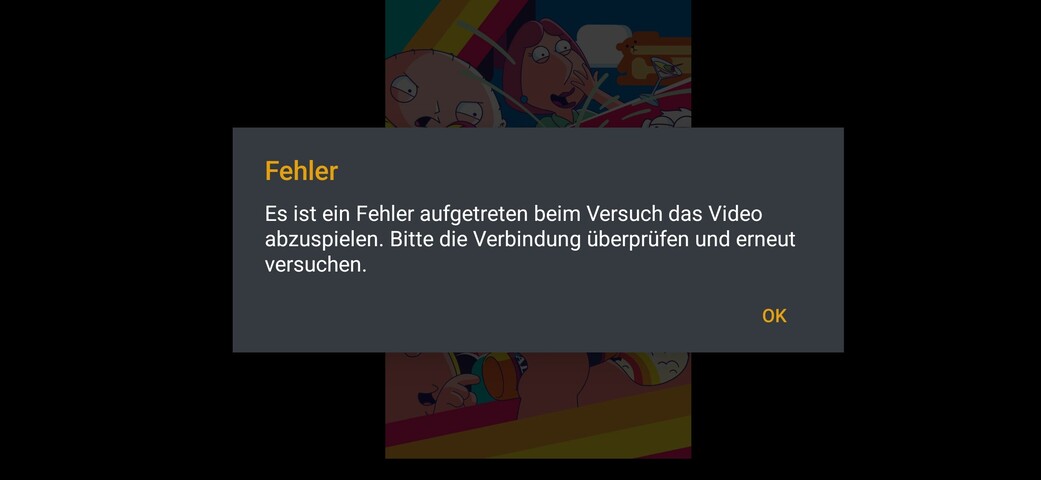
  • The mobile device tells that an error happend and I should re-check the connecteion an retry:
  • I also tried changing quality within LAN of the same file to 240p and it works (and is obvously visible) just to check if transcoding works. I would have assumed due tot transcoding on tv but anyhow: same mobile device that causes the error has testest local transcoding successfully (probably also within the log file)

Log file is attached:
Plex Media Server Logs_2024-12-16_20-03-05.zip (4.0 MB)

Thanks for support

From your logs:

Dec 16, 2024 02:03:38.057 [140290309499704] ERROR - Couldn't check for the existence of file "/volume1/Geraete/Plex/Backups": boost::filesystem::status: Permission denied [system:13]: "/volume1/Geraete/Plex/Backups"
Dec 16, 2024 02:03:56.188 [140290309499704] ERROR - Failed to transcode file (1): /volume1/video/Serien/This is Us/Season 04/tvarchiv.this.is.us.das.ist.leben.s04e01.mkv

First of all, your Plex library should NOT be accessing a backup and secondly, all folders/files must have the correct permissions for Plex to access your files.

The reason for the transcoding failure is listed as conversion failure, I suspect it’s a missing codec, but I may be wrong, perhaps @ChuckPa can enlighten us.

Also, that is NOT how you should name your files. I highly recommend using Filebot to automatically name and organise your files for you.

You can trial it for 12 months for $6 USD (5.70 Euro) or purchase a lifetime license for $48 USD (45.65 Euro). It may be installed on the NAS or on your PC etc.

I also recommend that you organise your media files on the NAS like so:

Media/
    Movies/
    Music/
    Photos/
    TV Shows/

That makes access to your files from other devices much easier, as you only need a single connection to access all media types.

It also helps when setting folder/file permissions on the NAS so that Plex is able to access the files.

Thank you for analysing!

  • The missing permission is for the backup. This is not a media library. This is a feature for scheduled actions. I have overseen to grant permissions to the backup drive and will fix it. Great hint but I doubt it is related to my issue.
  • I assume plex can access all media files properly as it can play all of them locally - especially the ones to working remotely => no issue I can understand
  • I might consider renaming the files but kind of off topic :wink:
  • Transcoding works locally => I also do not understand how this is related to the remote playback issue.
  • Thank you for the idea of reorganizing my data There are more considerations I need to include, especially Synology specifics. I also expect Plex to be able to handle the media organization I use and the working local playback proves this for me

Any idea about my issue of partly no remote playback?

  1. Plex is accessing the backup, so it must be a part of a library somewhere.
  2. When you Assume, you make an A s s out of U and Me :stuck_out_tongue:
  3. Not off topic at all, you have issues accessing your files. File naming can easily be part of the problem, however unlikely it may seem.
  4. Transcoding, is often not needed when playback is local.
  5. The Synology apps can easily access your re-organised media locations. Check the app settings.
  6. If Plex is unable to transcode certain media, then that applies to Remote Access more so than Local access.

Plex must often transcode to satisfy the network bandwidth limitations as well as for incompatible file formats etc. If Plex is unable to transcode the file for any reason, then Remote Access may fail, no question.

Hi,

quick reply - thank you.

  1. It is configured for backups, I missed to grant access. Log says it can not access the file. Where do you read this is a library file? I even double cheked all media libraries. I am sure this is a (correct) hint not beeing able to write to the specific backup location. THe permissions are corrected in the mean while, of course!

  2. I can play all files locally. I can play almost all files remotely. I call it assumption anyhow :wink:

  3. How do you explain the identical file can be plaxed locally but not remotely? Just because of filename?

  4. Please re-check my post: I checked transcoding on purpose. I forced the media to be plaxed locally at 240p. As I force it, this is independent of the question if this is needed. I did this to double check if transcoding has an issue in principle. I did another test with another wile. I can playback remotely (!) without any changes as well as if I force transcodfing manually to 240p. This is a single test for transcoding of playback for remote access.

  5. I like the way of the organization I have. I read and acknowledge your opinion but would like to keep mine.

  6. This might be a hint helping for my issue. I tested again with one of the files not working remotely: When playing locally, the transcoding can be forced successfully. I tried 240p again as result is very visible.

How can I analyze further?
How is transcoding done / contolled on synology?

New test: I used MX Player as external player and it worked remotely!
When playing internally, I have to time to select transcoding as the error message happens before I can select anything!

  1. If Plex is able to attempt to read the file, then Plex MUST have access to the file. Plex does NOT access random files in random locations.
  2. Your assumptions can easily be incorrect, right?
  3. I have already explained that, please pay attention.
  4. Did you read my remarks regarding missing codecs?
  5. You’re free to do as you wish, I simply offered my suggestion in order to help you, but if you want to do things the hard way, go for it.
  6. Transcoding is performed by Plex using the Synology hardware when it is available.
  7. MX Player is NOT Plex, stop comparing Apples and Oranges.

The two of us are going a little bit in different directions. I - honestly - appriciate you support! Anyhow, I would like to focus on hard facts and tests and like suggestions how I can improve (e.g. media organization) while not beeing offended if I stay the way I am.

Let’s summarize what we know:

  1. I can play all files locally => file permissions correct (backup is backup as shown in the screenshot and need to be differenciated from media libraries and their paths)
  2. I can access some files remotely => remote access seams to work
  3. I can play the critical files (not remotely working with native plex player) using MX Player (as an external player triggered within plex as a feature plex is providing) => remote access to file works
  4. I can transcode locally and remotely

I think I need to be more specific: When I say remotely, I just turn off wifi at home, hence remotely means for the tests so far cellular access (no wifi).

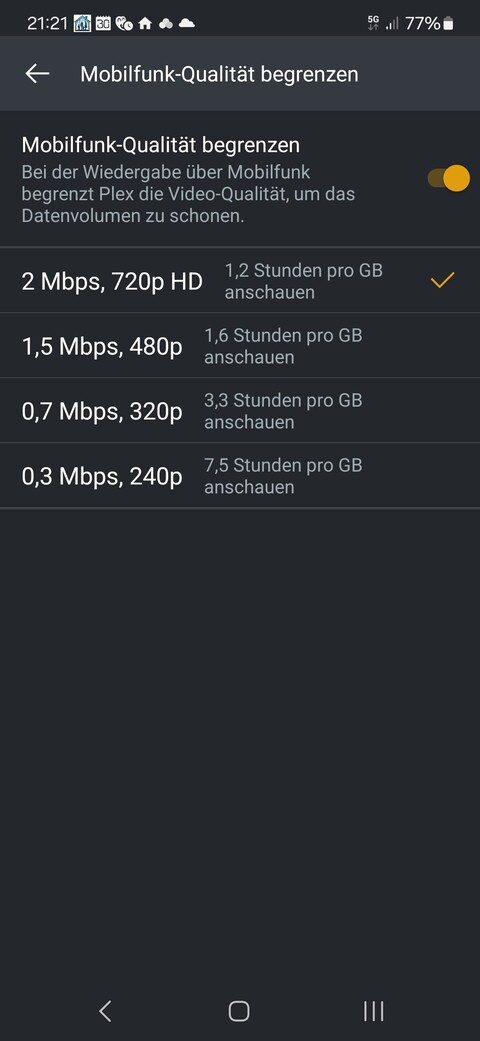
I realized when I deactive the option to reduce quality for cellular access, I can remotely play back the file successfully. I also tested different qualities with same error result. As soon as I deactive this function, remote (cellular) access to the file works as well. Looks like a bug!?

I have made my suggestions regarding improving your Plex experience overall. If you are unwilling to consider the positive versus negative aspects of my suggestions, then that clearly, is your choice.

  1. You keep denying that your backup path is part of a Plex library somewhere, why? Please take the time to think about that some more. Plex will only access the files you tell it to. It does not matter what type of library it is, it matters that you have given Plex access to the file/s willingly or unwillingly.
  2. Yes, but not all files will have the same network bandwidth available when you play them. There are other considerations such as file compatibility with your remote device as well.
  3. Again, you are comparing Apples and Oranges here. It does NOT matter how you invoke the external app, you are still accessing an external app that is NOT Plex.
  4. If you can do that, then why are you here?

I fully understand what Remote means, but it seems that you do not understand the mechanisms behind Remote Access.

This is why setting the Internet upload speed. is important for example.

It is also important to understand that any remote connection can be routed globally, which may slow the connection to the point of playback failure (as indicated by the error message).

You have no control over that, that is up to your ISP and their connections to other servers etc.

Try running a traceroute between your LAN and the remote device. Count the number of hops and the time needed to make each hop. Too many hops can easily cause a connection failure, too long a time between hops can also cause a connection failure.

When you reduce video quality, you also reduce the network bandwidth needed to transmit that video. Which is something that Plex tries to do on it’s own, but it is not always successful, depending on the available bandwidth at the time.

Bandwidth, is the ability of the connection to carry data, irrespective of the connection speed. If the connection cannot carry enough data, then the connection may fail regardless.

I am wondering about the offenses I earn. I repeat again to ask for professional and friendly communication. I respect how you handle your stuff. I also request you respect my way.

To find out the root cause, I followed the strongest hints and did some tests trying to prove the hints. This lead me to a single settings option that causes the problem.

  1. I define a backup path for the backup. I define media paths for the library. I do not understand why you call the backup path a library. I even double checked the libraries and they to not include the backup path. How does this lead us anywhere? I fully agree that I grant permission to access backup path for plex. I clearly reject that this is called library and I also reject that this is relevant (but helpful to be identified and fixed). How does this lead us to anything besides arguing?

  2. I do not understand this. Why should different files have different bandwith available? Assuming (somehow) constant bandwith of e.g. 50 Mbits, the bandwith is file independent. Local and remote bandwith are quite different, of course! Can you please explain what you mean?

  3. How does the access to the file when being played via MX Player work if this is independet of plex? From my point of view, this is one of the proves that plex can access the file remotely while another issue causes the problem.

  4. Please read my post: I always clearly stated I can play locally and remotely. I also clearly stated that I have issues for remote access for SOME files.

  5. I might not know the plex internals about remote access. I am very happy to read about the tec details! Anyhow, the upload bandwith has been specificed already as suggested from you, same is valid for automatic as well as manual port forwarding

  6. As I can remotely play files even in 1080p using 5G successfully while the quite basic files causing issues, I doubt this is related to bandwith and / or connection speed. I also know plex’S behaviour if this is the case resulting in a very long wating time, receiving a few frames, stuttering playback and especially the option to access playback settings and choosing different formats. NOTHING of this is valid for my issue. The error messages appears within a few seconds, I can not access any setting during that time, no single frame is shown etc.

Even though there is still the oportunity that the bandwith / connection causes the problem, I think this is very unlikely as it is only valid for a few files (the SAME few files)! In parallel other files can play with higer bandwith selected. Also the file bandwith (<6 Mbit) is far below my upload (50 Mbit) as well as my 5G download. I run speed tests and it is 11 pm in Germany (meaning no heavy usage). I can even stream 17 Mbits right away successfully via plex (same time, network etc.).

When I deactivate the cellular specific option I can play back the file directly as well as with all chosen quality levels?

What does the feature of reduced abdnwith for cellular access do specifically? Does it only kind of pre-select the quality level or does it do anything else / more?

With the latest observations, this might be a bug.

Happy to fix this together.

Off topic: There is a list of supported codings for NAS: Plex NAS Compatibility - Google Sheets

Since you have ignored just about every detail of this conversation, I feel there is nothing more I can do to help you.

Have a nice day :slight_smile: