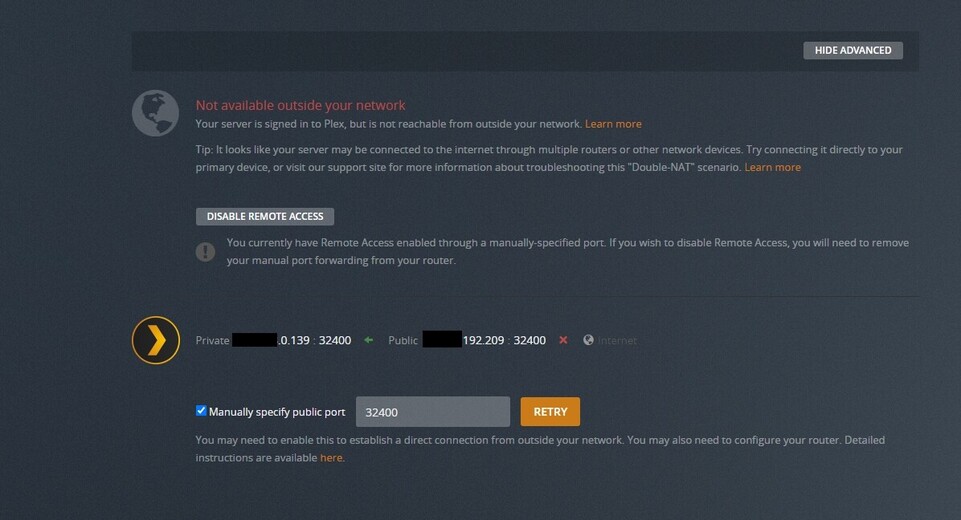
I have plex setup on my my fibre PC…remote access shows green for external connection, then after a while it go red to no access, and with this my friend cant access on hes smart tv to my pc.
Any help to fix this?
I did try change the port to the 32400, and opened it on my tenda ac10 router…but stil wont stay open for remote access…
Can you provide screenshots of the port forwarding rule you put in your router and the remote access page on your server. You can block out some of the IPS if you are concerned, but leave the last 2 sets of numbers so I can track them. i.e. X.X.1.100
Ah, that message there in the remote access setting says you may have a double NAT. Are you also using a router provided by your ISP? You need to either
1 - add an additional port forward from your ISP router to your Tenda router
or
2 - set your ISP router to bridge mode
or
3 - turn off the hdcp server on your Tenda so it becomes a switch/wireless AP
There has been an issue since yesterday for lots of people, it came up on the Plex status page but it has now disappeared even though the problem still remains.
At my system also remote access does not work, When I put it on in the settings section it changes to ‘no remote access’ within some seconds. Should this be the course that the connection between Sonosapp and Plex is broken?
Thank you for an answer that helps me.
Frank
I am very interested in this. I have been using Plex for many years (guess getting close to ten?).
Remote access has never ever worked, despite several posts and helpful suggestions from several members. None of the suggestions worked. I’ve been on the port forwarding roundabout a number of times.
I have a number of friends using Plex and none of them have ever been able to get Remote Access working.
The only place I have ever heard of someone having an operational Remote Access are some people on this forum.