Server Version#: 1.25.9.5721
Player Version#:
successfully port mapped my router but remote access wont stay connected for more than a few minutes sometimes an hour at a time
Did you already have a look at the related troubleshooting support article?
https://support.plex.tv/articles/200931138-troubleshooting-remote-access/
There’s also a guide with some more details
dose it matter that there are two servers sharing the same router because one is stable but my new one is not i did manually port forward the new one like i had to do with my older server ,both have been port forwarded in my router the old one works but my new one is giving me the problems
Should only matter if you’re working with automatic port forwarding (UPnP).
If both servers have a manual port forward and their own IP reservations inside your home network, this shouldn’t be a problem.

If you don’t have a static IP, yeah, that is a good idea. But even on dynamic IP I would not expect it to change in less than an hour.
I would check the box and specify port 32400, too. Shouldn’t have to… but it can’t hurt.
Static as in as static local IP address — yes. You don’t need a static public IP address though.
You mentioned you established a manual port forward… why haven’t you checked/configured that in your Plex remote access configuration?
As a side note: what we’re now checking is pretty much 1:1 the steps from the „basic remote access troubleshooting“ guide.

Plex includes a low-quality relay service for if you can’t get direct connections to work. That is probably what is going on.
Use an external tool like this to see if port 32400 is open. Don’t look at the remote access test inside Plex.
I strongly recommend you check the steps from the troubleshooting support article or guide. If you provide specifics based on those findings, others might be able to help you on how to sort this.

first… is this the same public port you get to see from inside Plex?
have you opened port 32400 as part of your manual port forward?

You only need to forward TCP 32400 and you can turn off any UDP options. You have 3 rules there, you just need one. And yes, you checked the right way with that site, assuming that was your public IP.

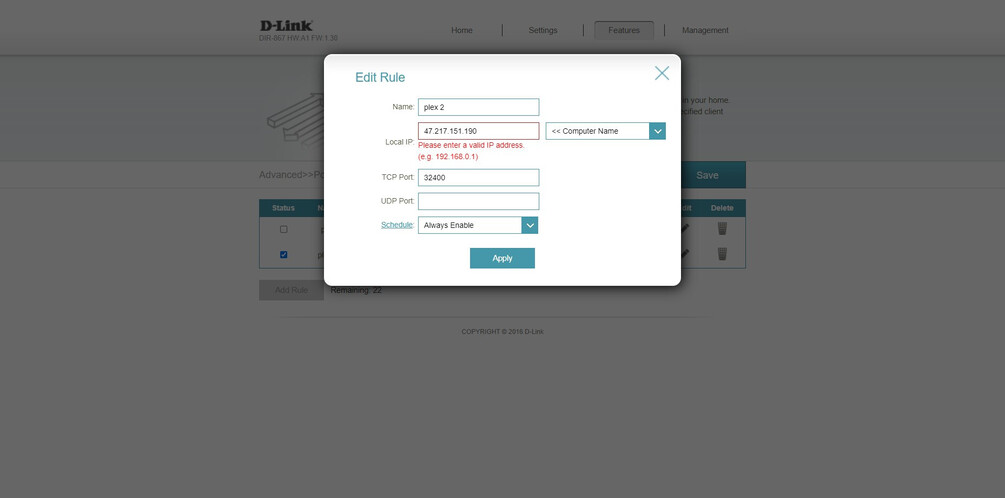
Assuming your Plex server LAN IP is the one ending in 185 I think that will do it.


The 192.168 address is inside your home, on your own network. It cannot be reached from the Internet so don’t put it in the port checker web site.
The 47. address is probably your public IP address. Put that in the port checker once you saved the port forwarding rule on your router.

Usually, a port-forward configuration allows you to set the public and private port. This way you can configure traffic to your router’s WAN IP on a public port to be routed to your Plex Media Server on the private port 32400.
That private port must always be 32400. However, changing the public port gives you some more flexibility.
(a) to use a different port if your ISP is blocking public traffic on that port
(b) to create port forwards for different machines using the same internal port.
It appears your D-Link configuration does not allow such a distinction.
I take it you only have 1 Plex Media Server in your home network?
If so – start with deleting all but 1 of your port forwards.
Make sure that remaining one is configured with LocalIP set to 192.168.0.185 (assuming that’s the IP reserved for the Plex Media Server) and TCP Port set to 32400 (leave UDP Port empty).
If it’s still not working you could ask your ISP if they might be blocking communication to port 32400 (and if so… if they might be willing to open that port for you). Given your router doesn’t seem to allow setting a different public port, you’ll otherwise be out of luck (except you can get your hands on a different router).
