Hey
I’m kinda new to plex, I have the same issue discribed above everything is limited to 2mbps over internet. Works fine over lan. I have checked ports and they fully open and plex says internet fully accessible.
Hey
I’m kinda new to plex, I have the same issue discribed above everything is limited to 2mbps over internet. Works fine over lan. I have checked ports and they fully open and plex says internet fully accessible.
Have you checke the actual clients?
Many have a video quality setting for remote or internet streaming, e.g. in Plex for iOS -> Settings > Quality > Remote Streaming or Plex Web -> Settings > Plex Web > Quality > Internet Streaming > Video Quality. This setting defines the video quality your client requests from the server (while being outside of that network) – if it’s not your own server, it might make sense to ask the server owner before setting it to Original Quality or Maximum as that could put quite some load to their internet upload bandwidth.
Many people are experiencing this and myself included. It’s is fare to assume with the 100% probability that it’s a Plex issue.
Makes me think why Plex team would do that and not test such main test case.
And what issue is that?
It’s one thing to raise your issue… it’s an entirely different thing attempting to hijack an existing thread where users already mixed up different issues that are superficially the same (no offense).
So what exactly are you experiencing?
Also… if you’re already hijacking a thread… please contribute some meaningful input . At least:
You were asking users to check the settings but everyone is telling you that they did not change any settings and right after the update they lost remote video streaming. This is not hijacking.
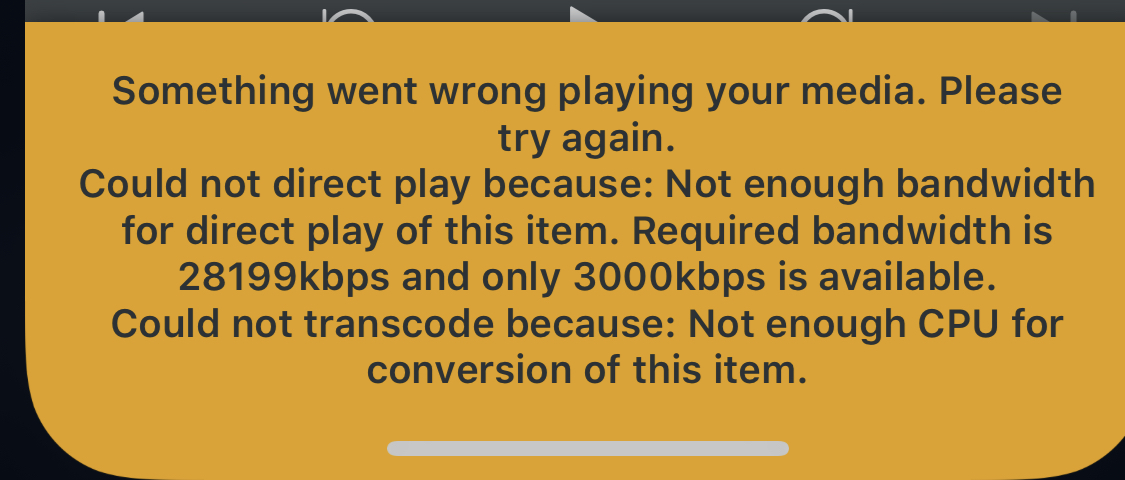
I had exactly the same issue. The fix I found out (after 4 hrs of testing) is to uncheck Transcoder-> Disable video stream transcoding**. This NEW default setting prevents remote clients like iOS devices to play video’s.
It is a simple fix. This new flag introduced in the software does it, blocks videos from playing direct and when enabled shows some strange messages on iOS devices like "not enough CPU for conversion the your bandwidth is too low.
So how is this related to users having their remote access bandwidth limited to 2 Mbps?
Disabling the transcoding is no default setting. It was added as an option for users who want to prevent their server to transcode any content e.g. if the server isn’t strong enough to deal with it.
So long story short: your client required the content to be transcoded which was disabled, hence no playback.
I agree there should be a better way to handle this. I’ve read somewhere that the related error message is to be adjusted (don’t know when this is actually going to happen).
Hello,
I still experiencing this issue.
I’ve done a fresh install of all the server, checked ports, firewall and everything else needed.
All settings are still good with 300MBPS, max quality, …
But clients still had between 712kbps and 2mbps max. In home I don’t experiencing this at all
Seems not to be alone with this problem
HOLA Saludos a mi me pasa lo mismo marco la casilla desabilitar stream trascoding y se deja ver plex con problemas de ancho de banda al desmarcarlo se ve pero trascodifica todo SD adicional a eso tuve que cambiar a 2mbps la calidad de video eso nunca pasaba antes