Just to confirm so all iOS devices can access the server remotely it’s only Android problem.
Another update: I just tested it and Android can even access music remotely, problem is only limited to playing video files. So the challenge comes only when it is supposed to start streaming video.
BTW I have no firewall in my setup and it worked like this for years without any problems and I haven’t changed anything.
@ChuckPa can you please have a look at the attached log from my Samsung S8 Android phone that as I mentioned:
plays everything while on local home network
sees plex server content and even plays music when accessing remotely
refuses to play any video when accessing remotely
Can you please see what could be the problem? The last thing I did before exporting the log was trying to play a movie remotely and it didn’t start at all.
Do you have a reverse proxy? If so what do you use? I had the same problem and adapting your routing rule solves it. The Android app is including more data in the host name header than the browser does. This means your proxy rule must be adjusted to be more forgiving than an exact match.
So my server is a 2014 Mac Mini (8GB RAM, 500GB SSD) running Mojave and the latest version of Plex server.
As for the network setup it is quite simple:
There is an optical cable coming from the ISP into a Huawei HG8240 router provided by ISP. I have mapped port 32400 on it to go on to my router that is plugged into it.
My router that is a D-Link DIR-835 is running just as a DHCP for the network and Mac Mini is plugged wired directly into it. There are a couple of Wi-Fi access points on it as well as well as other wired clients (Apple TVs mainly). Router itself doesn’t have any fancy settings, I have disabled Wi-Fi on it, disabled firewall, no any routing or QOS rules. The only thing I set on it is port mapping for the mac server that has a static IP and mapped port 32400.
There is also a Raspberry Pi sitting on the network that is running as a DNS server with Pi-hole on it and D-Link is configured to use it as a primary DNS, secondary DNS being the Huawei router
This setup has been working for over a year in this current configuration. I checked mapping, restarted everything multiple times and everything else I could think of, tried disabling Pi-hole but everything is working as it should and Pi-hole didn’t seem to make any difference.
As I mentioned server is fully accessible from outside my network and even Android app can see it and even play music from it. Other remote clients work flawlessly (iOS, Apple TVs, Samsung Tizen TVs, etc.) However, when Android app tries to play video remotely then it just fails to start the stream and only the spinning indicator is on the screen (I don’t even get any error message). Also as I mentioned when the same Android device is on the local network then it all works fine(!?) and even the video plays. I made no changes to any of it and it all worked fine until like 10 days ago.
I can’t explain it, but I logged out on my Android devices and back in and they seem to work now including the firestick when attached to my phone hotspot (so it is external to my network). I didn’t change anything since this post was started. I struggled with this issue for weeks and tried everything under the sun on the Android clients. Maybe the gods are watching this forum and changed something in plex AWS, or server backend? I had the exact same issue as others on here where I could browse pictures, music, even videos, but when i went to play a video it failed.
Hahaha, it’s quite funny that it would just randomly start working again.
I hope mine does that as well but so far no luck… I’m really running out of ideas as to what to try. @ChuckPa any chance of taking a look at my Android client log file I sent?
It does appear to be a Android client related issue.
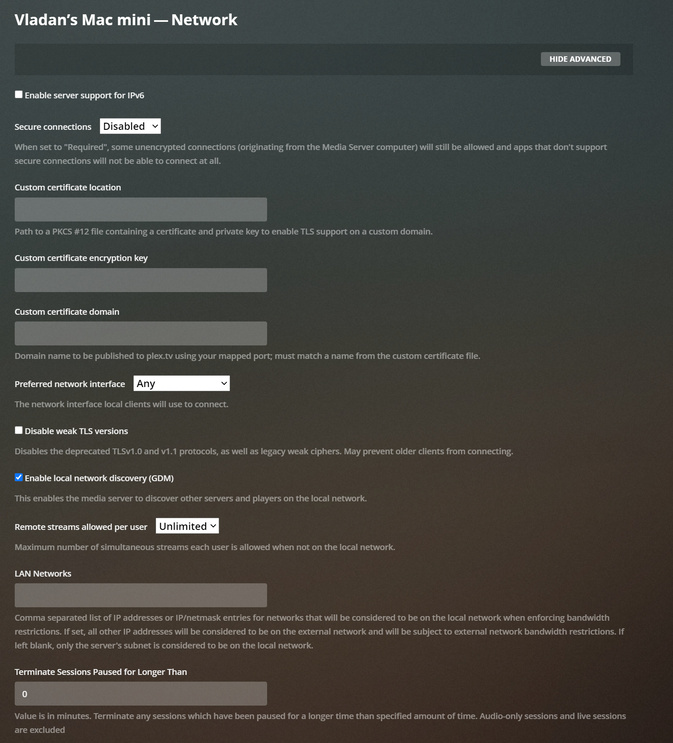
What do you have on your server settings page for Network and Remote. Can you show screen grabs?
So it looks like you are using the Plex service as your DNS and cert. Your server informs the Plex mothership what your IP is and server health. Then your droid clients call to the Plex mothership and proxy through them.
Have you attempted a direct connection with the app using your IP address? You may have to also temp disable encryption. Just to rule out the plex.tv proxy service?
Ok, you have nailed the problem there! The challenge is that the under Network server settings I had in that top drop down for “Secure connections” selected “Preferred” Turns out that if I change it to “Disabled” then Android app plays remotely!
So the issue is in negotiating secure certificates? However I’m not comfortable with leaving it unsecured, is there any way of fixing this? It would be nice to have Plex support join in @ChuckPa
I tried it now and it’s not related to Android client settings. Even when Android client is set to allow insecure connections it only works if the server is set to “Secure connections” Disabled
So it is definitely related to the server setting and how it interacts with Android app.
Thanks, sounds like a big job though! Especially considering that it was all working until a few days ago, I’m hoping that it can be solved some other way.
I am a bit confused here.
What is the problem to solve?
I see the upper part of the thread marked as solved but the conversation and problem discussion continues.