Server Version#: TS-469L
Player Version#: 1.25.2
After lots of network issues following fibre installation I was unable to access Plex on all devices so I decided to do a clean install of PMS on my QNAP.
I have tried to remove PMS from QNAP but it has now been stuck in ‘Removing’ for over 48hrs now. I can neither remove it fully, or reinstall a fresh copy until this has cleared. Is it still ‘removing’, or is it stuck?
Please help but keep the advice as simple as possible!
If you had a lot of media indexed, with image files, depending on the speed of your drives, App Center can take a long time to uninstall.
This is happening because QTS/App Center is deleting all the accumulated files before it returns to you.
In the rare case QTS is stuck, there is a manual procedure.
First, Control - F5 and see if PMS is still in App Center.
Second, Check if the HDDs are still busy.
Let me know the results please.
If they are quiet, I’ll show you how to resolve QTS.
Thank you Chuck
I do have a lot of media - mostly music & home videos / pics.
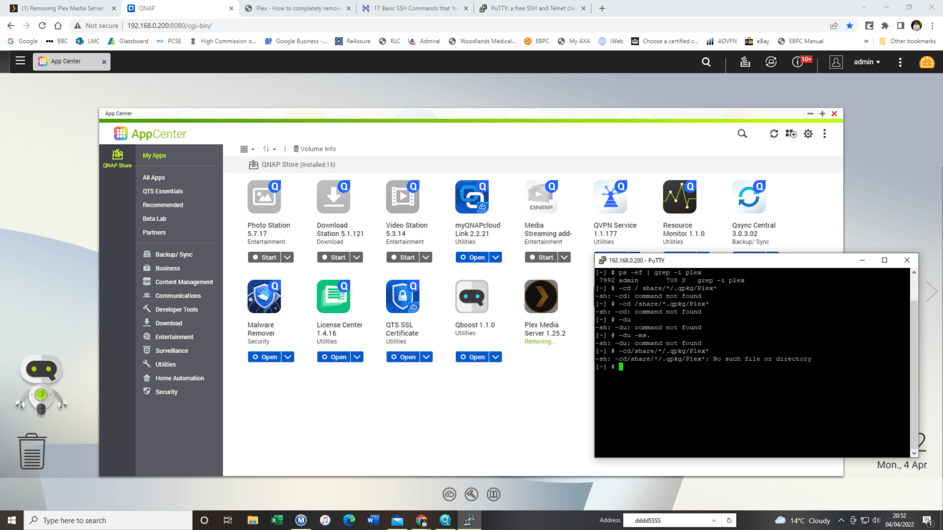
F5 definitely confirms PMS as still ‘Removing’. See pic
HDD seems fairly quiet on Resource Monitor (see pic).
Any next steps that you can suggest?
Regards
Gurjit
The next steps are going to be a bit messy (we’re working at the lowest QTS level).
- SSH into the QNAP
- see if it’s actually attempting to remove (
ps -ef | grep -i plex)
– it should be performing a rm (remove) operation
- if it is:
– cd /share/*/.qpkg/Plex*
– du -ms .
Please advise
Hi Chuck
Unfortunately I am a newbie to using SSH but I think I have managed to get into the QNAP NAS. The commands that you suggest don’t seem to reveal a lot, and unable to use the second command you suggest as you can see in my screenshot. PMS is still ‘Removing’. Anything else that you can suggest please?
sitting at the SSH command prompt, This is how you should take the first step for manual removal.
This is my console session log:
[~] # cd /share/*/.qpkg/Plex*
[/share/CACHEDEV1_DATA/.qpkg/PlexMediaServer] # ls -la
total 30540
drwxr-xr-x  5 admin administrators     4096 2022-02-16 11:37 ./
drwxrwxrwx 12 admin administrators     4096 2022-03-21 02:53 ../
-rwxr-xr-x  1 admin administrators  1173248 2022-02-11 13:42 CrashUploader*
drwxr-xr-x  4 admin administrators     4096 2022-02-11 13:47 lib/
drwxr-xr-x  4 admin administrators     4096 2022-01-13 20:59 Library/
-rw-r--r--  1 admin administrators   200054 2022-02-16 11:37 .list
-rwxr-xr-x  1 admin administrators   260032 2022-02-11 13:25 Plex Commercial Skipper*
-rwxr-xr-x  1 admin administrators  3082184 2022-02-11 13:40 Plex DLNA Server*
-rwxr-xr-x  1 admin administrators   109344 2022-02-11 13:25 Plex Media Fingerprinter*
-rwxr-xr-x  1 admin administrators  4405192 2022-02-11 13:42 Plex Media Scanner*
-rwxr-xr-x  1 admin administrators 15743376 2022-02-11 13:46 Plex Media Server*
-rwxr-xr-x  1 admin administrators  2912048 2022-02-11 13:25 Plex Relay*
-rwxr-xr-x  1 admin administrators    10584 2022-02-11 13:25 Plex Script Host*
-rwxr-xr-x  1 admin administrators     8323 2022-02-11 14:11 plex.sh*
-rwxr-xr-x  1 admin administrators    10624 2022-02-11 13:25 Plex SQLite*
-rwxr-xr-x  1 admin administrators   283176 2022-02-11 13:25 Plex Transcoder*
-rwxr-xr-x  1 admin administrators  3003392 2022-02-11 13:25 Plex Tuner Service*
-rw-r--r--  1 admin administrators     5254 2022-02-11 14:11 .qpkg_icon_80.gif
-rw-r--r--  1 admin administrators     4468 2022-02-11 14:11 .qpkg_icon.gif
-rw-r--r--  1 admin administrators     3138 2022-02-11 14:11 .qpkg_icon_gray.gif
drwxr-xr-x 10 admin administrators     4096 2022-02-11 14:11 Resources/
-rwxr-xr-x  1 admin administrators      826 2022-02-16 11:37 .uninstall.sh*
[/share/CACHEDEV1_DATA/.qpkg/PlexMediaServer] # ./.uninstall.sh
[/share/CACHEDEV1_DATA/.qpkg/PlexMediaServer] #
The ./.uninstall.sh is what App Center performs but you’re now doing the work at the Linux command line level.
Please let me know how this proceeds
Thank you ++ Chuck
That all seems quite complex, esp as I couldn’t get even the first SSH command recognised by QNAP.
Thankfully I have now resolved the issue. I decided to install the latest PMS qpkg update which QNAP allowed me to do. This brought the PMS app back to life from ‘Removing’ status to fully installed and active again. Hallelujah!
I shan’t try to uninstall it again but will resolve my Plex app issues in some other way!
Thank you again.