Continuing the discussion from Removing shared libraries that no longer exist: I am having the same problem with my library. When managing user share settings, I see old/duplicate libraries that no longer exist from old servers that no longer exist.
I’ve gone through a few server migrations over the years. The first migration I deleted the server and started over. The second migration was a move from Synology to an Intel NUC following the migrations instructions listed on the forum.
I only see my current server in the list of Authorized Devices and have tried logging out and reclaiming the server with no change.
Server Version#: 1.42.2.10156
You don’t have any shared servers in your account.
You have only one server of your own in your account.
Do they see the old servers? or do you mean only in the admin’s Manage Library Access Settings settings? Have you just restarted your server?
Also any reason you are running that old server version?
I only see the one server. I have not updated yet because I was waiting for the new linux repository updates to get fixed. I hadn’t checked in on the thread in a while and just noticed it is ready: Issue Upgrading to PMS 1.43.0.10467 on Debian and RHEL based distributions
However this issue has been persistent for several years, I just haven’t taken the time to fix it.
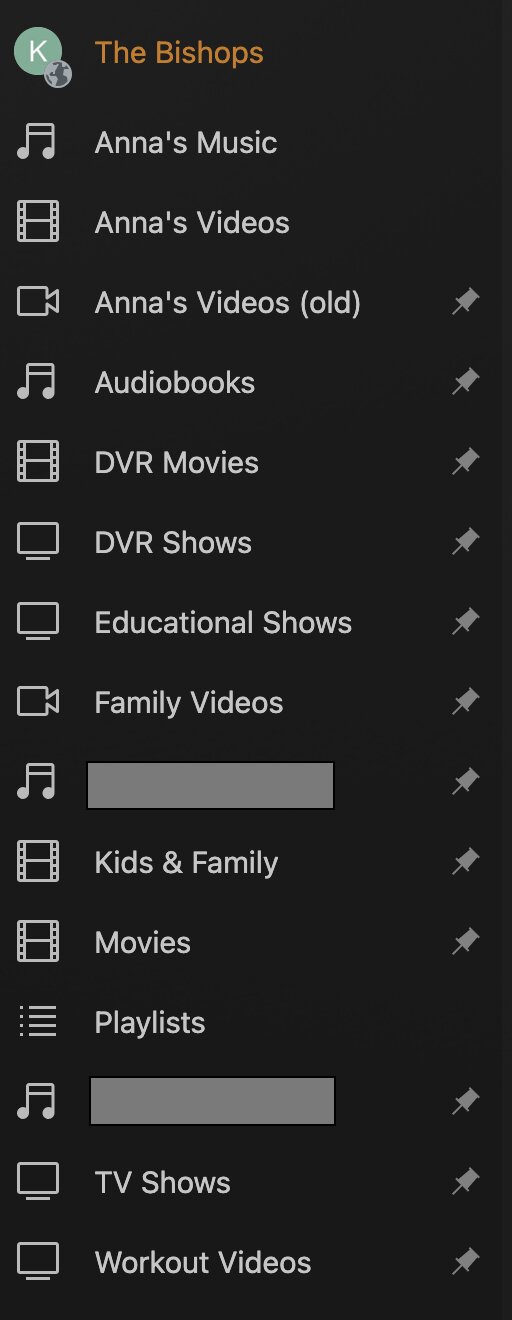
Here are the libraries I have on my server (A couple names are redacted because they are full names of family members)
This is what I see when selecting which libraries to share. The blue arrows indicate the old libraries that no longer exist. I am trying to figure out how to remove these references.
Have you restarted your server?
Optimized Database?
Are you using app.plex.tv or via IP? is there any difference? (app.plex is newer)
Yes I have restarted PMS and the machine itself numerous times over the years this has been happening.
I have Optimized the Database and run the DBRepair utility.
I primarily use app.plex.tv, but I just verified the issue is also present when access the web via IP.
I just updated to server version 1.43.0.10492 and the two old libraries are still present in the share list.
Your server is reporting to plex.tv that you have 16 libraries that is why it is appearing in the manage library access screen because that is what Plex.tv thinks you have to give access to.
For some versions a restart fixes it and updates plex.tv which is why i was asking to try that. I was just told 1.43.1 fixes the issue i was referring to but since a restart does not fix it for you then it may be another issue.
Is it possible to get your server logs after restarting and opening that page.