Firstly, let me say, I am sure I am not the only one with this issue in some way but let me tell you how I got here.
husband got new computer
husband wanted to install his old video card to my comp because it was a step up
could not after he realized they were different sizes
put everything back, turned comp on, black screen and mouse cursor
I fiddled around with it, ended up having to reset my comp
still downloading things but I got Plex already because I wanted to get my server back up
my server is “currently unavailable”
random server has appeared… that could have happened because when I was trying to figure out what email I signed in with, I accidentally signed up for an account when I was clicking buttons… I immediately deleted but it said it could take up to 30 days
I tried claiming said “unclaimed server” then deleting, that did not work, nor did uninstalling and re-installing Plex again
I’m sorry to tell you, but resetting your computer apparently deleted all of Plex’s data in the Plex data folder
The “weird” server is a new, empty server that was created when you started Plex.
“The Lizard channel” was the old server which is gone now. It’s only still lingering in your account, because the authentication token hasn’t been revoked. https://app.plex.tv/desktop#!/settings/devices/pms
That is a bummer… I am not sure if I understand it correctly but it is possible that only the PMS was deleted but everything else is intact.
I did the search for the data folder but I am not sure which one it is since nothing says “data” outright. However, I did search “Plex” on OS (C:) and it came up with Windows.old and it also had a PMS folder but had files with older dates, like back in March.
Is there a file name that might be what we need or should I just start over?
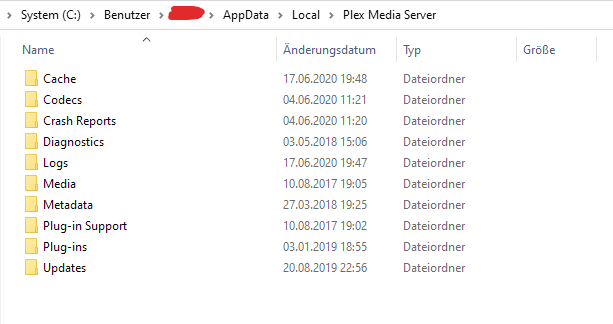
The plex data folder is in a different location from where the Plex program executables are stored.
It looks like this:
Maybe you can still find a folder which has these subfolders in it. If you do, move it to a safe place on a local drive which is formatted with the NTFS file system.
Plex can then be instructed to use this folder for its data. (Start with step 4 of this HowTo [HowTo] An extended guide on how to move the Plex data folder on Windows )
Thank you for the help and the links That is super helpful!!! It looks like The Lizard Channel finally bit the dust because it is gone so I will be starting over but at least now it will not be so painful!


 That is super helpful!!! It looks like The Lizard Channel finally bit the dust because it is gone so I will be starting over but at least now it will not be so painful!