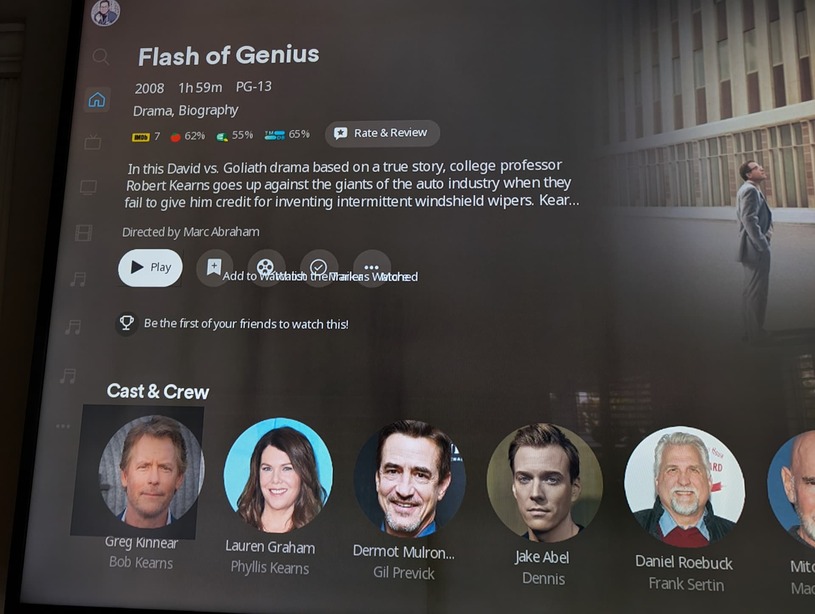
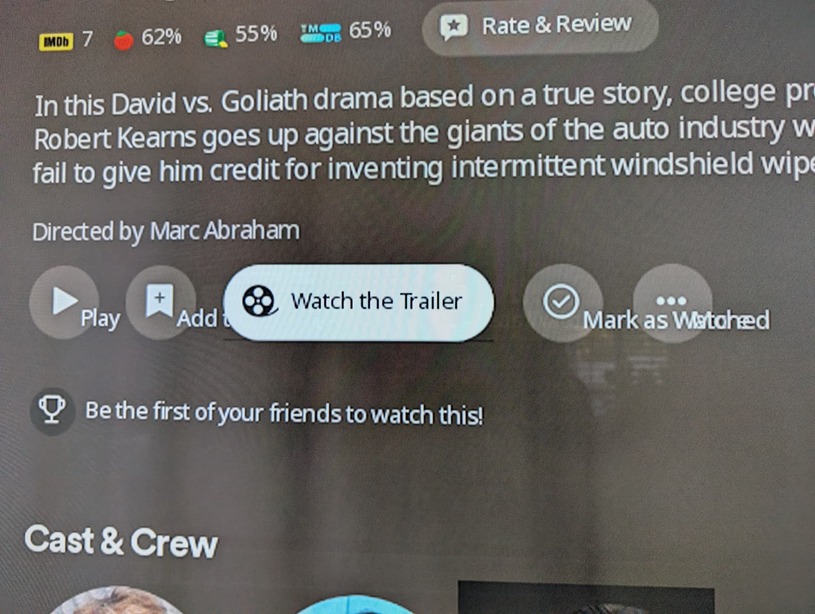
What’s the deal with these overlapping and misaligned UI elements? This is on a Roku Ultra 4800RW.
The Roku client has been doing this for several months. I debated posting it here because I know most threads just get ignored with no responses, but it’s gotten to the point now where it’s actually annoying.
They aren’t supposed to be visible. Plex changed the button style, at least on Android, several months ago and so the buttons are all just circles with icons. When you highlight one it expands out to a full label. What you are seeing here are the labels of all the buttons at the same time when they should be hidden until you highlight the specific button. On the far right you can see the text “Mark as Watched” and the “More” label printed on top of each other, because they are not meant to be displayed at the same time. The circle/icon of the “More” button is supposed to move right to allow room for the “Mark as Watched” button to show with its label when highlighted.
Yeah, I see what’s happening. I’m hoping they take notice of this bug and address it. Although after the layoffs it’s been tough to get Plex’s attention on anything.
It’s probably worth noting that my other Roku clients don’t mis-display these buttons (note the dark square highlight over the Cast and Crew too) so it makes me think it may be something unique to the Roku 4800RW?
Can you check the Roku OS version. Can be found in Settings -> System -> Software Update . Also worth checking the Display Type settings to know what the display is set to.
My resolution is set to “Automatic (4K HDR10)”. However it also occurs on almost every other resolution available:
4K Dolby Vision HDR TV
4K HDR TV
4K TV
1080p TV
When I switch it to 720p, the buttons appear as they should.
I have that Roku model and don’t have that issue so just wanted to throw 2 cents in… when I’ve had weird UI issues with my Roku devices over the years - including Plex - I’ve had to unplug the Roku Box\TV from power for 30 seconds in order to fix it sometimes. I think Roku holds onto cached info pretty hard and pulling power is the only way to clear it completely. Rebooting from the menu or telling the app to “Exit” and even re-installing Plex app didn’t do it but removing power entirely did on more than one occasion. Whenever something starts being flaky with my Roku devices I pretty much start with that now. I didn’t see that mentioned in your troubleshooting so thought I’d just suggest it as something that takes only a few moments to try and might help.
Uninstalling the Plex app, rebooting, and reinstalling the Plex app
What did work:
Factory resetting the Roku Ultra.
This was the nuclear option and I don’t quite understand why it worked when reinstalling the app didn’t. A complete system reset was annoying, but apparently necessary.
I hope this is helpful for others in the future.
Side note: The factory reset also fixed a consistent MPEG2 playback crash I had reported a few weeks ago.
A new, different Roku device has now started exhibiting this behavior.
It’s a Roku Streaming Stick+ model 3810X running Roku OS 14.1.4 build 7709.
It’s showing the exact same issue as of a day or two ago. Plex’s UI icons are all bunched up together not properly displaying, just like the screenshots in the first post. Plex is the only installed app that seems to have the issue.