Roku skips to next episode in the last few minutes

Maybe it’s a good idea to bring / point those other threads here ?
Having multiple threads spread throughout the forum makes resolution extremely difficult if not impossible to coordinate.

I’m going to update my Roku 3 to 9.4.0 so we can settle whether firmware is or isn’t.

Here’s a short log-set reproducing the issue with (I think) everything up-to-date. I restarted the server, reproduced the issue, and captured logs within about a 5 minute span.

I did enable remote logging on the roku, but I’m not sure how to tell if it worked. If “local” is better, let me know and I’ll give another set with the roku log copy/pasted.

Plex Media Server Logs_2020-10-28_15-15-50.zip (92.2 KB)

edit: some notes
PMS 4.34.4
Roku 3600X, 9.3.0 build 4194-24, app 6.6.11.6657 (so, not fully up to date)

@buck2202 linked several of the threads above. There are also some similar threads on Reddit.

Part of reproducing is me having the same settings in my app.
May I have a couple pics please?

(I’m leaning toward a HLS manifest issue – which is heavily influenced by settings)

Respectfully, I don’t go to Reddit. I have more than enough to keep busy here :smiley:

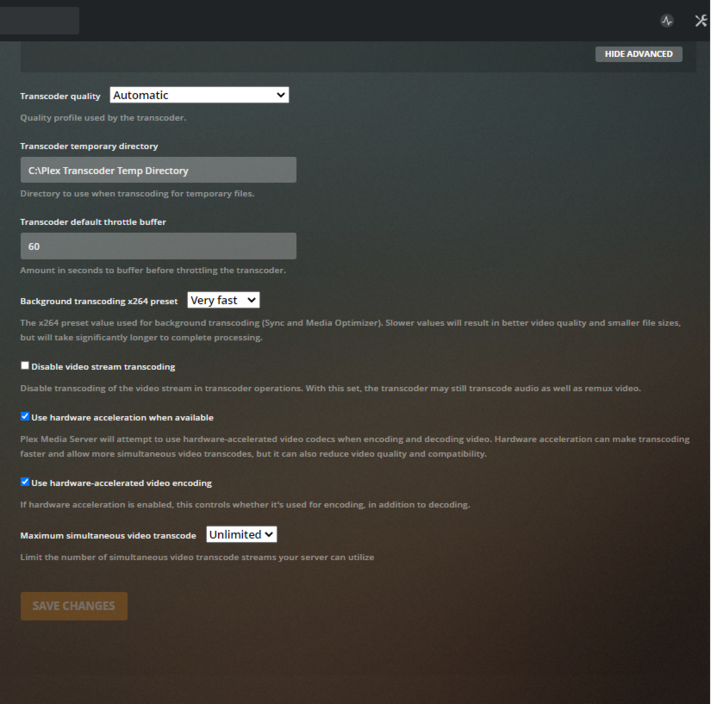
Transcoder settings? Here are mine. Let me know if you want something else.

My Plex app on Roku is set to Original quality.

APP settings please

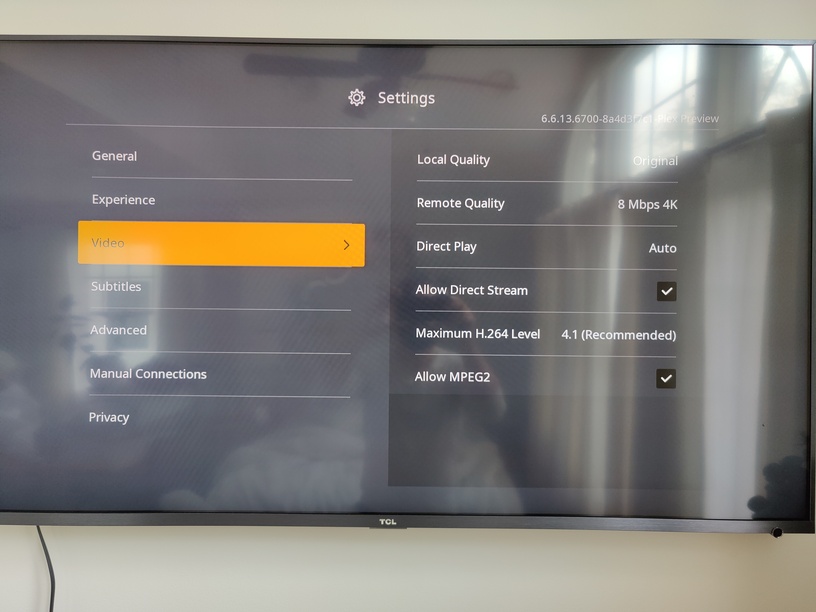
Sorry, what app settings? The Plex app on Roku? I can snap a pic of those settings if that’s what you’re looking for.

Yes please. Roku app settings.

On the app “video” settings I have: (typed in to avoid huge images and my reflection in the TV screen :smile:)

local quality: 12Mbps 1080p
remote: 4M 720p
Direct play: auto
Allow direct stream: (checked)
Maximum H.264: 4.1 (Recommended)
Allow MPEG2: (not checked)

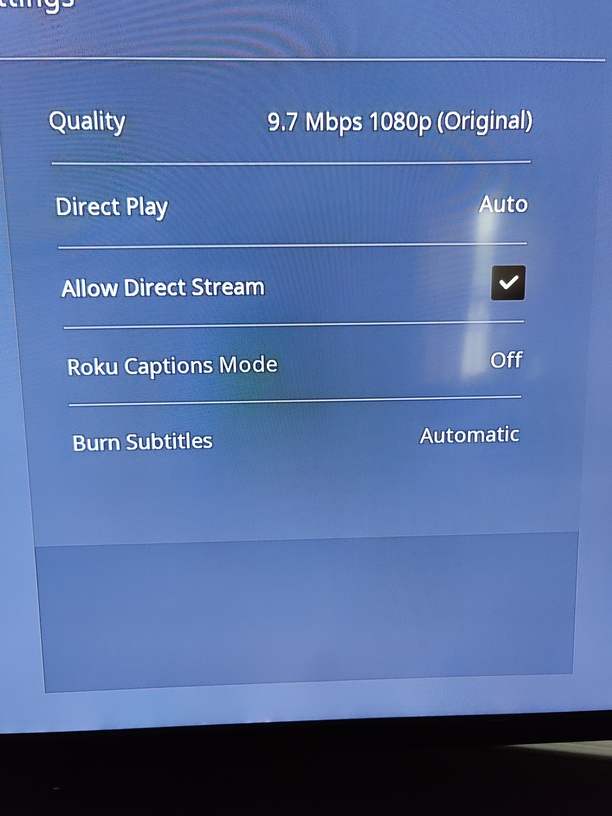
During playback of the file used in today’s log:
settings/playback:

quality: 3.2Mbps 1080p (original)
direct play: auto
allow direct stream: (checked)
roku captions mode: Off
burn subtitles: automatic

settings/streams:

subtitles: none
audio: English (AAC 5.1)
video: 1080p (HEVC Main 10)

settings/stream info:

playback: transcode
format: hls
video: H.264 - convert
audio: English (AAC stereo) - convert
subtitle: none
Speed: 3.7

I appreciate skipping the photo. I do the same when possible. Nobody wants to see my horns

:smiling_imp:

I went the pic route, doh! Sorry for the glare.

I just reproduced it on Roku 3, 9.4.0 firmware – my settings.

1 Like

here’s a roku log (local, copy/pasted) for the issue occuring

roku.log.zip (11.4 KB)

snippet:

10/28/2020 15:59:19.722 [992705:buck2202:3d01bb53-1ba4-5bf2-bf54-387d1ecc9936] INFO (PlaybackMgr) Updated timeline info {roAssociativeArray}
playerState: playing
transcodeInfo: {roAssociativeArray}
_CLASS: PlexTranscodeSessionClass
_name: TranscodeSession
audioDecision: transcode
complete: true
maxOffsetAvailable: 1294
minOffsetAvailable: 0
progress: 100
speed: 0.1
subtitleDecision: invalid
throttled: false
timestamp: 1603915036
videoDecision: transcode

10/28/2020 15:59:23.939 [992705:buck2202:3d01bb53-1ba4-5bf2-bf54-387d1ecc9936] INFO (GeneralTask) [IdleManager] Info: lastKeyPress=7, lastRealKeyPress=6, screensaverTimeout=590, lockscreenTimeout=590, screensaverIsActive=false, lockscreenIsActive=false, isSuspended=false
10/28/2020 15:59:24.525 [992705:buck2202:3d01bb53-1ba4-5bf2-bf54-387d1ecc9936] INFO (PlaybackMgr) Player state changed to error (hasAd=false)
10/28/2020 15:59:24.533 [992705:buck2202:3d01bb53-1ba4-5bf2-bf54-387d1ecc9936] ERROR (PlaybackMgr) Failed to play media! errorCode: -5 errorMsg: no valid bitrates errorInfo: {roAssociativeArray}
category: mediaerror
clipid: 0
dbgmsg: buffer:loop:demux:Errors seen on all bitrates:extra:retry:0:lasterror:404:clip_id:0:source:buffer:loop:demux
errcode: 9
ignored: false
source: buffer:loop:demux

edit: awesome to hear you’ve reproduced it, @ChuckPa

Try this for me?

Set playback bitrate to 20 Mbps not Original

Changed mine from 12 to 20 Mbps, error still occurred. Error codes in the roku log were the same. But I’m guessing that was directed at @ramair02 since you say “from original to …”

I am also tripping over the historical “Roku 3 - 20 Mbps” device physical limit.

I’m chatting with the dev now. We are seeing interesting things not seen before

I changed to 20 Mbps in the Plex for Roku app, but still having the same issue.

Here are details of one of the files I’ve had this issue with

Thanks for everyone’s help so far.

I think I have this as “Almost 100% reproduceable” :rofl:

  1. Seeking to 80% and letting it play doesn’t set it up to fail.
  2. Now trying a full, normal, playback.
  3. If theory is correct, it will terminate early with exactly 2 minutes remaining.

Fundamental action in this test is — transcoding.

1 Like

Not to add any confusion here, but “Seeking to 80% and letting it play” is almost exactly what I do to reproduce it (I was going to 17 or 18m in a 21m file), and ‘full, normal’ playbacks from time zero with no seeking or interruption never produces it for me :neutral_face:

But good luck. And thank you so much for getting involved!

I have to start somewhere :smiley: