I have a smart playlist. I edit filters, and Add Rule Group. After Update Playlist, my rule group is not longer a rule group (the rules are still there, but not in a group).
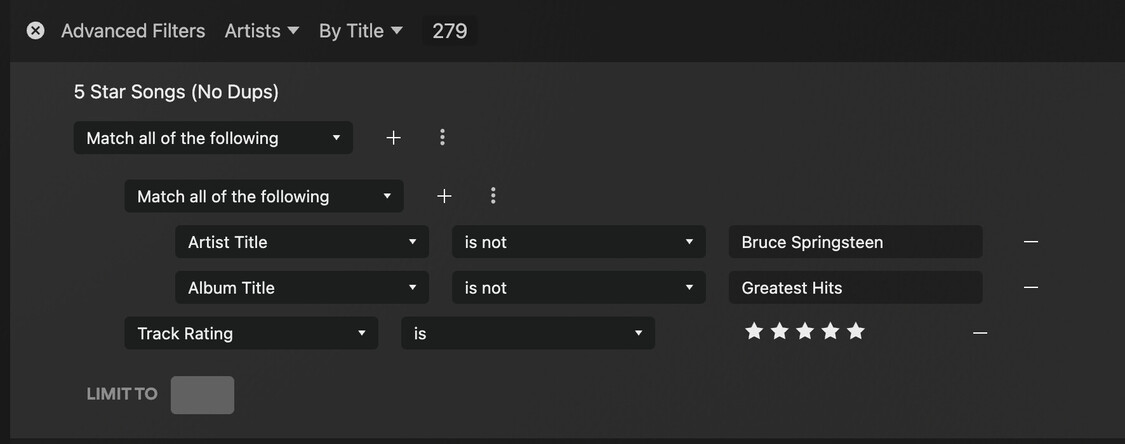

Seems right. What exactly do you want the rule to do. Unless the overall filter is supposed to be “match any” the results will be the same won’t they. Filter all song by Bruce Springsteen from that album rated 5 stars.
I have a smart playlist that includes songs rated 5 stars. When I rate ‘Thunder Road’ from Born to Run as 5 stars, the version from Greatest Hits also gets 5 stars (some see this as a feature, I see it as a bug). I just want to remove the Greatest Hits version from my playlist. Any suggestions?
Notice I am using is not in the rule group

I‘m not sure why Plex doesn’t keep the group.
Purely following the filter logic, both versions are exactly the same.
{rating=5 stars} AND {album!=Greatest Hits} AND {artist!=Bruce Springsteen}
is equal to
{rating=5 stars} AND ( {album!=Greatest Hits} AND {artist!=Bruce Springsteen} )
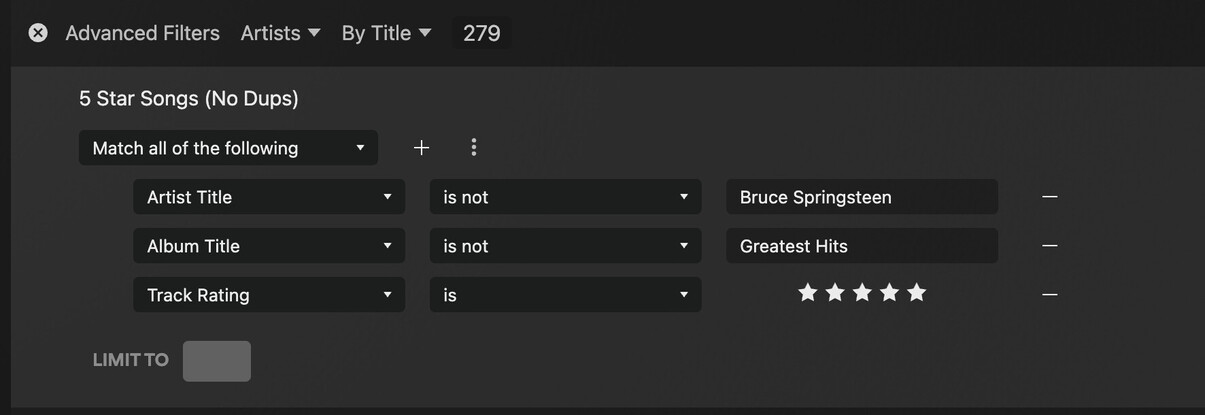
I wondered if that might be the case. It’s still technically the same rule, because every condition is a match all.
You’re probably going to need a more complex rule with differing condition selections (any vs. all) in order for groupings to matter and be maintained. Here’s one I created a while back to illustrate this:

As it is Plex appears to be normalizing your rules to their simplest possible form.

