I am desperate for the help of you smart people. I am not a smart man. I am quick to anger and generally lazy and underwhelming. I have been attempting to set up remote access for over a year with very little success. I was making due for a while now having those I share with still able to access via indirect connection, but alas (despite my remote access page telling me my server is fully accessible unbeknownst to me) my server is totally unavailable remotely. Here are a few more details about my setup.
Windows 10 Desktop UTD
Connected via lan to Motorola SBG6580 Gateway (wireless disabled)
PIA VPN
Meshforce M1 Mesh routers, connected alongside the server
Malwarebytes premium
Windows firewall/security all disabled
I have attempted about every fix I can find on here. Here are some recent things;
-Port forwarding setup on SBG6580 (can not see it on canyouseeme)
-DMZ Host enabled
-VPN
-Currently, VPN on or off doesn’t make a difference. Server shows “fully accessible” but is not.
-Tried using the split tunneling function. Even when it was working for indirect connections, if
this feature was active it would prevent all connections to the server.
-Tried turning off malwarebytes.
Not sure what else to say. That’s a short list of my failures. You people are amazing, I hope you can show me the light.
(current remote access page)
Moderator: Image removed to protect privacy.
I’m going to tell you right now, not going to work with PIA I have the same set up you have for years,(MB wont do anything to Plex FYI) even had AVG and had it working perfectly even with AVG just couldn’t have the Hacker Attacks Firewall up it would never work right with that portion going, PIA changes your IP and with the small packet delivery and now with WireGaurd on no Chance so don’t even use it with Plex on at all, also Make sure secure connections is disabled (Under Network in settings) Now on to your Router, have you set up a Port Forwarding TCP/UDP to 32400 for Plex and done all the Firewall settings that Plex asks for to allow the Remote Access to work properly? https://support.plex.tv/articles/200931138-troubleshooting-remote-access/?utm_campaign=Plex%20Apps&utm_medium=Plex%20Web&utm_source=Plex%20Apps
Try that on see what happens… Good luck and let me know.
You need to make sure you are not behing a NAT (Network Address Translation).
Basically what it means is that you are sharing one ip address with other users.
Incoming connections (for services like Plex) are not possible without big workarounds.
While you are definitely using NAT with PIA VPN, you need to ask your internet service provider if NAT applies for your connection. For most cellular connections thats the case.
Once that is clarified, assign a static ip address to your server and configure a port forwarding for it. Make sure to select the right protocol (tcp).
Please don’t put your machine in a DMZ, thats very dangerous.
Do not use VPN.
Reenable Windows Firewall after debugging and set up proper rules.
You can try to temporarily remove the anti virus software.
Duly noted about PIA. I will only activate it when necessary.
I first went and remove the manual port forwarding I had setup and then enabled UPnP per the link you provided. This allowed to me connect to the server again indirectly. I then changed Secure Connections to Disabled and the server became unreachable once again.
I then removed UPnP and setup up the manual forwarding once again to 32400. This also does not work unless Secure connections is marked preferred or required…
I contacted my ISP (comcast) and they notified me that NAT does not apply to my connection. I would say I am 50% sure the rep actually understood the question.
Set up port forwarding with TCP.
I reserved the IP for the server on my modem.
VPN is off. Firewall back up with rules allowing Plex to function.
Remote access page says “not available” but I can again access the server indirectly…?
From what that I can see, from the status page you showed, you should be good to go. Plex web services are seeing all the way into your network to your server. Which would make me think the issue was on the end of your remote guests.
BUT, the odd thing is that canyouseeme isn’t showing port 32400. It should. Go here and click the green Probe THIS Port button, then report back. https://www.grc.com/port_32400.htm
Also just as a heads up, your Public IP is the one you should hide. That’s the one telling everyone the directions to your front door.
Yes the status page at that time seemed like we were good but I couldn’t access the server from multiple devices. To include my phone, a smart tv, and laptop. Each one listed the server as “offline”.
I visited the site you requested and it states port is “stealth”
Interesting. So the issue may be with your router. What model of router do you have? Are you able to post a screenshot of the page where you are setting your firewall/port forwarding rules?
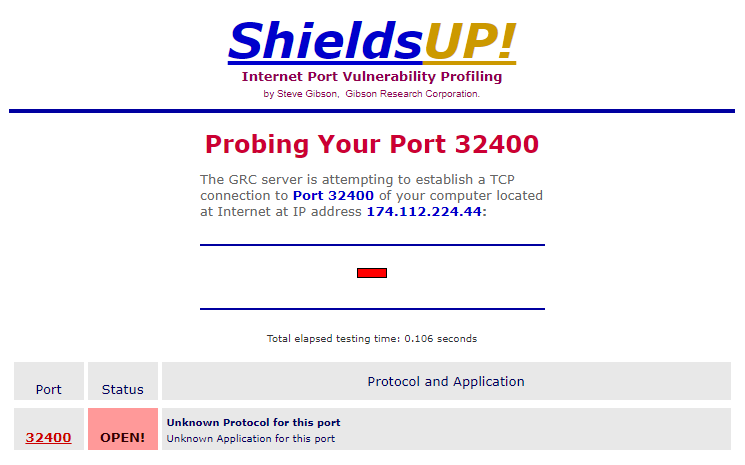
For the Shields Up test, you should see a result like this:
In truth I don’t think I have ever setup all the ports manually in windows firewall that plex suggests. I did that and the server is again unavailable outside my network. Shields up still says “stealth”
Malwarebytes BUT. I’m happy to report that after upgrading my modem and router, Plex is officially working as intended for all users (fingers crossed).
Interesting. It did seem to be related to networking, so makes sense that a router upgrade would fix it.
One thing to look out for if you have a separate router from the device the ISP gives you, is that you aren’t double NAT’ed. Often those ISP units are modem and router combo units. They are fine to use with your own router so long as you disable all their NAT, firewall, etc, features.
For sure. Appreciate everyone’s help. I have all my own equipment and a decent degree of certainty I’m not doubled Nat’d. Hopefully smooth sailing from here on out (knock on wood).