Ok, this is officially getting irritating. I have had the scan run a number of times and it is not picking up some of the TV show folders. I have verified they are spelled and labeled correctly according to tvdb. It does pickup some folders but not others that are all under the TV Shows folder on the same HDD. What do I have to do? Delete the folder and then redo it? It also keeps picking up the art work of Galactica 1980 with the regular Battlestar Galactica of 1978. I have made sure everything is listed correctly according to naming conventions, etc.
Plex Media Server version and platform (Windows/Linux/etc) please. Available in the list of Authorized Devices.
Also, please provide a directory listing, screenshot, etc showing how you have the files named and organized.

On the Battlestar Galactica 1980, I tired Galactica (1980) and Galactica 1980 and Battlestar Galactica (1980).
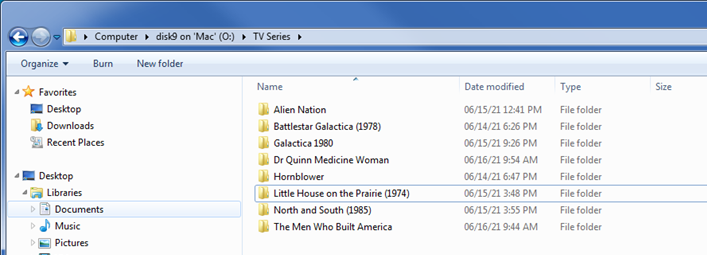
Let’s stay with that example.
Can you share how your files for Battlestar Galactica (1978) and Galactica 1980 are organized and named inside their top-level folders?
Also… I take it your library is pointing exactly to both T:\TV Series\ and O:\TV Series\?
Are both shows displayed as individual items or are they merged into a single show?
Yes both of the folders are added to the library. So I decided to remove that folder and Plex removed the shows it had on that drive. Then I re-added the folder and magically it found them. But of course it had to go thru the whole scan for everything on that disk, which takes some time.
This topic was automatically closed 90 days after the last reply. New replies are no longer allowed.
