Season specific Backgrounds loading wrong

Server Version#: 1.41.9.9961
Player Version#: 4.148.0 (Web); 4.147.1 (local); 7.36.15 Roku

I’ve been seeing Season specific backgrounds showing up lately and I don’t remember this really kicking in until recently. When I went to check on it I found that they are loading even when nothing’s been selected or even ones that don’t even exist.

Here’s Derry Girl’s Season one:


That background that loaded is different from my show background and if you look the option in the selection screen is different from the one that’s loaded and isn’t even selected. That’s 3 different images none of which are loading correctly and only 1 (the show level - not pictured) that I selected.

I found a few others that were loading season specific backgrounds even though none were selected so it’s not just specific shows.

I also have an example of a different background loading when there isn’t a season specific one even existing:
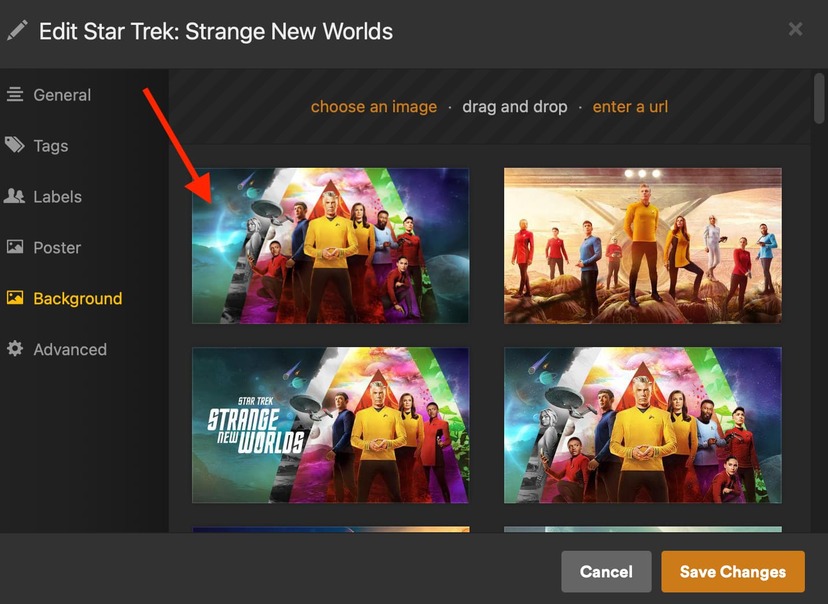
Here is my Show background for ST:SNW:

Here is Season 3 with a different background despite no backgrounds present in the selection area:

This seems like a server side bug in loading\managing the backgrounds since you can see the different backgrounds load on Web and Roku (on the Continue Playing background on Roku it’s loading the season background, not the show background).

Not a fan of assets being loaded for my local content I can’t manage or control. Can someone please check this out?

Also, once this bug is sorted, since unique season backgrounds are a feature, is there a way to set “don’t use season backgrounds” if we don’t want them changing from the show background or will we need to monitor these and load matching season backgrounds if we don’t want season specific ones? I didn’t find anything at the library or show level to control that. Maybe it usually worked out that it’d use the show level background unless a season background was manually selected but there doesn’t seem to be a way to revert in that case.

Side note, I noticed the Plex Web release notes stopped at 4.146 but both 4.147 and 4.148 were released but don’t have any notes (I realize they are usually small changes, but still…).

Edit: Digging further I think what is happening is that the season is loading the “default” show background - even if I’ve selected a different show background. Or at least loading the first background listed in the show background selector (which isn’t always the default). In both example they match up with the season background being used.
Here’s Derry Girls:

Here’s ST:SNW:
8 Likes

happening for me too.

4 Likes

I have noticed the same thing, it took me a bit of troubleshoot yesterday to figure out it’s pulling the default backdrop from the Plex mediaverse for this show instead of sticking to the show backdrop at the show level. Going back to the previous version fixes it for me so I don’t think it’s a server-side (as in, on Plex’s infrastructure) change.

3 Likes

I hadn’t gotten to testing going back yet in case I needed to pull more info… which Plex Server version fixed it for you?

1 Like

1.41.8.9834

3 Likes

Thanks!

In case anybody else wants to go back a version, I use this GitHub for those download URLs: GitHub - axlecrusher/plex_download_urls: Archive of Plex mediaserver download URLs

Kinda disappointing this bug made it through all the testing between 1.41.8.9834 and 1.41.9.9961 but maybe lots of folks never change the default backgrounds so wouldn’t notice it (or like us noticed it but didn’t worry about it too much).

2 Likes

I downgraded to 1.41.8.9834 and it’s still happening so maybe it is something on the Plex side not tied to the server? Or it started even further back than that version…

I also noticed on Roku it’ll flip to that unselected “default” background during loading when you hit play from Continue Watching as well. So there’s definitely a few references impacted by whatever is at the root of this bug.

Updated the title a bit to line up with just the general “loading wrong” bug. :slight_smile:

1 Like

This is also happening to me since the last update.

I hope they will fix it in the next release since I don‘t want to downgrade.

2 Likes

I have the same issue. I also downgrade, but didn’t help.

1 Like

I also am having the same issue. I am using a different background that plex provides for a show, but when I go to any season, it changes to a different one, most likely the default one when you have no background selected. I just tried the beta update, but nothing has changed.

3 Likes

I made a bug report for this last week when this topic was made but forgot to thank for report and acknowledge. Sorry I cannot provide any ETA on a fix.

seasons should afaik use the whatever show background only if there is not one selected for the season. ( if you changed the show background it should use that instead of the show default.)

9 Likes

I appreciate you getting it on the bug report! :sign_of_the_horns:

1 Like

Just a small update - it might be impacting Season posters too. I set a custom poster for a show but the season poster is still using the original “default” even though there’s no season level poster.

Show level with custom poster I added myself:

Season (miniseries) level showing the original “default” poster:

Season\Miniseries Poster options - none:

Typically if there’s no season poster it uses the Show poster even after changing the show poster. Just thought I’d mention it in case the bug impacts more than just the backgrounds.

3 Likes

Just noticed that on my server too. I was confused about why many of the backgrounds inside seasons were suddenly different than the one of the main show. I hope it will be fixed soon.

Thanks for confirming this bug isn’t happening in 1.41.8.9834. Downgrading might actually be a good idea. Especially since @BigWheel specified there isn’t any clear ETA for a fix. I looked at the release notes for the current build (1.41.9.9961) and it doesn’t seem there’s anything in there really important for my specific workflow, so going back to 1.41.8.9834 looks like a great solution for now.

I’ll try it out and see how it goes.

Edit:
I downgraded to 1.41.8.9834, and after doing a “Refresh All Metadata” on the whole library, the background images of all seasons are back to normal. So I guess I’ll stay on 1.41.8.9834 until the bug is fixed.

1 Like

Could someone check if this is fixed in the new build that was just released?

I won’t update my server if the bug still isn’t fixed.

Edit:
Also, could someone remove the “solution” tag from this thread? Because unless someone confirms the bug is fixed in the latest 1.42.1.10054 build, this thread hasn’t been solved. @BigWheel just confirmed the bug has been acknowledged.

That belongs to the person who opened the thread. @Insomnic_1 would need to un-mark the post they indicated was the solution.

@Tion1 They rarely come back to these when they do fix it so I tend to mark “it’s on the bug list” as a solution (if BigWheel says it’s on the list, they are pretty reliable); there’s nothing more to do but wait for it to be fixed. At the time nobody else was really paying attention to this topic until recently so I don’t mind unmarking it if that makes it easier for other folks.

It’s probably not fixed in that newest version - too soon as that beta was released around the same time I pointed out the bug. Probably watch for the next beta.

1 Like

Can confirm this is happening in the latest release, as I updated yesterday and added a new TV show and I am having this issue. Was very confused, as I never set season-specific backgrounds. I always set the season background only.

Same issue here as well. Currently on Version 1.42.1.10060
