Hello
I have a situation with my plex media server and I do not know how to solve the issue. I previously had a good installment of plex on my server. But I wanted to install a new router configuration to my home network. I installed plex media server on my server with no issues. I re-installed plex media server app on my windows 10 pro desktop. When I opened the app on my desktop I found that I have an extra plex button with a yellow triangle and exclamation point inside the triangle. I appears to keep trying to establish a condition or connection with a rotating circle. Please help me solve this problem.
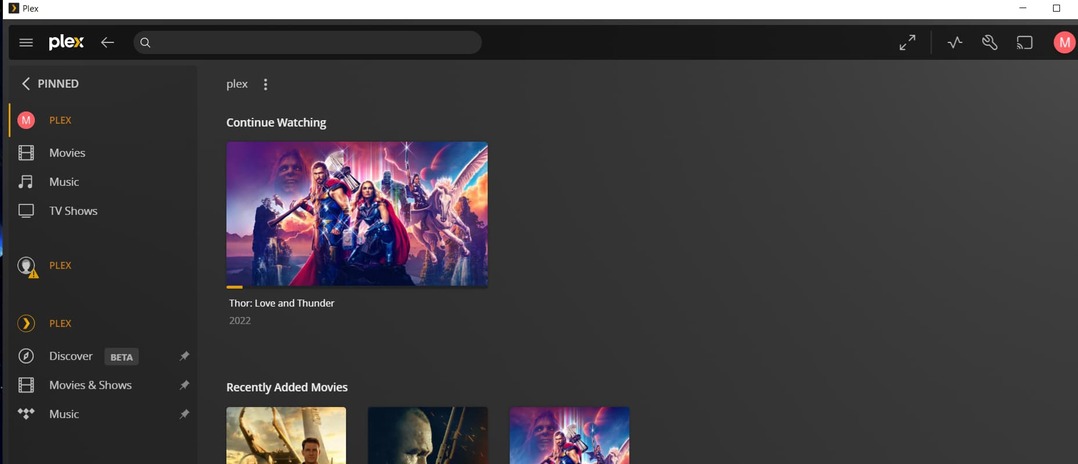
Your new server installation is literally a new server.
Which means that you continue to see the old, now defunct one as well. (You can have almost as many servers as you like in your Plex account)
Remove the old server from here: https://app.plex.tv/desktop/#!/settings/devices/pms
(careful to remove only the old server)
Thank you. I removed the old server by going to the setting page. First, clicking on the “wrench” at the top right of the page on my ‘home’ tab, then finding ‘plex’ with a green hand bag next to it, on the left side of the setting page. There is the current version at the top and older versions underneath. So I deleted the older grayed-out version. That appears to have been the solution. Thanks. I was unaware that the old configuration still exists after you create a new server. Again, thanks!
