Selective Plex Inability to load / play selective files - I get infinity spinner

Hi.

Could someone recommend some fixes for my issue? I’ve tried no end of searches but can never find anything that fits my specific situation.

Situation:
Have Plex server installed on my home PC, it reads data across the internal HDD and several externals. No issue for years running this setup.

I view Plex predominantly remotely as I travel for work. I use a variety of devices, laptop, tablet, xbox, but always through the web page.

I watch a TV shows and movies. Some in low def, some in high def.

Issue:
Plex will choose, seemingly at random, certain movies that it won’t play. I never get an error message, the load spinner will just spin for infinity (I left my ipad plugged in and spinning for 3 days once as an experiment). Sometimes this will happen at the very beginning and it won’t play the file ever (Again no error message). On some it’ll play for 5 minutes, or 20 minutes, or even a couple hours, then hit a wall… give me the infinity spinner and that’s that.

Then with TV shows it’ll pick these at random to do the exact same thing. Except in addition to that sometimes it’ll start the infinity spinner at 5 minutes in. So I close the browser, wait 10 seconds, reopen it. Hit play and it’ll then play for 5-10 more minutes then hit me with the infinity spinner again. It’s not buffering because it never catches up. It just hits the infinity spinner and will only start again if I close the browser and reopen it.

This is of course incredibly irritating.There is no pattern to this. It’s not say on Wednesday nights when my wife is streaming something else. Or when there’s a storm. Or the internet speed vary (They remain constant 70MB at home and 200+ MB when I’m travelling). It doesn’t afflict just one file type (I’ve had issues across .mkv .mp4 etc. It not just 1080p, it happens to 720p and lower too. It’s not just large movie files, it can happen to 20 minute TV shows that are 100MB.

Numerous times I’m having to use the RDP I have setup to stream (It’s not good quality) the shows/movies to my personal laptop but they play like a stop-start training video. But this at least confirms there’s physically nothing wrong with the files or the storage device they’re on.

Like I said I never get an error message so I can’t report what the error is… i just get this infinity spinner.

So nobody knows? And that’s why I’ll never pay for premium. Can’t be relied on.

I don’t remember seeing this post before, so maybe I’m not the only one to “miss” it. Whatever the reason, I’ll see if there is any way we can kick off getting help for this.

This is a head scratcher. Let’s gather more information, to see if anyone else can clue in on a possible suspect.

  • Are you ever encountering this issue at home? You mention primarily using this remotely, and then always through the web player. Sounds like possible dropped network connections; internet hiccups that seems to drop the connection between the client and server.
  • There may be no visible error, but lots of clients have error logs that might be accessible one way or another.
  • Since you mention iPad, then are all your devices apple-based? Does this mean you are using only Safari?
  • The server itself also generates logs. You can download several hours/days worth of logs by using the “troubleshooting” section of the Plex settings menu, clicking the Download Logs button. I don’t know what to look for, but perhaps someone might know and give a hint.
  • You can also see server log events in real-time by going to the “Console” menu in Settings. Here you can even filter for Warning and Error level of lines, to filter out the large amount of fluff these logs generate. You will want to reproduce the spinny circle problem while the console is open to see if there are any errors logged server-side.

Hey. Thanks for coming back to me, appreciate your help troubleshooting.

As I type this I’m in the process of trying to watch an episode of Ozark that is stopping every 2 1/2 minutes :-/

  1. I can have the issue at home, even when on the same wifi network. But nowhere near as often as when remote.

  2. When you say client are you talking about browser? How would I access these error logs? I presume they’re fairly indeciferable so might need some help translating haha

  3. Haha it’s funny you ask. I actually hate Apple products and iOS but have a work iphone and ipad so I’m pretty tied in. I tend to avoid Safari, preferring Chrome on iOS devices. I encounter this same error across all my devices (ipad, iphone, Xbox, work laptop, personal laptop). And encounter the issue across a multitude of browsers: Chrome (most commonly used), edge, Firefox and Safari.

4/5. I’ll take a look and see if I can find these logs. But yeah I’ll most likely need help translating!

Hmm. Next time this happens, get a screenshot of the dashboard. (Click the heartbeat icon next to the gear in the upper right, and click Dashboard). Expand the list to show more info by clicking the double-underlined square in the upper right corner of the page (below the heartbeat icon you clicked earlier).

This can tell us a load of info about how the media is being streamed. In particular, I want to know if the video is being transcoded by the server (highly likely if you use browsers to view stuff), and whether the server claims to be “buffering” when it is spinning.

I do not know if/how browser clients (yeah, the browser is a client, a player) have logs to view. I’ve heard of them being found for set-top Android boxes, but I have no idea for browsers.

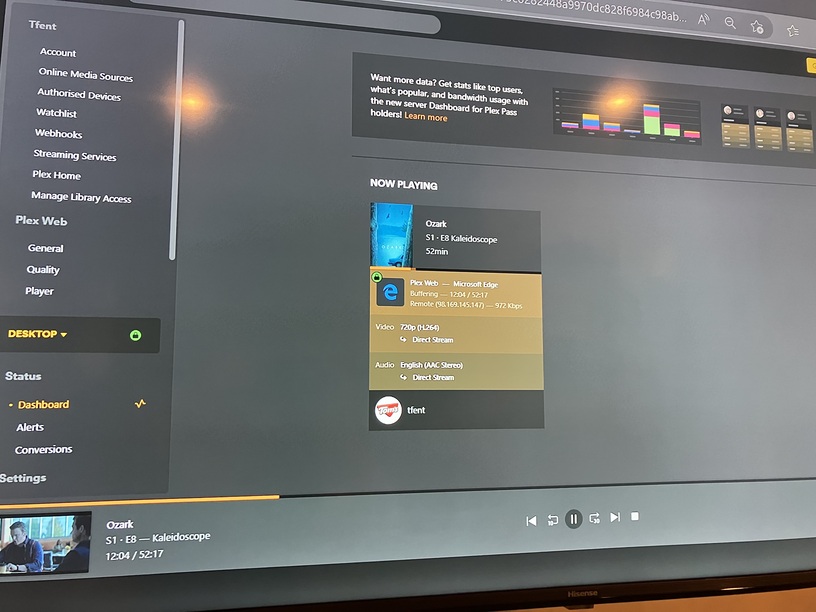
Hey. Grabbed a screenshot and video. Looks like it says “buffering”, but it’ll buffer forever without intervention.

Okay, that is interesting. It’s direct-stream, which means the server isn’t transcoding it, so that isn’t relevant. The video itself is fairly small (~1 Mbps. fairly compressed 720p). Remote connection, as you said, but it’s not using the Plex relay, so that’s good.

It says buffering, and it appears to have sent a little bit (the darker orange bar under the poster is a video segment that your local player has downloaded but not played yet). Looking at the mini player at the bottom though, the player doesn’t seem to believe it has any buffered data. Hm.

Well, it’s good to have this info, but it rules out a lot of common issues I was hoping for (as I can help troubleshoot those).

The only other thing I can think of at this point is to wonder if your internet has really bad upload or there is some network protection blocking the traffic. The first is unlikely, as you said this happens at home. The second… is a lot more difficult.

Anyone else have an idea here? Server logs, perhaps?

Much appreciate your help! Any suggestions on the root cause from.anyone else?

Still happening on the vast majority of my library. It’s weird because I used Plex for about a year without issues before this started happening.

We changed nothing in this time, our home internet remains 100MB and if anything the “away” internet has been stronger.

It’s really disappointing, I’m so glad I don’t pay for premium !!

This topic was automatically closed 90 days after the last reply. New replies are no longer allowed.