Lots of people say the easiest way to get around 4K transcoding issues is to have a separate 4K library which is not shared to other users. This is all well and good but how on earth do you separate the 4K files from the others? Presuming the filename doesn’t include metadata, it seems Plex is unable to properly deal with metadata like bitrate and resolution so I can’t work out a doable way of identifying and moving the files.
A totally new library for them.
Things are improving though. Some clients have started doing a far better job of identifying the best file to use for that given client. But it’s not quite there yet I every client.
you need to keep them separate outside of plex, keep them in a separate folder (and separate plex movie library).
regular movies library
/media/movies
4k movies library
/media/movies-4k
3 Likes
That’s my question. How do I identify them to move them?
View library in Plex Web. Sort by Resolution. Either Grid View or List View.

ideally, you should already know they are 4k when you are ripping them.

2 Likes
I know. Again, the reason I ask is because it’s well established that sort by resolution has never worked.
I did. That’s why I put 2160p in the filename. It still isn’t helping me find and move them.
filter by resolution works for me
you can even save them as auto playlists (they update automatically)
plex does not move files, so if you are wanting to use plex to move/rename files, then that just isn’t going to work.
using the above screenshot by fordguy you can filter the 4k movies, then manually move those movies to a new folder and create a new movie library in plex and point the new library to the 4k only path.
2 Likes
I have each movie folder labelled Title (Year) and each file labelled Title (Year) - Source-Resolution.ext. When I have a 4K rip and 1080p rip of the same film, both go in the same directory so Plex can group them.
Neither sort by bitrate or resolution has ever worked with this set up.
I want to find them with Plex so I can move them.
Works for me.
All my 4K movies say “4K.”
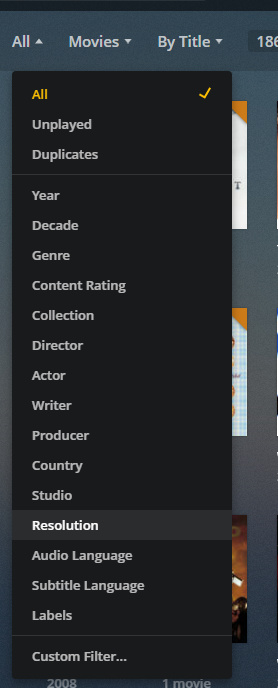


Again, I think I’ve said many times I’m perfectly aware how filter is supposed to work as well as sort by columns. They just don’t work with multiple versions of the same film.
plex will need to have analyzed the files to get the resolution, so if that has not been done.
the movie info page should show the resolution and audio

Run a recursive “ls” from the command line & pipe through grep for the resolution.
Don’t know the syntax off the top of my head, but a quick google search will find it for you.
ls -lsR | grep 2160 or something similar. “R” is recursive. Other options as desired.
column view also shows resolution for me (you need to enable it as indicated below)

here is all movies list, the entries without a resolution are a collection

sorted by resolution
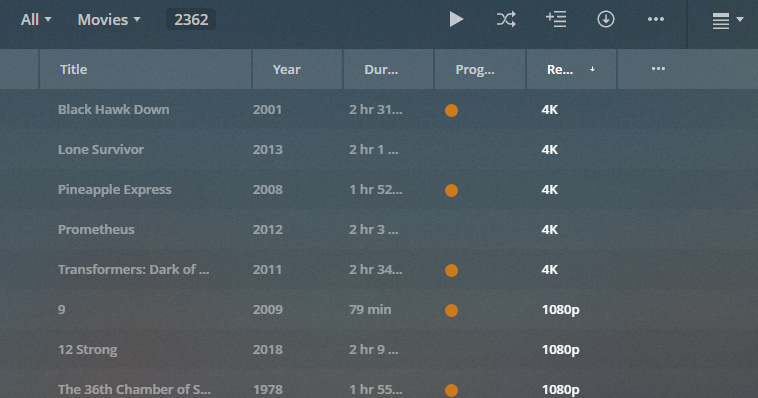
Again, I’m perfectly aware of basic functionality of Plex. I know how it should work. The files have been analysed. Showing screenshots doesn’t help when it’s not working as it should.
I’m asking how to get it to work when these functions are not working as intended.
Thanks. I think Plex just won’t help here. I’ll write a shell script or use rclone I guess.
well try to analyze your library;

if you are using some kind of remote file system like a google drive or whatever, then that is probably why plex hasn’t analyzed the files to get the resolution/audio info.
Really?!
I’m pretty sure I understand basic Plex functionality like filters, analysing a library and sorting by columns such as bitrate and resolution. That’s exactly why I’m saying these features don’t work because I’m well aware of them and am trying to use them.
It’s getting a bit silly when you tell me Plex needs to analyse a file to determine its resolution.
if they have been, then there would be resolution/audio info stored in the database and you would be able to see/filter/sort by resolution.
either your analysis is broken or you have some database issue or some other unknown problem that is specific to your setup, cause it works for me and apparently fordguy (and probably everyone else).
