Hello All, this is something I just noticed recently.
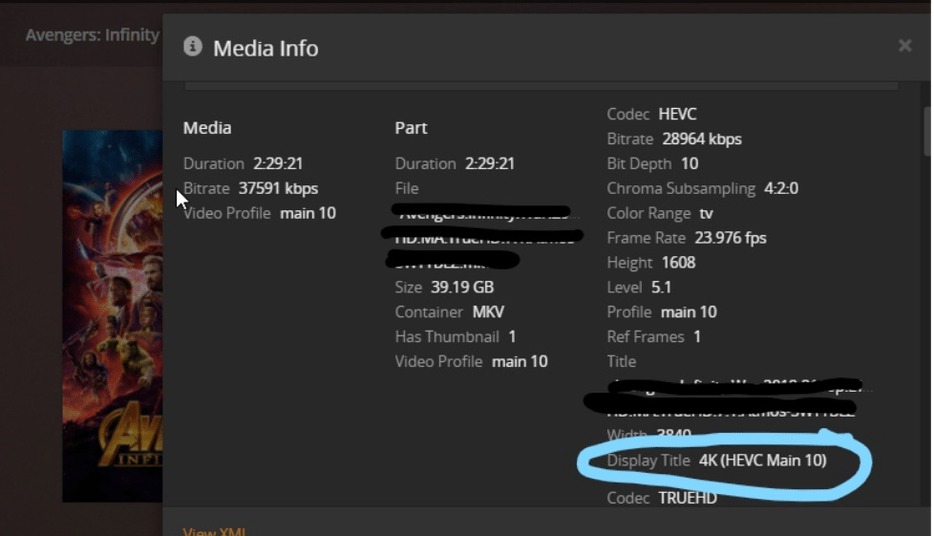
Using Plex and filtering by “Resolution: 4K”, a lot of my movies do not show up under this. I have a bunch of movies with “4K (HEVC Main 10)”, these are not mapped to anything even though they are 4K. Looking at the “Video Profile” it is mapped to “main 10”.
Any suggestions would be appreciated. I am on Plex Version 1.15.4.993.
Thank you
What Plex client are you using?
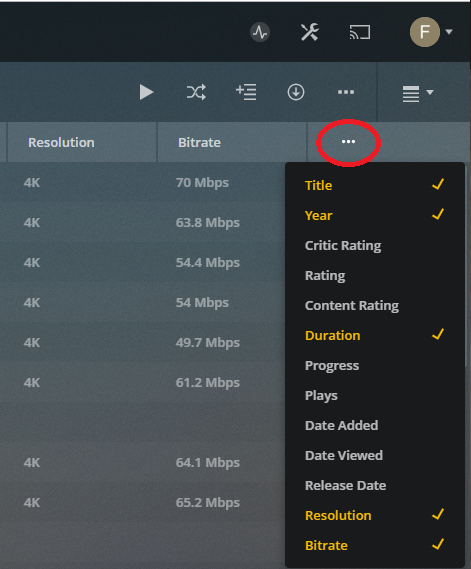
If you use Plex Web in List View, does the Resolution column show the movies as 4K? You can also check Video Resolution with Get Info / Media Info.
If the movies have the incorrect resolution, try re-analyzing the individual movies (or the entire library if that is easier).
If I use Plex Web and define a custom filter for Resolution, 4K is listed. 4K is also listed if I click on All -> Resolution. Note that Plex only lists the resolution for media present in the library. If there are no 4K videos, you won’t see 4K listed (same for 1080p, 720p, etc).
I’m using Plex Web v3.97.3 (current hosted version) on Chrome/Win10 and PMS 1.15.5.994 on a Synology DS918+.
Grid/List/Summary View selection

What columns to display in List View
FYI, the listings w/o resolution or bitrate are Collections, not individual movies.
Get Info / Media Info

All -> Custom Filter
All -> Resolution

Hey Thank you for reaching out.
So I don’t believe this is a ‘UI’ thing. I have several players, Chrome, Nvidia Shield, Roku, they are all seeing the same Metadata. I am able to sort by resolution (as you mentioned above), however these HVEC encodings do not show up as part of the 4K category. The 4K movies I do have in Video Profile just say “4K”, not "4K (HEVC Main 10).
I have attached a couple screenshots.. Happy to share more info if anyone can lend any additional info..
Thanks for the info.
It seems Plex is not picking up some info from the movies. Try re-analyzing the file or library.
Below is Media Info from my system for the same movie. Notice the difference in the Media column.

Thank you… I tried:
- Fixed Match
- Analyze
- Then I umatched, and then rematched…
All the same… The video format never changes to just “4K”. I don’t believe its my system, since I do have 4K movies that have the 4K resolution…
Would you happen to know the DB column, I’ll just go update that, and call it a day.
Thank you.
Does anyone else have any suggestions? Probably going to do some risky database updates if nothing else…
Try Plex Dancing the movie.
This will remove all metadata, XML, etc info about the movie from your PMS. When you add the movie back, it is like adding it the first time.
For some reason the PMS scanners are not gathering all the data about yoru movies. You should see Video Resolution, Width, Height, Aspect Ratio, etc listed in the Media Info window. Plex Dancing the media forces a complete re-analysis. Hopefully the Plex scanners pick up all the data when re-analyzing the movie.
Hey yes, this worked! Much appreciated…
Is there a way to script/automate this, without re-importing the entire library?
Unfortunately not. Folks have been asking for such a thing for a long time.