Server Version#:
Player Version#:
I check my virus protection, checked the tech stuff here, signed on to the server, confirmed device etc but no library access for the server. What else can I do?
I’m not quite sure where you’re coming from or what exactly isn’t working for you.
Is this about libraries being missing on your server when accessing it on the browser or some other apps? Do you have access to the libraries in question elsewhere (e.g. via the browser)?
Did you check the More section in the app sidebar to find unpinned libraries?

The side bar has my library as PC. The wheel icon just keeps turning like it is trying & never changes, even after days. I cant access my library thru the browser or the server.
Same experience if you open your server in a browser using https://app.plex.tv/desktop ?
I assume the Server app is running.
This is what shows up when I try https://app.plex.tv/desktop even though the server is running. I have tried using the link in the yellow bar that reads, “Get Plex Media Server” to download media server again but when I do all that happens is the little wheel keeps spinning like in the pic I shared earlier. Any ideas what else I should try?
Thank you for all your help,
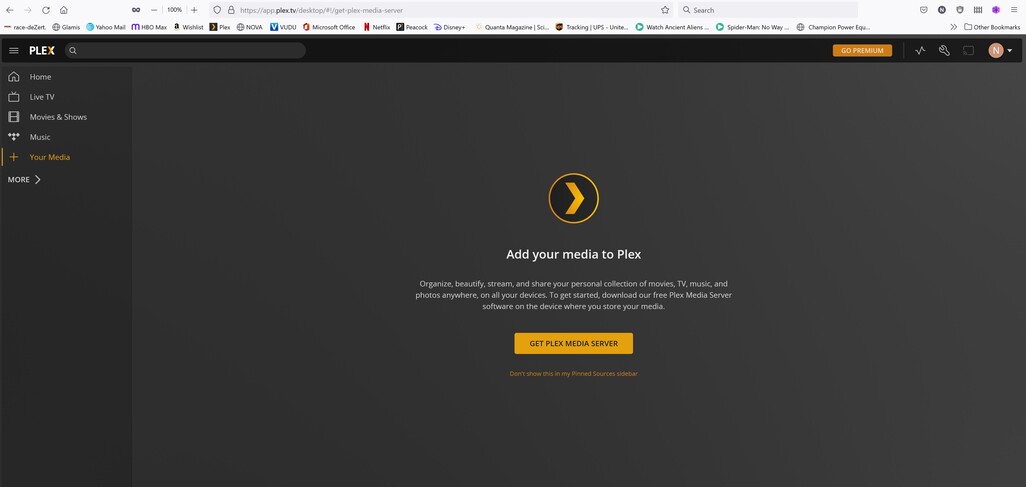
Did you previously complete the setup and create some libraries or are you stuck when initially setting up the server?
Based on the 2nd screenshot it appears the server is at least not linked to your account. Do you get to see any local libraries or the server settings if you open http://127.0.0.1:32400/web from the machine that’s running your server?
This topic was automatically closed 90 days after the last reply. New replies are no longer allowed.
