LOL fresh launch of chrome opened incognito went to 127.0.0.1:32400/web got same result splash screen then nothing no other windows up nothing. I mean it is aggravating but at least I know I can use Firefox to get to it instead. I just hate not figuring out stuff like this and using work arounds but it is what it is at this point I guess. Thanks for your assistance
resultant splash screen?
(the “not hosted by plex”)
Then log in?
Then nothing?
If this is true,
- Stop plex
- make a tar.gz / zip of the Logs directory and attach

I don’t even get the login or the option to select the users just immediately goes to this screen and just sits there
exit that.
open a terminal window:
curl http://127.0.0.1:32400/identity
It should come back claimed="1" if it thinks it’s yours.
If, claimed…
STOP PMS…
Make a tar.gz of the logs and attach
ChuckPA can you pm me please. I am still down and I am no closer to resolving this issue. I have been able to ssh into the server but after that nothing works.
Chris
For anyone else on TrueNAS, I was able to use ChuckPa’s script as a guideline and helper to manually claim my server back. Here’s how:
- Get the UserCredentialReset.sh script onto the jail where Plex lives (Home directory for root is where I placed it on mine)
- Shut down Plex (for me it was
service plexmediaserver_plexpass stop), useservice -eto get the enabled services and find the one that matches Plex - Verify nothing shows up when you do
ps auxwwww | grep -i plex - Find your in-jail absolute path to Preferences.xml (for me it was
"/Plex Media Server/Preferences.xml") - Save a backup of your Preferences.xml
- Open Preferences.xml in the graphical editor of your choice (I used WinSCP to open it and NotePad++ to edit it)
- Delete the key-value pairs for:
PlexOnlineToken,PlexOnlineUsername,PlexOnlineMail,PlexOnlineHome,secureConnections,AcceptedEULA - Edit line 319 of UserCredentialReset.sh to print the received token:
echo " Token: $Token"
The next few steps need to be done within 4 minutes or else the token will time out
- Grab a claim code from Claim | Plex
- Run the script with the -p flag and path,
sh ./UserCredentialReset.sh -p "/Plex Media Server/Preferences.xml"and insert the claim code when prompted (You can disregard thestatandsederrors - The script will spit out your username, email, and the
Tokenthat it received back - Manually add back the following key-value pairs with the values you got back:
PlexOnlineUsername="returnedUsername",PlexOnlineMail="returnedEmail", "PlexOnlineToken=“returnedToken”` - Additionally, add
AcceptedEULA="1",PublishServerOnPlexOnlineKey="1" - Save your changes to Preferences.xml
- Start the Plex service (
service plexmediaserver_plexpass startfor me) - Access your Plex server via it’s local network IP address:32400/web/index.html and sign in
Your server should now be accessible again.
Hi, I am a complete idiot when it comes to all this stuff. So apologies for my stupid questions… Ever since the forced password reset, I can’t connect to my Plex server on my Synology Diskstation DSM 6.2.4-25556. I’ve tried all the easier solutions but nothing has worked. The instructions here look pretty straightforward for those who are familiar with all the language, but I am not a computer wizard and can’t even get past the second step. What is a tar file and where do I find it? How do you elevate the command line shell? How do you invoke the utility? Apologies again, but I’m desperate to get Plex up and running and I’ve been so frustrated with trying to get it back on line. If anyone can help me, I would be so deeply in your debt. Thank you!
There is a very easy way to do it manually.
-
Stop Plex
-
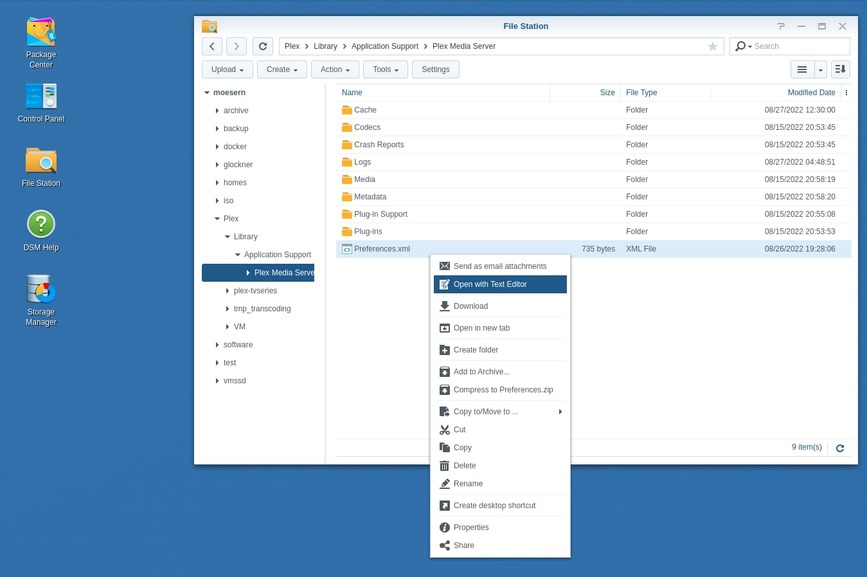
Package Center → Install the Synology “Text Editor” app.
-
Open the Plex shared folder and navigate down until you see Preferences.xml
-
Right-click Preferences.xml and “Open with Text Editor”
-
When it opens, you’ll see this:
-
On the second line is where we will do some editing.
-
Cursor across until you see the first of the four items we need to remove. They can be in any order. We only need to make certain we remove the complete field of
Thing="Value"

- PlexOnlineUsername
- PlexOnlineMail
- PlexOnlineToken
- PlexOnlineHome (if it exists)
Look here at my Preferences.xml

-
Cursor over to where “PlexOnlineUsername” starts.
-
Slowly tap the delete key and start deleting each of the pairs we need.
-
When all four
Name="value"preferences are removed, SAVE the file and exit. -
Now start PMS
-
Now connect to PMS using the LAN IP in your browser.
This is necessary because, at this point, the server isn’t claimed.
You are awesome, Thank you so much for helping me out. I did everything, but the only option I have when I open the PMS is to download a server, not claim a server. Am I doing something wrong? Thank you so much again!
Did you open the server directly by it’s Synology IP?
http://ip.addr.of.syno:32400/web ?
( You can’t use app.plex.tv – YET) 
Supplemental:
If you still have problems claiming it, I’ll show you how to use Task Scheduler to clear the credentials and claim it in one step.
Hi, thanks again for the tips. When I type in the Synology IP address, it keeps defaulting to app.plex.tv… Urgh. Not sure what I’m doing wrong… I don’t know if it matters, but I am on a MacBook…
I haven’t seen any web browsers “defaulting” to something other than what you type in. IOW if you type in https://192.168.1.100/ it should stay https://192.168.1.100/! What web browser are you using? How and when does it default to app.plex.tv?
DSM 6 ONLY
Let’s just do this whole thing using the utility I wrote.
- Stop PMS
- Put the utility in the “Plex” shared folder
- Control Panel - Task Scheduler - Create a task -
– User-defined Script
– Run as: root
– Email yourself the results

- Contents of the script
cd /volume*/Plex

chmod +x UserCredentialReset.sh

./UserCredentialReset.sh

-
SAVE the new script
-
Open the script again (get it ready to use)
-
In a new browser tab: https://plex.tv/claim
-
It will present you with a claim token
-
COPY the token into your browser
-
Switch back to the Synology and PASTE the token

-
“OK” again to save this.
-
RUN this task one time.
-
Check your email.
-
You should have an email from your Syno which contans:
bash-4.4# ./UserCredentialReset.sh claim-j8uv3SafErJdszRYjzgX

          Plex Media Server user credential reset and reclaim tool (Synology (DSM 7))

This utility will reset the server's credentials.
It will next reclaim the server for you using a Plex Claim token you provide from https://plex.tv/claim

Using given claim token:  'claim-j8uv3SafErJdszRYjzgX'

Clearing Preferences.xml
Getting new credentials from Plex.tv
Claim completed without errors.
 Username: ChuckPA
 Email:    Chuck@myemail.com

Complete.  You may now start PMS.
bash-4.4#
Hi, sorry I was on a business trip and just got back the other day. I just attempted to try this but I am stuck on #2 and the reference to a utility. Everything else looks clear enough, but I’m just stuck on where where your utility is posted. Thanks again and apologies for all this back and forth. Hopefully this solution will work!
Hi, it worked! I’m back in. I can’t thank you enough for your assistance in getting things up and running again. You are absolutely brilliant!
Running the script and getting as far pasting the claim token into the putty window. It comes back with “ERROR: Could not get credentials from plex.tv (Error: 6)”.
Check DNS and default router on the box
I’m running on DSM 7.
