Are you trying to use this on a Windows Plex server ?
Hi there, thanks for this however I have a massive problem with steps 3 onwards! I’ve loaded Putty but when I entered the network location for my WD NAS it tells me access is denied. Aside from that, most of the writing after step 2 could be a different language for me, sorry!
Is this the only way to solve the problem? I’ve tried all the various solutions that have been posted but still have no visibility whatsoever of my server in Plex
@ChuckPa I have a MyCloudHome that I use to store data.
I access it through
- my laptop that has a windows OS and a Mycloudhome folder
- my connected TV through the plex app.
When I look in My program in my laptop I can find Plex in the list but I do not know where it is installed.
EDIT: I have in the MyCloudHome folder a Plex folder.
Here is the important question.
- Where is Plex installed ?
– On the MyCloud ?
or
– On your laptop ?
I think on MyCloud.
When I open mycloudhome.com, I can see it on the “do more” section

EDIT: I have Plex installed on Z:
I have put your .sh there and executed it through a command. But it just opens it in Notepad.
I tried to launch manually but it does not find the path.
I copied your .sh there

I also tried with it copied there

Do you know if SSH is enabled for your machine?
https://technical-tips.com/blog/internet/wd-my-cloud-enable-ssh-26693
1 Like
Thank you @ChuckPa .
I don’t understand why it doesn’t work for me. The config for curl seems to be the same.
The only difference is the root user but my user is in the same admin group.
Still blocked and i can’t use my plex server.

Describe ‘blocked’ please? There is no “blocked” in linux.
These steps are for MyCloud, not MyCloudHome.
I cannot enable SSH
Then this might be as I thought.
I need help from our Engineering team.
If it is how I think I understand,
- Some WD (MyCloudHome) uses Android
- Others (PR2100, PR4100, etc) use Linux

My utility only can support Linux because all the Android management is via a private app.
Is this correct ?
I have the answers:
-
Restart the NAS
-
Open your browser to the Wester Digital Cloud Management Web UI page.
Do not manage Plex using the NAS -
There is a “Do More” section.
-
Click on “Plex Media Server”
-
Click on the button where you Open/Launch/Configure
-
Now you can configure & reclaim the server there.
What happens here is the WD MyCloud Home sees it’s not claimed and then launchs into claiming
@ChuckPa
I am not sure.
Seems to me that mycloudhome is still linux.
When I connect to my plex account, in the “appareils autorisés” (authorized devices), we can find

But not connected for 6 days now
Is it possible to have someone call be to help me with a step by step approach? To be completely honnest, I fear that I will not be able to succeed even with all the efforts you are putting to help me (thanks a lot again by the way).
Plex does not have telephone support… (not that big — yet  )
)
I have asked one of the engineers to look in this thread at your posts here to advise me.
Have you tried using the cloud-based WD management UI ?
I do not know what it is.
The engineer messaged me.
I quote:
The user needs to use the main WD WEB UI to claim, NOT the plex web app
I had granted friends access to folders instead of the entire server. I didn’t use this utility but after claiming the server all my friends have no libraries shared with them. Asking here because y’all are going through this process too, have any of you lost the friend sharing too? Is there a way to multi-select or batch share the libraries back to all friends? One at a time is 10 clicks per user to clean this up.
I have no idea on how to access this.
Concerning your other suggestion, I tried several time through the web app MyCloudHome and when I click on “configure” for PMS, it opens a new tab (Plex)
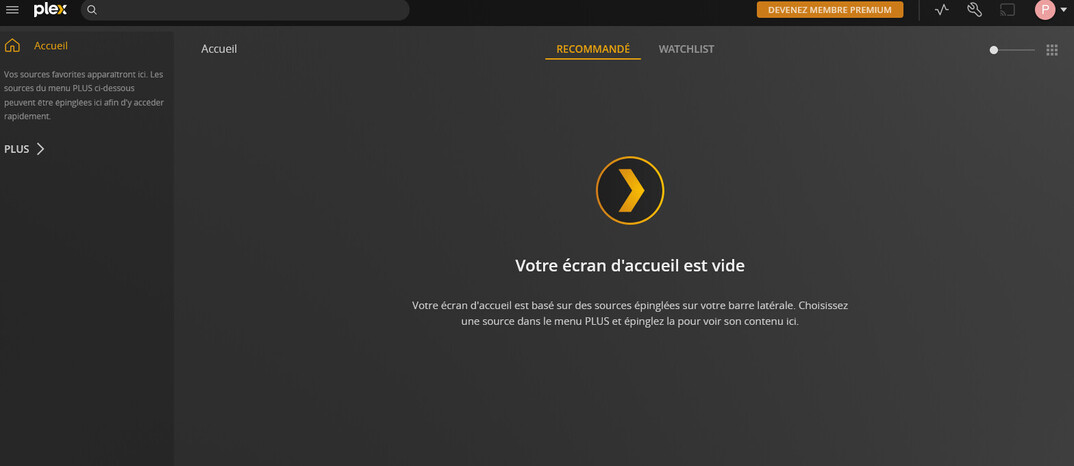
I cannot claim anything there
greetings Chuck
I am sorry to be a bother to you but this is greet to me.
what is the “host” my windows computer or my DS920+
is there a simplier language you could explain the process in for people such as myself
I really need to get my server back up and running
I am so frustrated right now i dont know what to do
Sorry for my sentence.
The script still doesn’t identify than curl is installed and i get the error even if the path is the same as you :
This utility requires the 'curl' command which is not found.
Please install 'curl' or add it to 'path' if already installed.
