Server is gone............ again

Server Version#: 1.105.2.269-12a32491
Player Version#:

For the second time in the last few months, my server suddenly became unavailable, and then a couple days later, vanished completely.

The last time I tried all common troubleshooting, but nothing seemed to work although the issue did resolve itself at some point and the server was back and working normally.

This time, I haven’t done anything other than making sure it was up to date thinking/hoping it would resolve itself again. It hasn’t, and now it’s been down much longer this time than last.

Any ideas how to fix it, and what’s causing this to happen?

What troubleshooting steps were that in particular?

Is this about a native PMS on Windows installation or are you running PMS in a container?
Is your server data directory on the machine itself or stored elsewhere?

Server logs might give a hint on what’s been going wrong (unless the “becoming unavailable” is too long in the past).

These troubleshooting tips-
https://support.plex.tv/articles/204604227-why-can-t-the-plex-app-find-or-connect-to-my-plex-media-server/

It’s a native PMS on Windows 10 Pro with data directory stored on the actual PC.

I will try to figure out how to run the server logs.

I will also attempt to reclaim my server too as I’ve done some reading about it.

An important detail will be:
Is the server only disappearing from that particular client or is it vanished from all apps (e.g. including the web app if accessing it from the same machine hosting the server via http://127.0.0.1:32400/web).

It’s gone from all devices

Neither “http://localhost:32400/web” or “http://127.0.0.1:32400/web” work on the server pc. I get an error message that says “This site can’t be reached”

Trying to reclaim it at the moment,

Also, I can’t figure out how to download the server logs. This is where people stopped helping me last time. I’ve gone here https://support.plex.tv/articles/200250417-plex-media-server-log-files/ and this path doesn’t exist for me that I can see. I’ve watched videos on it, but they are all outdated.

Under Authorized devices, it’s been 22 days now since my server was connected

The server logs support article describes where the log files are stored on your system.

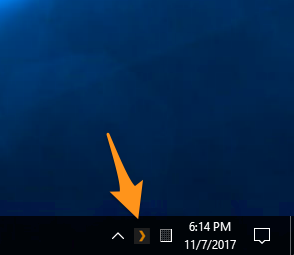
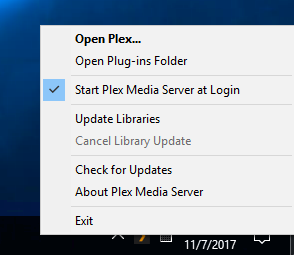
Do you see the Plex server icon in the Windows system tray, indicating the server is actually running?
PMS in the system tray PMS system tray context menu

Yes it’s running as I’ve been searching through it’s settings trying to find the logs.

For what it’s worth, all the actual media is there and is fine.

I’ve just signed out, closed it, and restarted the PC.

If you can’t access the server, you cannot download anything through Plex (the web app can’t download server logs if it can’t see the server).

Your server is running on Windows, so you should be able to find the files in your local file system:

%LOCALAPPDATA%\Plex Media Server\Logs

Well the Plex app is up to date and is running, but it can’t/won’t see my actual server.

I’m trying the find the logs using this now
%LOCALAPPDATA%\Plex Media Server\Logs

Ok I found the logs manually found the plex media server logs in explorer. What exactly am I looking for?

I found the latest entry which seems to be around 22 days ago I think
Plex Media Server.log (3.0 MB)

Is that the right thing?

There is another entry for the same day titled “plex media server.1” but it’s actually 2 hours older than the one I posted

vs.

Are you sure there’s a PMS icon in the system tray?
Unless you’ve configured your server to store its data directory somewhere else (which will include a different location for logs), that’s the last log and your server last ran on Dec 11 at approx. 6:45pm

Ok. Sorry, but the PMS icon is in the taskbar, and Start menu, but NOT in the system tray. The app is running though and is show in task manager.

I have no configured the server to store data anywhere else.

If I open the Plex app and sign in on my laptop, the PMS icon is shown in the sys tray, but I can’t get it to show on the host PC. Is that the issue here? I’ve uninstalled and reinstalled it on the host PC, but nothing changed.

Would you mind sharing what is showing in your task manager?
If PMS isn’t showing in the system tray, the server itself isn’t running – at least not properly.

Out of curiosity…
when you write the icon is showing in the system tray of your laptop but it’s not showing on the “host PC” – I assume that’s not the same machines?

Yeah the actual host PC is a desktop/server I built to host the files. It’s worked flawlessly for like 6 years with no issues until a few months ago. I can sign in to my account with the app on my laptop. I’m also signed in on several smart tvs. Of course my server isn’t showing up on any of them.