I found these Logs in the Library section, but no Migration.log appears.

I too, experienced the “Server lost after updating to 7.1-42661” issue.
(If this belongs in a new thread, please pardon my noob mistake and move it as appropriate)
I have a Synology DS218+ running DSM Version “7.1-42661 Update 1”.
Prior to the errors below, it was successfully running PlexMediaServer-1.26.0.5715-8cf78dab3-x86_64_DSM7.spk
Recently, communication between PMS running in my NAS and Plex.tv apparently failed. I now suspect that this occurred after I recently updated DSM to “7.1-42661 Update 1”.
My local PMS was named “HomServer”, and no longer appeared in my Plex.tv dashboard OR in my local PMS dashboard.
Not seeing any similar threads to this in the Plex support forums, I decided to completely delete and reinstall PMS.
And then it gets worse . . .
At the outset of a new Plex installation, one must obtain a Claim Token from Plex.tv, after which the installer needs to communicate directly with Plex.tv to complete the installation and configuration. This now consistently fails.
I attempted a manually installation of PlexMediaServer-1.28.0.5999-97678ded3-x86_64_DSM7.spk, as follows:
Select “Install using Plex Claim Token”
Click “Get Plex Claim Token”, which opens a new browser window to Claim | Plex
Copy the value from the new browser window & paste it into the Claim Token field.
Click Next.
A Confirm Settings dialog appears.
Click Done.
Within 10 seconds, an error dialog appears, with the following message:
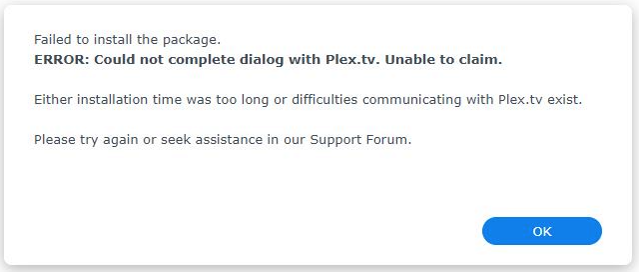
This error is persistent, after multiple Delete PMS / Restart DSM cycles.
I suspect that the Synology server is failing to connect to Plex.tv (Addresses: 54.72.40.42, 63.33.115.6, 34.250.156.248, 52.213.118.233).
There have been no changes made to the configuration of my ATT router, which has had the following configuration for 2 years:
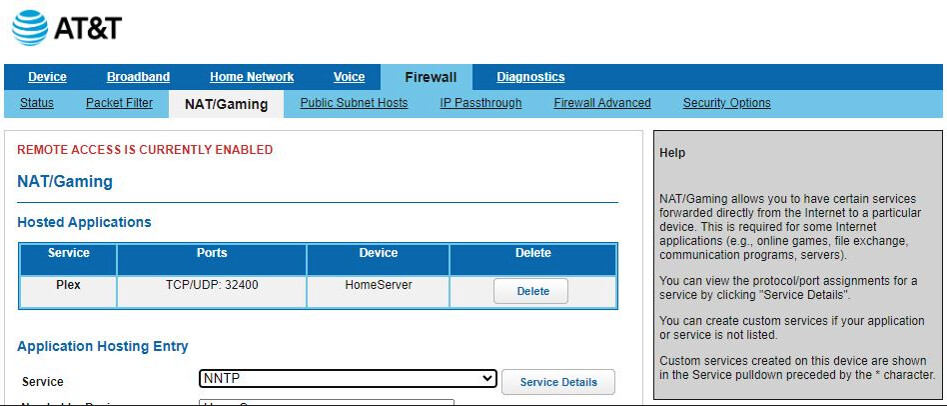
I opened an SSH session to log directly into my NAS & attempt to troubleshoot my suspicion, but the following commands do not work:
Admin@HomeServer:/bin$ nslookup plex.tv
;; Got recursion not available from 127.0.0.1, trying next server
Server: 192.168.1.81
Address: 192.168.1.81#53
** server can’t find plex.tv: REFUSED
Admin@HomeServer:/bin$ ping 54.72.40.42
ping: socket: Operation not permitted
There is no telnet client in /bin, so I’m out of ideas for troubleshooting this apparent connectivity issue.
Synology only supports SSH access for the security.
This line:
server can’t find plex.tv: REFUSED
That’s disturbing.
That tells me your DNS server is refusing connections
Suggest going into the Syno Control Panel - Network – and into the interface you’re using
For testing purposes, change the DNS to directly point to google 8.8.8.8 and 8.8.4.4
Save and retest
Changed DNS to Google, with no change at first.
Next, opened DNS → Resolution & discovered that Enable Resolution Service was NOT enabled.
Enabled it and Enabled Forwarders:

Restarted DNS, which now works:
Admin@HomeServer:~$ nslookup plex.tv
Server: 192.168.1.81
Address: 192.168.1.81#53
Non-authoritative answer:
Name: plex.tv
Address: 52.213.118.233
Name: plex.tv
Address: 54.72.40.42
Name: plex.tv
Address: 63.33.115.6
Name: plex.tv
Address: 34.252.41.177
Name: plex.tv
Address: 176.34.175.0
Name: plex.tv
Address: 34.250.156.248
Name: plex.tv
Address: 54.154.55.122
Uninstalled the failed PMS (+Erase All), restarted DSM & retried PMS installation, sadly with no change to my original problem.
PS: Synology Support says “Synology does not support downgrading the DSM”, so that option is officially off the table.
Can anyone suggest next steps?
Does the installer log any of its progress anywhere?
Good (but perplexing) news!
I again attempted installation of PlexMediaServer-1.28.0.5999-97678ded3-x86_64_DSM7.spk, this time WITHOUT selecting the Claim Token option.
It works perfectly (after of course scanning all my media).
The PlexMediaServer ID was automatically granted R/W access to my media folder.
My server is again reachable from the Plex app in my Android TV.
How is this possible without having obtained a Claim Token?
If there is a FAQ entry on Claim Tokens, their purpose and applicability to specific scenarios, please accept my apologies for having missed it.
Thanks again for the assist with the DNS in my DSM!
This topic was automatically closed 90 days after the last reply. New replies are no longer allowed.
