I made the mistake of updating to the latest Server Version#: 1.19.5.3112.
I now have several problems including connecting to the Server and Library updates.
The server is installed on the same PC that I am trying to access it from using the Web-App (at http://127.0.0.1:32400/). My PC name is “UD4”.
Sometimes when I restart the server it sees two UD4, one that it can connect to and the other is unavailable. It then wants to set up the connected server from scratch. In this case, I restart the Server.
Most of the time it cannot connect:
(The troubleshooting tips relates to connected devices, not connecting to the server from the Web-App).
However, as shown above, I can access the media files but not the settings.
I didn’t have these issues before the update. In any case, I also tried to disable my firewall, but it didn’t help. Sometimes, rebooting the PC rather than rebooting the Server helps.
Do you still have issues with access to server settings?
I can see two servers on your account -
one created 4 years ago on local IP 192.168.2.30 and appears to be running
the second one was created about 7 days ago and not seen since.
Do you use multiple windows accounts on your PC ? It is possible you launched Plex Media Server.exe using a different windows account and that created a new server instance in that windows account
Look for %LocalAppData%\Plex Media Server\Logs in all your windows accounts and copy out and zip each set of logs and attach. You can exclude Installer Logs from the zipped logs
Try to get to server settings and if it fails, get a screenshot with time showing and then get the logs zips
I do not use multiple windows accounts on this PC. The duplicate server appeared after I upgraded to the latest version about 7 days ago.
I realized that the access to the server settings had changed after the upgrade. I can access the settings in the top UD4 in the image above.
The problem is with the"extra" UD4 in the middle - that is “unavailable”. How can I delete/remove it?
Do you still need the logs? (do they contain any personal info?).
UNRELATED (I have not been able to get help elsewhere): After the upgrade, I lost access to the Sub-Zero UI plugin. I read that I now need to install Kitana to get access to the UI (https://github.com/pannal/Kitana). However, I cannot find the standalone Windows installer (that was recommended elsewhere). Any idea where to find it? I have posted this in github “issues” but never got a response.
Would need logs covering the time when the new server appeared.
But I would only expect a new server to get created if the windows registry entries for the existing server became inaccessible to the windows account was switched
Could you launch RegEdit with “Run As Adminstrator” option and then select HKEY_USERS and right click on it and select “Find” and paste in this value in the search box - searching Keys/Values/Data 55AB4B66FF6B308A48F40DD2F7651409C6493CB8
See if it is found and if it is then would need to find the SID for the user account and then we can translate the SID through the ProfileImagePath within the profiles held under HKEY_LOCAL_MACHINE\SOFTWARE\Microsoft\Windows NT\CurrentVersion\ProfileList
In Plex Web, click on Settings icon at the top
Then select “Authorized Devices” in the left sidebar
Use the filter to filter Server
Find the server that was created and last used 8 days ago and delete it
Very strange - you could give me saved copy of each of the Windows System Event Log and Windows Application Event Log and i will see if there are any clues for round the time when it happened. It was Friday 14th August between 23:06 and 23:10 - i think these are UTC times. So the registry only has this server id:
this is part of the ID 5e465a39666ab26fd98589
Send the Event Viewer files as zipped and by Private Message
Yes device entries get created if there is some attribute that is not the same as existing one.
You can filter the list and select Server
Yes it is safe to delete the spurious server that got created 8 days ago
I have had several problems since I did the Server update on Aug 9; 15:54 PST (from v. 1.14.1.5488 to v. 1.19.5.3112.). Note that the update got stuck and I restarted the server after several hours waiting. I had resisted upgrading for a long time because I was afraid things might go wrong …
I just realized that the 2nd UD4 server appeared 5 days after my update. No clue why. I did find the ID 5e465a39666ab26fd98589 in the registry (for ProcessedMachineIdentifier). I have messaged you the Event and Log files (I excluded PMS Plugin Logs & Installer Logs).
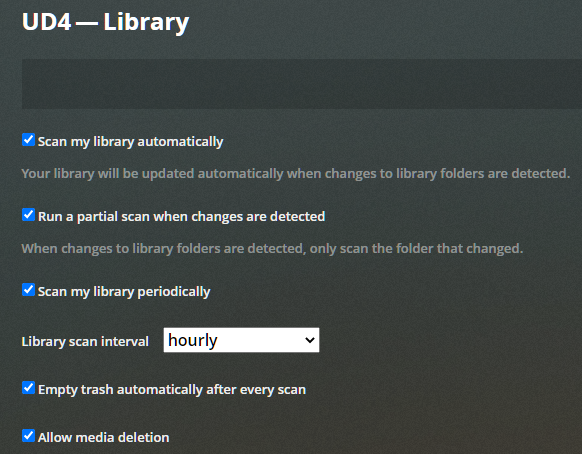
The 2nd problem, that started right after the update, is that the Library is no longer automatically updated. Here are my settings:
If I try to manually scan the library files (for TV-Shows) it appears that there is a stuck automatic scan:
However, there is no activity!? If I cancel the scan, and then do I manual scan, I see activity:
After a manual scan, the library is properly updated. Maybe you can help me figure out why the automatic scan is stuck by looking at the logs (which were saved before I cancelled the scan)?
UPDATE: A few hours later Plex is trying to do auto scan again and I again have the option to cancel the scan. I now see “activity” (rotating circle) but I am not sure what this activity is as nothing is shown. With the manual update it showed TV-Show scanning::
The 3rd problem is that I “randomly” loose the TV-Show thumbnails; the thumbnails are replaced by a black rectangle: .
I am not 100% sure, but I think that it happens after a failed auto library update followed by a manual library update.
I have to manually go in and refresh the metadata one-by-one for the lost thumbnails (I may be able to do a global refresh instead - I haven’t tried it because it takes a long time)
That was a big jump in versions. There were a lot of database changes between these versions - the database should get upgraded automatically
The Plex Update Service.3.log and Plex Update Service Launcher.log show that the update from 1.14.1.5488-cc260c476 to 1.19.5.3112-b23ab3896 started at Aug 09, 2020 15:51:26 and completed at 15:53:44. At 15:53:56.802 the server was running version 1.19.5.3112. No evidence of hung install - but we only have these two logs going back to the 9th of August
The event logs do not show much - only that a windows restart was initiated at 23:08 on the 14th August. The new server was created at about 23:06
The Plex Media Server.x.log files do not go back far enough - so can’t work out how it arose and why the ProcessedMachineIdentifier with value starting with 55AB4B66FF6B308A4 does not exist in the registry now. - very odd. Could there have been another PC launching Plex Media Server.exe ?
I can see a deep analysis scan getting stuck on this movie every time
P:\Ultimate_Server\Movies\Impossible, The (2012)\the.impossible.2012.720p.bluray.dts.x264-publichd.mkv
and then cancelled
The last log lines for the last instance of the hung scan
Aug 23, 2020 11:03:06.559 [35420] WARN - [FFMPEG] - Could not find codec parameters for stream 4 (Attachment: none): unknown codec
Consider increasing the value for the 'analyzeduration' and 'probesize' options
Aug 23, 2020 11:03:06.728 [35420] DEBUG - [FFMPEG] - After avformat_find_stream_info() pos: 271673928 bytes read:271684285 seeks:0 frames:941
Aug 23, 2020 11:03:06.728 [35420] WARN - Failed to find stream info for "P:\Ultimate_Server\Movies\Impossible, The (2012)\the.impossible.2012.720p.bluray.dts.x264-publichd.mkv"
Aug 23, 2020 11:30:54.937 [35420] DEBUG - Deep Analysis: Read 10000 packets at 89.748000
No other PC launched Plex Media Server.exe. I guess I will just ignore this issue for now and delete the extra created UD4 server. Just strange that it happened a few days after the update. Never seen this before (for several years). Maybe there are some new features in the new version that makes this prone to happen?
It streams w/o any issues. It is a large file (6.55 GB). How could I send it to you?
I am really confused. First of all, why does the TV-show scan hang when there is a problem with a Movie file? Second, why does it work to do a manual scan of the TV shows (after I cancel the auto scan)?
I subsequently observed this:
When I now try to Scan the Movie Library files, nothing happens when I click on “Scan Library Files”.
I then try to scan the TV-Show Library files, and it shows that I need to cancel the TV-Show scan which is stuck (and there is no activity)!?
I cancel the TV-Show scan and do a manual Movie scan. It completes w/o any issues…(it doesn’t get stuck).
It appears that it is only the automatic TV-Show Scan that has an issue…???
p.s. I temporarily removed the “problematic” movie file from the library. I will see what happens after the next automatic scan starts (if it still hangs).
UPDATE: After I removed the movie file (and subtitles), the automatic TV-Show scan worked fine. I then moved the file (and subtitles) back and it still seems to work. Very strange!
I also don’t understand why I didn’t have this issue with the old server version? The movie file has been there since 2013…
Any idea why some of the Thumbnails are missing? I just realized that they are only missing when I access the server using:
Just did a rollback from plexmediaserver_1.19.5.3112-b23ab3896_amd64.deb back to plexmediaserver_1.19.4.2935-79e214ead_amd64.deb, problem solved for now
No time to go into all details but first things i noticed was VERY sluggish GUI from media players, starting playback is usually instant but now took minutes!
New movies/TV-series media added was not match to anything, trying to match manually was unable to select agents, they where empty !
Tried to access server settings all options was shown as not available.
I think i will pause updating now for a few months.
The only possibility is that we got an error on trying to read the registry key - perhaps the registry was locked out - perhaps it was a launch of Plex Media Server on the 14th August coinciding with the shutdown you instigated - the fact that we cannot see the new machine identifier in the registry suggests that the same error that stopped us getting the existing identifier from the registry also stopped us accessing the registry to write the new machine identifier
Of course logs covering that time would confirm if this was the case - together with the system event log to see when the shutdown / restart was instigated in relation to the logged errors
Without the logs - it is a hypothesis but likely to have happened - as i have seen errors on GetRegistryValue before - the issue would only arise if this coincided with launching Plex Media Server
That would be difficult. You could do some testing with a cut version of the file - using mkvtoolnix to say create 500Mb chunks of the movies using the option to split the mkv. and then adding these to test library and see what happens with deep analysis and if there is one chunk that exhibits the problem
It appears that scan jobs are scheduled in serial - one at a time - so if one is running we would not scheduled the next scan in the scenario seen in the logs
Do you know if the scheduled tasks ran to perform the deep analysis on the file after you added it again ? - this would be logged during scheduled tasks window as
Aug 15, 2020 13:38:56.837 [6344] DEBUG - Butler: Scheduling deep analysis for: The Impossible
and
Aug 16, 2020 11:01:58.344 [10552] DEBUG - Butler: Scheduling deep analysis for: The Impossible
etc
It was this deep analysis that was hanging
Don;t have an answer but they are different versions of the Plex Web app - the first is referred to as the hosted Plex Web app, the second is the bundled Plex Web app
What is the difference between the two? When would I use one vs the other? In my case, the server is only accessed on the local network. Very strange that some thumbnails are only missing in the hosted Plex Web app.
Well … it is not relevant to a topic titled “Server not available after update”
I suggest you progress this through a new forum topic. with server logs and plex web logs from bundled and hosted apps and screenshots and indication of times of the tests
The Plex Media Server release notes mention when there is a version update to the bundled Plex Web app. The Plex Web app release notes list changes for each released version
The Plex Media Server.x.log files and Plex Media Server.log file and Plex Media Scanner Deep Analysis log files
(It is the normal server logs)
You can change the scheduled tasks time period (settings / server / scheduled tasks) - say changing start time to be at the next hour. Not sure if you need to restart the server.
You can search the logs for Butler: Scheduling deep analysis for: The Impossible
Searching logs for “Butler” would indicate when scheduled tasks are running
I moved out the “Impossible” movie, but the scan still hangs.
Currently it has been doing a TV-library scan for more than 6 hrs with the activity icon still spinning.
No new Plex Media Scanner Deep Analysis.log has been created (since 2 days ago), but the Plex Media Server.log is continuing to grow today. Not sure what to look for in this log (there are several “Butler” entries but no “Scheduling deep analysis”)?
Thanks for looking at this again!
It is very strange that all these issues started after the server update. I have the same media files.
The rotating icon has stopped now (after I put the PC to sleep - and woke it up) but the scan is still stuck.


 …
…


 .
.
