Server Version#: 4,1,08
Player Version#:
<If providing server logs please do NOT turn on verbose logging, only debug logging should be enabled>
I have 3 Plex servers (Mac, QNAP, Synology) which are independent. I turn off Settings Sync so that when I go to a specific server I get the pinned libraries for that specific server. Unfortunately this setting keeps getting turned back on, evidently when doing server updates. This means I have to unpin and re-pin some 30 libraries every time serttings sync gets turned back on.
That’s not how it works.
The settings sync is syncing settings for the client (web app) for your user account.
The server doesn’t play a role in any of this.
If you want differently populated side bars for different use cases, you either
create managed users and Switch Users depending on which type of media you want to look at. The snag: a managed user is not allowed to do any administrative operations.
turn off Settings Sync and use either different Web browsers, or Plex clients
Keep in mind that all settings of the web app are stored in a cookie. If your web browser (or some 3rd-party app on your computer) is regularly cleaning out cookies, then these settings are lost. You need to create exception rules to preserve cookies from plex.tv.
The basic principle of Plex is that you can access all servers, which are either owned by you or are shared to you, from within the same Plex client.
All libraries on all your servers are available. You can freely pin all or a selection to the side bar. If you switch the side bar to the MORE view, you can see all libraries, sorted by server.
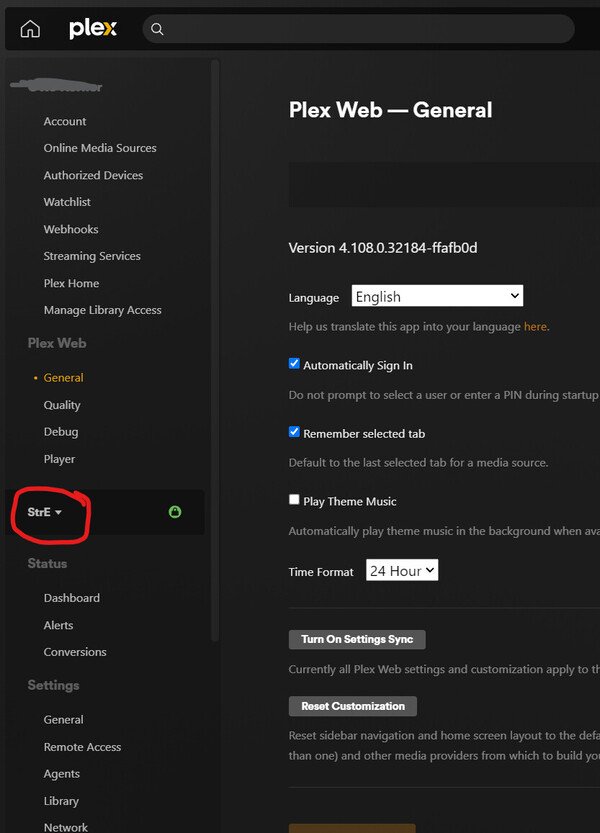
You can also manipulate the settings of all your servers from within the same web app.
All you need to do is to switch the server name when you’re in the Settings:
Thanks for your reply. Don’t understand why you say “the server doesn’t play a role”. With setting sync off I access each server by IP address and the pinned libraries are those which I set for that individual server. I use the same login for all of the servers.
Am I being unreasonable to ask that the settings sync switch not be reset when a server update occurs?
I can only recommend you to extend the list of exceptions which cookies to preserve.
Add all the IP adresses of each individual server to the list.
It was never intended for individual servers to have their own sidebar configuration.
Customization is always centered around the user. And since you are using the same user account with all servers, it is almost unavoidable that settings “spill over” between servers.
However, with the above mentioned exception list and carefully checking the “settings sync” after logging in on each local web app, you might be able to keep them separate if you only use the local web app.