Server Version#: 1.23.3.4707
Player Version#: last
Good Afternoon,
I´ve got a bug in the Plex Media Player in Shield TV Pro, it´s been wrong since I started using it (2 months ago).
I have multiple plex servers, 5 local, 1 remote.
I can connect to them perfectly from web player, apple tv and smart tv (LG) , select the libraries i want to pin and reproduce without a problem.
The issue comes in Shield TV , when connecting to the remote server, it duplicates the libraries of the local server i´ve selected as primary, and the libraries of the remote server appears with the names of the local libraries.
I´ve tried to reinstall Plex APP several times, change the names of the libraries… no success.
In the remote PMS there are 4 libraries, 2 of them shows right, the other two has a name of the local server (for example, Movies 4k appears under the name documentaries, wich is a library of the local PMS).
Aditionally, when i connect to the remote server (only in Shield) appears the 10 libraries of the local PMS, 8 of them empty, the other 2 are the ones with the content from the remote PMS but the library name is one of the local PMS.
Sorry for my english, trying to do my best explaining myself.
Not sure what you mean by this. You do not connect to individual servers anymore. All servers are available at all times. You can pin specific libraries from servers to the sidebar. If you are seeing the ability to set a specific server, you must be running a really old version of the Plex app on the Shield. Please double check what version you are using. If you still see the option to select a primary server, please provide an image so we can be sure we are talking the same thing.
Sorry, it´s evident that i´m not able to express myself properly in english.
I´ll try to explain myself again.
It´s the last version of the player on Shield.
I see all the servers.
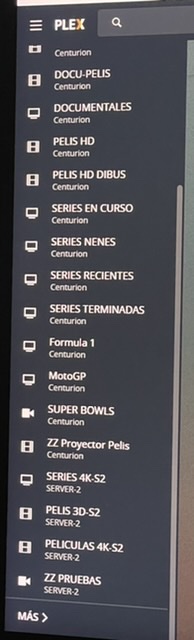
The problem is than the remote server, instead of appearing with the libraries it has (3) ( library 1, library 2, library 3) appears with the same libraries of the local server (8) plus one library of the remote server (Library A, B, C, D… + Library 1)
This libraries that appears in the remote server are empty, except for the one that it has the correct name (library 1) and two with wrong name (library B, Library D) wich has the wrong name but if i get into this libraries it has the content of the remotes libraries lost (name: Library B - content of Library 3 , for example)
Please, tell me if i´ve been able to explain myself better.
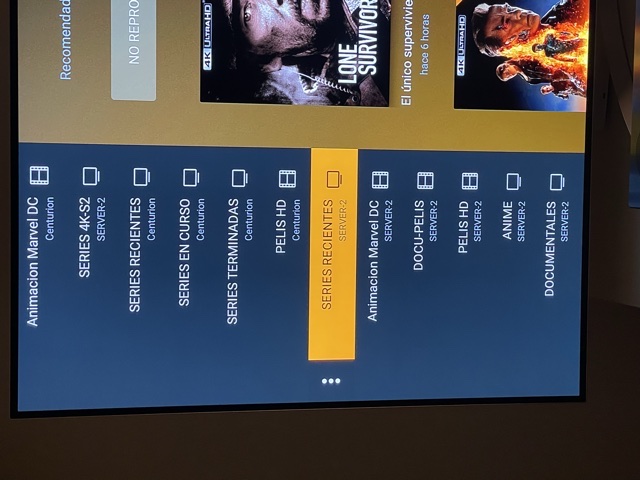
Second photo plex shield - library should be “PELICULAS 4K-S2” but it appears under “SERIES RECIENTES (server 2)” which is a library that doens’t exist in server-2 (PMS)
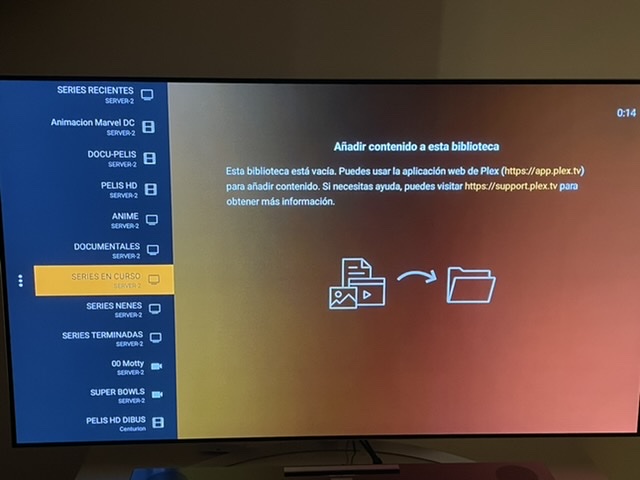
Third photo, a library in server 2 (the remote one) that doesn’t really exists (it only has 4 libraries, the ones that appears in photo 1) , and is empty and you can see the message displayed.
It is possible that these libraries existed before? If you delete a library from the server, it does not automatically get deleted from the sidebar. You can manually unpin it, which should get rid of it from the sidebar.
It’s a whole new server, started from zero, and only have the libraries you’ve seen, no other one has been created.
I’ve proven with another Shield, in another location and with other user, same problem, the server seems to be duplicating the libraries of other server.
Only happens in Shield, it works fine in LG, Apple TV and Plex web , it has to be a failure in the Shield App
Got the invite and accessing your server, I only see the 4 libraries.
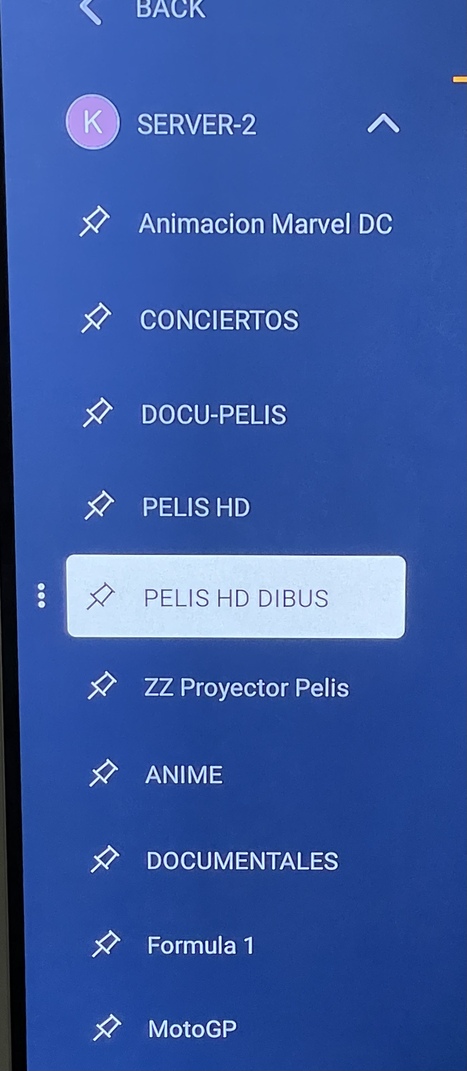
Your screenshots are the pinned sources, so somehow those libraries existed at some point and you had them pinned. Just go ahead and unpin them and repin the actual 4 libraries if you want those on the sidebar.
If you unpinned the library, they shouldn’t be there anymore.
That should have removed all the pinned libraries and you would need to pin them again manually. The only thing I can think is that you have an old server on your account that had these libraries and during the initial setup of the app when it ask you your main server, it selected these libraries. If you can try going through this setup again and checking the libraries shown when picking the server to see if this is the case.
If so, check your authorized devices using Plex Web and see if you have more than 1 server listed with that name. If so, delete the older one shown, then reset the Android app and check for the library names again.
That is so odd. Those libraries shouldn’t exist. Can you navigate around and try accessing those libraries from the more page, don’t pin them. Then get me the android logs.