I’m literally TERRIFIED to do this
def a memory leak, i noticed in the analyze loudness portion is broken..
│Sep 24, 2021 22:31:11.983 [0x7f4814c36b38] ERROR - Analysis: Format error ‘Out of memory’.
this error repeats multiple times a second.
i’m at 34gb of memory used and growing, and not even halfway though my collection.
edit: 10 minutes later at 60gb.

edit 15 minutes later, after disabling the loudness check in the settings, i killed the process after it reached 100gb and now everything is continuing normal, we’ll see how the full update goes.
edit: next day, everything updated, keeping loudness check off until i feel better about it.
Apologies in advance if this is off topic but I see lots of discussion here about the new Plex agents and seem to have an issue with the “Plex TV Series” agent specifically.
I saw the new “Upgrade Library” option and did that for both movies and TV shows. It happened really quick, seemed to fix some issues and overall loads metadata for everything much quicker without needing as much assistance fixing matches as the previous agents. I was pretty happy with everything until I noticed the other day that the Studio information shows for TV shows no longer shows the Network but rather the Studio that created the show? For example Ted Lasso shows ‘Doozer’ instead of ‘Apple TV+’. Um… what?
I found a few other posts that have screenshots and seem to articulate the issue better than I can.
Long story short it appears that the new Plex TV agent might pull “studio” info from IMDB instead of TVDB. The old “TheTVDB” agent seems to put the Network in the Studio field and I prefer that.
Anyone have a fix for this or know a workaround? Debating my options here.
- Go back to TheTVDB agent. Doing a little test and it seems to fix this Studio issue but OMG its so slow! I would also have to ignore the little suggestions to “Upgrade Library” in a few places.
- Go vote or comment on the other threads talking about the Studio/Network switch up and hope for a feature to come down the pipe that allows changing the fields on the TV show details screen. For example check boxes to pick which info you want displayed. Network and Studio maybe.
- Manual override somehow so the new TV series agent pulls studio data from TVDB instead of IMDB which is how it currently seems to be working?
Since only the new libraries will be supported from now on… I read through the entire thread and took the plunge.
My fears were I have 100% custom Movie collections with a large library of movies and TV series. I have selected my favorite posters for nearly everything. I have a Family Friendly label when I have custom selected shows and movies that would be appropriate for younger (and our elderly) friends and family.
I focused on the advice in this post:
Here is my experience:
PROs
- My customized collections were preserved. This was my biggest fear so very happy about that.
- Most of the posters were preserved…but look at the cons below for more details.
- For the most part as far as the average end user would be concerns nothing major was lost or changed on the front end.
CONs
- For whatever reason around 50 of my movies that were had the Family Friendly label lost it. It was fairly painless to find them with a few advanced filters, but I I still had to look for them and fix them.
- As far as posters, I am not sure if vast majority were okay out of luck. I do have quite a few posters that I will have to spend time changing to the ones I had selected before, both ones I had selected from the previous agent offerings and personally uploaded ones. Again, this is manageable if it is the worst that happened, I can live with it, fix them in my down time over the next few days and move on knowing my libraries are now compliant with the latest standards and future updates.
- EDIT: I just noticed out of all my TV series I do have to figure out and fix my Garfield Holiday specials. This seems to be the only causality after the update and after the metadata refresh that I have found so far.
Overall
- It went smooth and completed without any technical hiccups or challenges.
- I had minor label tweaks
- The largest opportunity is fine tweaking my posters again…which again is the worst that happened I count myself lucky.
This was a Sharing label that you applied to movies, and it was lost during the process?
the real question is: how to circumvent this shift if we do not want another agent?
You can’t without moving on from plex. Care to share your horror story or is fear guiding you?
Only a few movies. I am sure there was a margin of my oversight assigning the label PRIOR to the migration, but I know I certainly did some of them.
98% of them were just fine.
I think my biggest fear is episode order? I wish I could remember specifics - but I do recall naming a few tv shows with filebot and the TVDB had a different order than another agent… and there have been instances where I had to use TMDB in filebot under TV naming to name a TV show because it matched the order I had but TVDB didn’t. Little things like this that make me hesitant (especially when you’re dealing with lots of series that don’t have title cards)… I never understood why some series have title cards and others don’t.
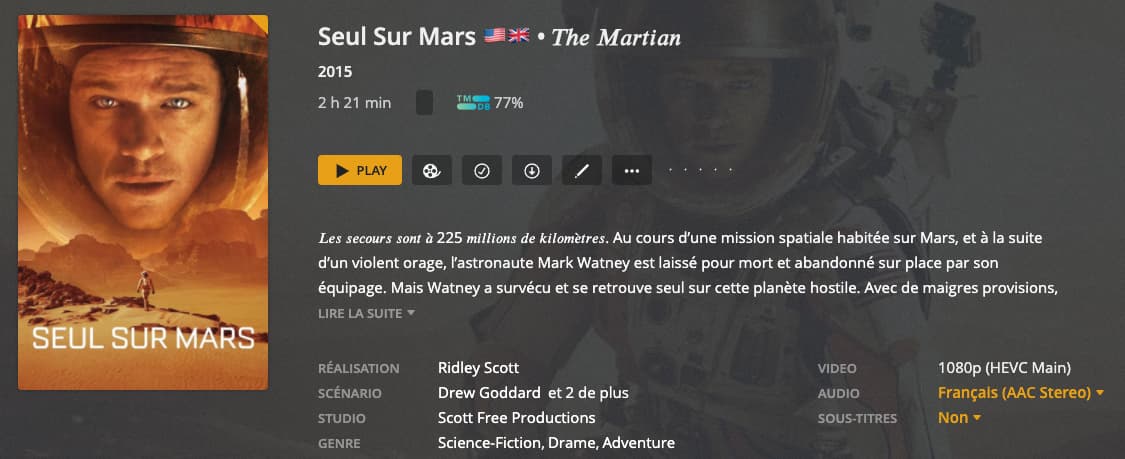
New library
langage setting is french
and here i have the genre Adventure (english word) and should be “Aventure” in french like it is on TMdb and those datas are available from the API. Subler on Mac gets them and i will put them again in my mp4tags
this is only one example… i could send you hundred like this with different errors.
all this with a new library !
upgrading is even worse !
Perhaps for english things are not so bad (i really hope)
Where do Plex got the word Adventure as a french genre ? this is something i would like to know !
i have 291 movies with Adventure genre that I’ll have either to tag myself or change it manually in Plex

Except the fact that again Biography is an english word, this movie is NOT a biography !
I did refresh all the libraries without refreshing metadata. Have had no (new) issues in that regard so far.
I read only one or two posts around backing up the Plex Server and Media libraries before performing this upgrade. I am surprised that I haven’t seen any posts around snapshots. If you are hosting your Plex server in a virtual machine or on a NAS with snapshot capabilities, make sure to snapshot the server volume, and ideally the media volumes as well. Then, make sure you aren’t doing any other work on those volumes (as it will get lost if you revert later), perform the upgrade, and then you have the option to revert if it doesn’t work out well.
There are a variety of tools which can help with snapshots if you don’t have the capability natively. (Windows has VSS, Mac has Time Machine, most NAS have snapshots, 3rd party tools, etc.) Backups can work too, although they are a lot slower and you need at least the same amount of storage for the backups. Don’t forget to delete snapshots after you don’t need them, so you save space, but a great datacenter technology to use for situations like this…
If anyone miss their content in movie libary after upgrade, make sure your path does not contain this regex pattern ^es\d{2}[-_]\d.*. New Plex Movie agent will ignore the path under this pattern altogether. And they have not fixed that yet for more than two months since I identified this and they said report to the developer.
