I have the Harry Potter movie collection on my personal server, all 8 movies.
What is happening is the Plex server/client is automatically merging parts 1 & 2 of the Deathly Hallows into one movie. I know, technically, it is one movie; but it is displaying it as one 4-hour-long movie, rather than the two parts.
I’ve tried following the support topic from Plex to split the files, but it doesn’t give me the option to split them.
Any way I can split them and force Plex to treat each file as its own movie?
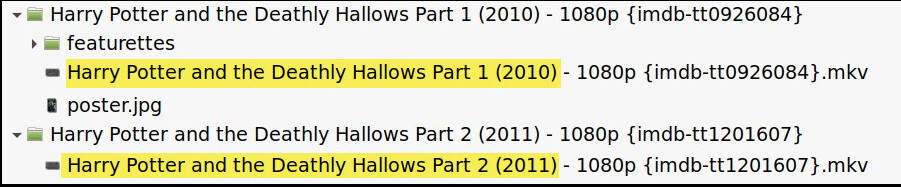
I suggest keeping the files for each movie in their own folders, if you don’t already do so. The filenames are also very important. Here’s a screenshot of my files for the same two movies (I’m also on linux). The highlighted parts of the filenames are the most important – the imdb numbers could help, though.
If you rename/reorganize the files, you should probably do the Plex Dance afterward.
There may be other ways to go about this, but Plex has never tried to merge these two movies into one on my server.
Thanks for that!
Thing is, my movie files aren’t in separate folders. All files are just in one main folder called “movies”. I didn’t realise you should put them in their own folders
This works fine even if you have them loose inside your movie folder
Harry Potter and the Deathly Hallows Part 1 (2010)
Harry Potter and the Deathly Hallows Part 2 (2011)
They don’t NEED to be in their own folders. It’s recommended to do so to make scanning for new content quicker if you have a LOT of media, as well as organizing any additional media (posters, subtitles, etc) easier. Me, I don’t use folders for each of my movies, but I do occasionally use sub-folders for movie series (Transformers, Bond, etc).
The reason you are running into this issue is the particular filenames you are using. Plex has support for movies/shows that are split among multiple files. (Most likely a holdover from the 700-MB file splits to fit bootleg movies on CDs). Anything with the following in their filename, Plex will attempt to irreversibly combine with another movie into one long video file:
- cdX
- discX
- diskX
- dvdX
- partX
- ptX
If you avoid using those terms exactly, it should work. Are you leaving a space between “Part 1”, or does it have no space, such as “Part1”?
Plex really prefers release-year to be in filenames, and it’s a good habit to get into. For this Harry Potter movie, it’d help to have it so Plex recognizes the “Part 1” and “Part 2” are for separate movies. So the ideal filename for these movies would be:
- Harry Potter And The Deathly Hallows Part 1 (2010)
- Harry Potter And The Deathly Hallows Part 2 (2011)
Since the “Part X” of the name comes BEFORE the year, Plex will assume it is a part of the title and shouldn’t attempt to combine it with the other one using it’s “PartX” logic.
Refer to this article for how Plex handles split-media
Thanks for all the info guys! It’s definitely helped me think about how I organise my media, going forward!
The filenames contain “Part X”, but not the year of release.
I’m just going to have to take the server offline and plug the storage hdd directly into my PC and sort the filenames for all my movies out, by the look of it!
Honestly, Plex is pretty good at figuring things out without years at the end of files, but it will really help remove any ambiguity. I got into the habit of doing so, and I am glad I did, but I am also saying you don’t have to if you don’t want to. The main reason to use them is for those pesky remakes (A Christmas Carol). If you do not, Plex cannot tell if your copy is the 2009 animated movie A Christmas Carol or the early 1938 version of A Christmas Carol. If you keep those in mind and use years on only those, you can maybe get away without including it on all other files.
Aside from using one of those “PartX” sequences", you shouldn’t run into many other issues going forward, as much as I can remember. The “PartX” combiner is a tricky surprise when you first encounter it, but thankfully not many movies use these, so it’s not common.