Server Version#:1.15.4.993
Player Version#: n/a
Distro : Debian 9.0
Hello
I don’t know why but since a few days I can’t reach my Plex server.
I’ve tried to reinstall, delete my conf and so on but I’m stuck.
The Plex service seems to be on :
# service plexmediaserver status
● plexmediaserver.service - Plex Media Server
   Loaded: loaded (/lib/systemd/system/plexmediaserver.service; enabled; vendor preset: enabled)
   Active: active (running) since Fri 2019-05-10 17:21:42 CEST; 45s ago
  Process: 3468 ExecStartPre=/bin/sh -c /usr/bin/test -d "${PLEX_MEDIA_SERVER_APPLICATION_SUPPORT_DIR}" || /bin/mkdir -p "${PLEX_MEDIA_SERVER_APPLICATION_SUPPORT_DIR}" (code
 Main PID: 3474 (Plex Media Serv)
    Tasks: 126 (limit: 4915)
   CGroup: /system.slice/plexmediaserver.service
           ├─3474 /usr/lib/plexmediaserver/Plex Media Server
           ├─3589 Plex Plug-in [com.plexapp.system] /usr/lib/plexmediaserver/Resources/Plug-ins-107756f7e/Framework.bundle/Contents/Resources/Versions/2/Python/bootstrap.py
           ├─3735 /usr/lib/plexmediaserver/Plex Tuner Service /usr/lib/plexmediaserver/Resources/Tuner/Private /usr/lib/plexmediaserver/Resources/Tuner/Shared 1.15.4.994-107
           ├─3736 /usr/lib/plexmediaserver/Plex DLNA Server
           ├─3770 Plex Plug-in [com.plexapp.agents.plexmusic] /usr/lib/plexmediaserver/Resources/Plug-ins-107756f7e/Framework.bundle/Contents/Resources/Versions/2/Python/boo
           ├─3930 Plex Plug-in [com.plexapp.agents.themoviedb] /usr/lib/plexmediaserver/Resources/Plug-ins-107756f7e/Framework.bundle/Contents/Resources/Versions/2/Python/bo
           ├─3938 Plex Plug-in [com.plexapp.agents.opensubtitles] /usr/lib/plexmediaserver/Resources/Plug-ins-107756f7e/Framework.bundle/Contents/Resources/Versions/2/Python
           ├─4071 Plex Plug-in [com.plexapp.agents.plexthememusic] /usr/lib/plexmediaserver/Resources/Plug-ins-107756f7e/Framework.bundle/Contents/Resources/Versions/2/Pytho
           ├─4078 Plex Plug-in [com.plexapp.agents.thetvdb] /usr/lib/plexmediaserver/Resources/Plug-ins-107756f7e/Framework.bundle/Contents/Resources/Versions/2/Python/boots
           └─4551 Plex Plug-in [com.plexapp.agents.imdb] /usr/lib/plexmediaserver/Resources/Plug-ins-107756f7e/Framework.bundle/Contents/Resources/Versions/2/Python/bootstra

mai 10 17:21:42 ******* systemd[1]: Starting Plex Media Server...
mai 10 17:21:42 ******* systemd[1]: Started Plex Media Server.
And when I listen what runs on port 32000 there is nothing…
# netstat -tulpn | grep :32000
#
I might have found stag but I’m not sure. In /var/lib/plexmediaserver/Library/Application Support/Plex Media Server/Logs/PMS Plugin Logs# cat com.plexapp.system.log I’ve found this :
2019-05-10 17:21:47,597 (7f6ba9ffb700) :  DEBUG (networking:166) - Requesting 'http://127.0.0.1:32400/servers'
2019-05-10 17:21:47,597 (7f6bebeac700) :  DEBUG (streamservice:18) - Starting the stream service
2019-05-10 17:21:47,598 (7f6bebeac700) :  CRITICAL (runtime:709) - Private handlers are no longer supported; couldn't register <bound method StreamService.token_handler of <streamservice.StreamService object at 0x7f6bc1bc8350>>
The server is not signed into your Plex account.
Because of this, and that it’s on a remote IP (WAN address), you must use a SSH tunnel to connect to it.
ssh -L 8888:127.0.0.1:32400 ip.addr.of.host* (or use putty to forward 8888 to 32400 on Windows)
it doesn’t work. even locally with lynx I can’t connect. if you look at my net stat command absolutely nothing is listening on port 32400. even locally.
I’ve tried with https too.
OK. The last issue I didn’t check was to restart my firewall conf. So, after restarting my firewall rules and restarting the service, I could finally got an answer on port 32400 and… I could connect on it. So now… it works Let’s rebuild all my meta datas
EDIT : Ok now I’m stuck again… It couldn’t connect to my server. I could reach port 32400, have the interface but it said it was deconnected. So I tried to remove the Preference.xml file and recreate it but… the server was again in error, unable to have anything on port 32400 (even after reloading my firewall conf…)
Now I try to reinstall everything, wiping up every file, directory containing anything about plexmediaserver… And it’s a real pain… I give you news when I’ll be able to install plex again…
IS there some who has a previous version then i completely the current version and install a previous version, Problems started after update. ( i am never updating again always problems after updates (F*** updates)
locate and remove manually every little files and directories containing anything about plexmediaserver
# locate plexmediaserver
--- getting a list of all my files ---
# rm /foo/bar/plexmediaserver.ext
# rm /oof/plexmediaserver
...
--- (removing every file one by one, there were not a lot) ---
then i checked that i had still disk space on the part containing the /var directory (huuuu believe it or not, my log directory was full…) and make some cleaning
reloading my firewall rules (just in case of)
reinstall the packet
# apt install plexmediaserver
no errors while installing ? perrrrrfect.
checking the service status
# service plexmediaserver status
● plexmediaserver.service - Plex Media Server
   Loaded: loaded (/lib/systemd/system/plexmediaserver.service; enabled; vendor preset: enabled)
   Active: active (running) since Sat 2019-05-11 14:05:17 CEST; 3s ago
  Process: 15808 ExecStartPre=/bin/sh -c /usr/bin/test -d "${PLEX_MEDIA_SERVER_APPLICATION_SUPPORT_DIR}" || /bin/mkdir -p "${PLEX_ME
 Main PID: 15812 (Plex Media Serv)
    Tasks: 15 (limit: 4915)
   CGroup: /system.slice/plexmediaserver.service
           ├─15812 /usr/lib/plexmediaserver/Plex Media Server
           ├─15862 Plex Plug-in [com.plexapp.system] /usr/lib/plexmediaserver/Resources/Plug-ins-107756f7e/Framework.bundle/Contents
           └─15888 /usr/lib/plexmediaserver/Plex Media Server

mai 11 14:05:17 ********* systemd[1]: Starting Plex Media Server...
mai 11 14:05:17 ********* systemd[1]: Started Plex Media Server.
lines 1-13/13 (END)
Connecting to my plex panel through a vpn between my computer and my server (to access it locally)
starting configuration
disconnecting from vpn and verifying i can access the panel remotely
Everything works.
The only thing that failed was to move my metadata in an other directory through a symlink. I don’t know why but if I do that, I can’t access my plex anymore. So from now I let it like that.
Something strange too is that netstat doesn’t show anything on port 32000. I don’t know why but you know what ? It works. I don’t touch anything more from now

 (TGZ isnt a recognized extension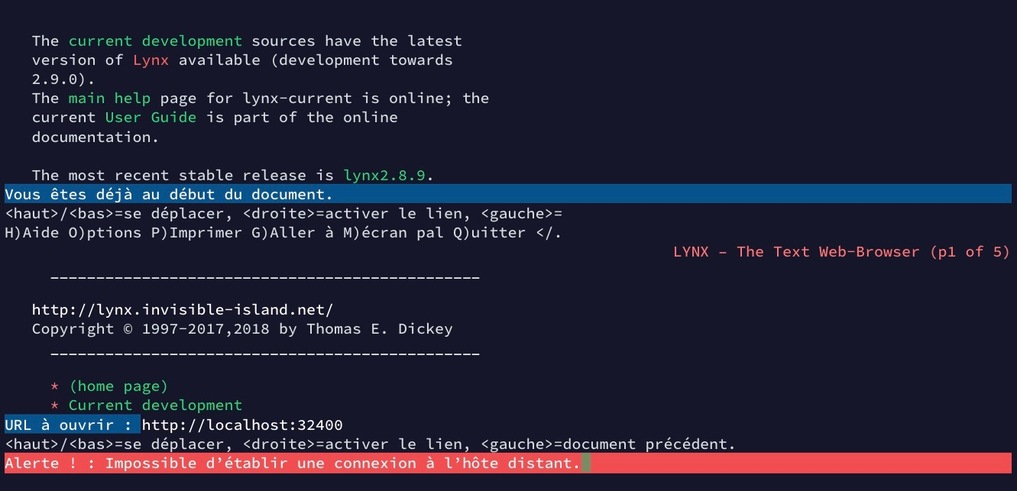
 Let’s rebuild all my meta datas