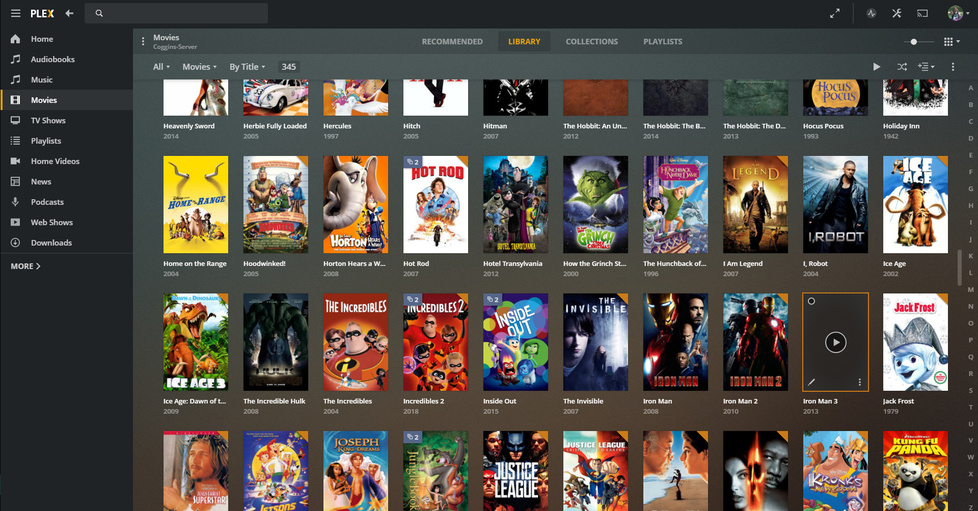
Server Version#: 1.19.3.2764
Player Version#: 1.10.0.1208-daa6b641
Some posters for movies show up as blank in the movie list when selected. You can see them when you edit the movie, but it is blank when you see it in the movie list. Shows up the same on the Plex app for Windows (non-store version) and the Android app. See included screenshots.
So I also had this issue happen on a season of a TV show in my Plex database. I decided to go to thetvdb.com to manually upload the poster. I found out that the posters I was trying to select were not actually on thetvdb.com, even though they were showing up in Plex. And the only posters that would work were the ones that were visible on thetvdb.com. I have tried to replicate this with movies and have not been able to find exactly where those posters are being pulled from. My guess is it is a similar issue.
TMDB is where ‘most’ of this artwork comes from and very recently they dropped a thermonuclear device on a whole bunch of posters and artwork that was out of compliance. <—artwork comes from TMDB - even if Plex Movie is your agent.
The trouble started.
The trouble being a lot of artwork is missing.
If you have other artwork agents involved other posters may exist, but you’ll have to check to see if any are there to select.
This issue will eventually work itself out, but in the meantime manual intervention is required.
Generally, artwork is auto-selected with your language in consideration - how well that works at times is up for debate.
When you add anything to TVDB - it’s gonna take at least 24 hours before you’ll see it come down - might want to manually add it to your local show/movie. Drag and Drop will be fine - in the edit window for poster/background/etc - in the space provided.
We all hope we don’t have to do this much - we’ll all find out together.